Choose a scanner to suit the size and condition of your clippings. For fragile pieces or flat sheets up to A3, an overhead scanner offers contact-free scanning, while a flatbed scanner is suitable for flat clippings up to A4. A sheet-fed scanner takes up little storage space, but is only suitable for originals that can safely pass through the feeder. Also measure how much room the clipping needs while it is being scanned.
Who is this suitable for?
Collectors with a small desk
Do you scan individual newspaper clippings and want to put the device away after use? Compare both its stored dimensions and the space it takes up while scanning. CZUR describes the Shine 800 A3 Pro as foldable, while Canon says the CanoScan LiDE 400 can be stored vertically.
Keepers of fragile clippings
With brittle, irregular or small pieces, it’s important to consider whether you want to feed them through rollers. Compare contact-free scanning, the scanning area and the option to crop several pieces individually. Ricoh describes the ScanSnap SV600 as a contact-free overhead scanner; Canon lists this cropping feature for the IRIScan Desk 6.
Archivists who want to search for text
If you want to search articles by keyword later, check whether the software creates searchable files and test its recognition with your own small or yellowed newspaper text. CZUR lists searchable PDF output for the Shine 800 A3 Pro; Canon describes OCR for creating searchable files with the IRIScan Desk 6.
What should you look for?
Foldable overhead scanner
Choose this if: you want to scan flat clippings, including those up to A3 size.
Consider: the whole sheet must fit beneath the camera; for A3, CZUR quotes around 205 dpi for the Shine 800 A3 Pro.
Overhead scanner for fragile or small pieces
Choose this if: you’d rather not feed originals through rollers, or want to capture several small pieces at once.
Consider: the IRIScan Desk 6 scans up to A4; the ScanSnap SV600 supports A3, but you’ll also need room on the desk to lay out the pieces.
A4 flatbed scanner
Choose this if: you mainly scan individual, flat clippings up to A4 without feeding them through a feeder.
Consider: the Canon CanoScan LiDE 400 scans up to 216 × 297 mm; you’ll need room for the scanner and lid while it’s in use.
Compact sheet-fed scanner
Choose this if: you mainly scan sturdy individual sheets and compact storage is a priority.
Consider: paper passes through rollers. Epson specifies paper weights of 35–270 g/m² for the WorkForce ES-60W, but that doesn’t automatically make it suitable for brittle or torn clippings.
| What to consider |
What to look for |
Who it’s for |
| Scanning size and desk space |
Measure your largest clipping and the clear space where it can lie while being scanned; compare this with the scanning size and setup. |
If you scan larger clippings and have limited desk space, you’ll want to know in advance whether both the sheet and the scanner will fit. Around 36% of consumers prioritise size and workspace. |
| Fragile originals |
Assess the condition of the paper; check the scanning area and whether small pieces can be cropped individually. |
If you have brittle, torn or irregular clippings, you’ll want to know whether they can be scanned without feed rollers. Protecting the original is the top priority for around 29% of consumers. |
| Searchable text |
Check whether the output supports searchable PDFs and make a test scan using your own material. |
If you want to find newspaper articles by keyword later, first test how well small or yellowed text is recognised. Searchable text is the main consideration for around 21% of consumers. |
| Compact storage |
Check the storage dimensions, and only use a sheet-fed model if the paper and the condition of the original are suitable for its feeder. |
If compact storage matters more than contact-free scanning, look for a space-saving option for sturdy individual sheets. Around 14% of consumers prioritise the smallest possible storage size. |
Common pitfalls
-
Measuring only the base of an overhead scanner
An A3 scanner can only capture a large sheet if the entire original fits within the scanning area. So be sure to measure the clear workspace you’ll need to lay out the clipping, too.
Before buying, measure both your largest clipping and the space where you can position it while scanning.
-
Assuming a compact sheet-fed scanner is suitable for every old clipping
A sheet-fed model pulls paper through the device, which works differently from contact-free scanning. Brittle, torn or irregular pieces therefore need to be assessed individually.
Use the feeder for suitable, sufficiently sturdy sheets, and choose a flatbed or contact-free scanning method for fragile pieces.
-
Assuming OCR means a flawless transcription
The models listed offer searchable output, but having OCR doesn’t guarantee that small or yellowed newspaper text will be recognised correctly.
Make a test scan of a representative clipping and check both the image and the recognised words.
Allow time to proofread the recognised text and correct it where necessary.
Brands to consider
CZUR
CZUR positions the Shine 800 A3 Pro as a foldable overhead scanner for flat, individual pages up to A3.
- The manufacturer lists searchable PDF output and around 205 dpi for A3.
- CZUR’s model comparison positions this model for flat pages; don’t attribute book curve correction from other models to this one.
IRIS
The IRIScan Desk 6 is a USB-powered document camera for documents up to A4 size.
- According to the product information, the software can crop several small pieces individually and create searchable files.
- A3 sheets are outside the stated A4 scanning range.
Ricoh ScanSnap
The ScanSnap SV600 is a contact-free overhead scanner for individual sheets and fragile pieces up to A3.
- The manufacturer lists the ability to capture multiple items and correction for bound material.
- Even with contact-free scanning, you’ll need room to lay out the originals on the desk.
Canon
The CanoScan LiDE 400 is an A4 flatbed scanner with a maximum scanning area of 216 × 297 mm.
- Canon says the scanner can be stored vertically.
- Larger clippings won’t fit in a single scan within the specified scanning area.
Epson
The WorkForce ES-60W is a mobile, wireless A4 sheet-fed scanner for suitable individual documents.
- Epson lists use in small workspaces and specifies paper weights of 35–270 g/m².
- Paper passes through feed rollers, so the scanner isn’t automatically suitable for brittle clippings.
Joybuy products
These Joybuy product picks are designed for scanning individual newspaper clippings on a small desk. They include flatbed and overhead models for flat or fragile pieces, as well as compact A4 sheet-fed scanners for suitable sturdy sheets.
 No image available
CZUR Shine 800 A3 Pro
Suitable for flat, individual clippings if you also want to scan A3 sizes and put the device away after use; place the entire original beneath the camera.
Foldable overhead model with A3 support. CZUR lists searchable PDF output. The product description advises against scanning highly glossy material.
View at Joybuy
 No image available
Canon imageFORMULA DR-F120 Flatbed & ADF Scanner
The flatbed offers a scanning option for flat or fragile pieces, while the ADF provides a separate feed path for individual documents. Decide which method is right for each clipping.
A4 model with flatbed and ADF. Stated dimensions: 469 × 335 × 120 mm.
View at Joybuy
 No image available
Epson WorkForce DS-1660W Flatbed Scanner
A flatbed option for flat pieces you don’t want to feed through rollers; check whether the A4 scanning area is large enough for your clippings.
A4 flatbed scanner. Stated dimensions: 451 × 315 × 120 mm.
View at Joybuy
 No image available
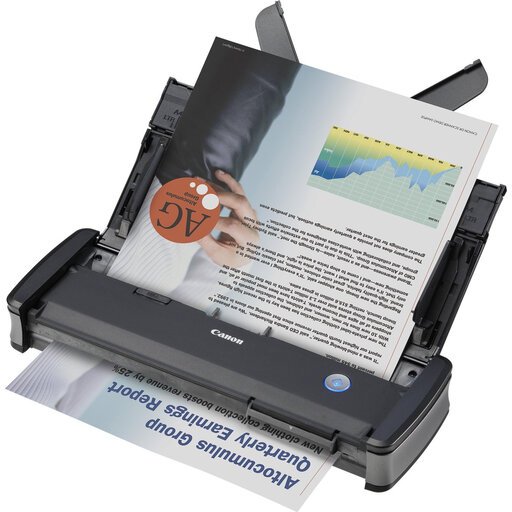
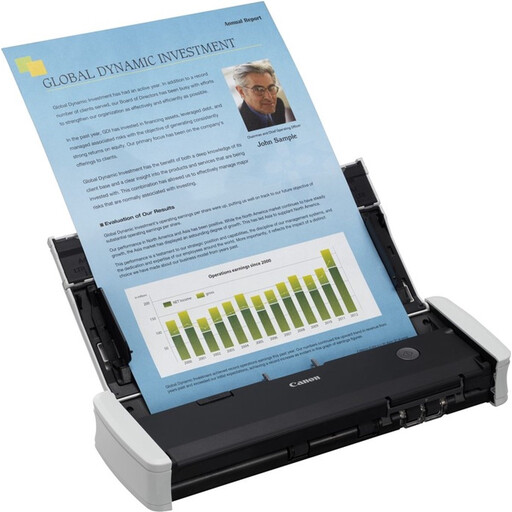
Canon imageFORMULA P-215II Sheet-Fed Scanner
A compact sheet-fed option for individual, sturdy clippings that are suitable for the feeder; choose a flatbed scanning method for fragile or torn pieces.
A4 sheet-fed scanner with a 20-sheet ADF.
View at Joybuy
 No image available
Canon imageFORMULA R10 Sheet-Fed Scanner
Suitable for individual clippings up to A4 that are sturdy enough for document feeding; don’t use the rollers if the paper isn’t in suitable condition.
A4 sheet-fed scanner with double-sided scanning; the product description highlights a portable design that fits in a laptop bag.
View at Joybuy
Frequently asked questions
How can I scan several small clippings without aligning each one separately?
Place the clippings separately within the scanning area. Canon lists a feature on the IRIScan Desk 6 that crops several small documents individually; Ricoh lists a similar feature for the ScanSnap SV600. Check the cropped images before putting the originals away.
Can I feed a brittle newspaper clipping through a mobile scanner?
Don’t assume it’s safe: a sheet-fed scanner transports the paper through the device. Epson specifies paper weights of 35–270 g/m² for the ES-60W, but that range alone doesn’t tell you whether a brittle, torn or irregular clipping can be fed through safely. For fragile material, consider a contact-free or flatbed scanning method.
Does a two-year manufacturer’s warranty cover all my warranty rights?
No. ACM ConsuWijzer distinguishes between a manufacturer’s or seller’s warranty and the statutory guarantee in the Netherlands. With normal use, a product must meet the standard you could reasonably expect; contact the seller if there’s a problem.
Can I publish scanned newspaper clippings online or share them at work?
According to the Dutch government, a private copy for personal use can’t simply be distributed or made public. For businesses and institutions, the Dutch government sets out separate reprographic rights conditions for copying from newspapers and other publications. So consider online publishing or sharing for business separately from private scanning.


