
Home worker with several wired devices
Wants to connect a work laptop and other permitted network devices to an existing network connection, without taking up unnecessary desk space.


If you only need a wired connection for your work laptop, first check whether a free router port and, if necessary, a suitable USB-C-to-Ethernet adapter will do the job. A compact gigabit switch is designed to split an existing wired connection between several devices; management features or PoE are only relevant if your equipment and network setup genuinely require them. Count the free ports once the router is connected, and check with IT before making changes to a company network.
Wants to connect a work laptop and other permitted network devices to an existing network connection, without taking up unnecessary desk space.
Needs to check first how to connect the laptop by wire. A switch does not add an RJ45 port to the laptop; TP-Link and StarTech.com describe USB-C-to-Ethernet adapters as a possible solution, provided they are compatible with the laptop and comply with workplace policies.
May need a PoE device or configurable network features in addition to a laptop. Microsoft describes network access management as a separate part of accessing company networks, so check with your IT administrator before making changes or configuring management features.
First decide whether you need extra ports, then check your laptop’s connection and only then consider whether PoE or configuration management solves a specific need in your workspace.
| What to consider | What should you check? | Who is this important for? |
|---|---|---|
| Ports and size | Count the router connection, laptop and any other permitted devices. In a typical setup, a five-port switch leaves four ports free when one is connected to the router. Also check where you can put the switch and its power supply. | If I want to connect several wired devices at a small desk, I need enough connections without an unnecessarily large device. Around 36% of consumers are mainly looking for extra ports and a compact design. |
| Laptop connection | Check whether the laptop has an RJ45 port or a suitable USB-C port for an Ethernet adapter. Make sure peripherals are permitted under your workplace policy. | If my laptop doesn’t have an Ethernet port, I first need to know how to connect it by wire; a switch won’t solve that on its own. Around 21% of consumers prioritise this laptop connection. |
| Simplicity and speed | Check the port speed, laptop adapter, cable and existing network connection together. TP-Link lists five 10/100/1000 Mbps ports for the TL-SG105; this port rating is not the same as the measured speed of your internet connection. | If I simply want a wired work connection without configuring network features, a straightforward connection and compatible equipment are important. Around 21% of consumers put simplicity first. |
| PoE power | Check the PoE standard and total power budget for the exact version, then compare them with the requirements of the device you want to connect. Not every version of a model has the same PoE specifications. | If a phone or access point needs power through the network cable, the switch must be suitable for it; PoE doesn’t automatically mean the switch can charge a laptop. Around 14% of consumers prioritise powering a PoE device. |
| Network management | Check whether features such as VLANs or port diagnostics are genuinely needed and whether you’re allowed to manage the network setup. TP-Link lists these features for the TL-SG105E. | If I want to configure network features, this needs to be appropriate for my role and the company network. Around 8% of consumers consider permitted management features decisive. |
A switch splits an existing network connection between extra ports, but it won’t add an Ethernet port to a laptop without an RJ45 connection.
First, count the devices that need to be connected by wire and check the laptop’s ports. If your laptop doesn’t have a suitable port, check whether you’re allowed to use a compatible Ethernet adapter.
A switch takes up space and needs its own power supply; depending on the laptop, you may also need an adapter.
In a typical setup, the connection to the router uses one port.
Make a list of the router connection, laptop and any other permitted devices in advance, then choose a switch based on how many ports you’ll need after that.
If you need more connections than the switch has available, you may need one with more ports.
TP-Link lists different PoE standards and power budgets for versions of the TL-SG1005P. As a result, a connected device may not receive the power it needs.
Check the exact version, PoE standard and total power budget, and compare them with the device’s requirements.
A configurable switch may offer features such as VLANs, but that doesn’t automatically mean you’re allowed to make changes to a company network or that you’ll gain access to business resources.
Choose management features only for a specific purpose, and check with IT before making changes to a work network.
The models mentioned range from a basic five-port switch to configurable and PoE versions.
The GS305v3 is a basic five-port switch; the GS305EP is a different version for a setup requiring PoE+ and management features.
The DGS-105GL is an unmanaged five-port switch for a simple wired network expansion.
The GS-100 series includes the five-port GS-105B V5 and the eight-port GS-108B V5.
These products are for anyone looking to add extra ports to an existing wired connection, with options including compact unmanaged switches and PoE models.
 No image available
A compact option if you want to share an existing wired connection between several devices.
Five 10/100/1000 Mbps RJ45 gigabit ports; TP-Link specifies a fanless design for this model. In a typical setup with one connection to the router, four ports remain available.
 No image available
An option if you want to power a compatible Ethernet device through the network cable as well as connecting wired devices.
The product title lists five gigabit ports and four PoE ports. Check the exact version, PoE standard and available power; PoE does not automatically provide power to a laptop.
 No image available
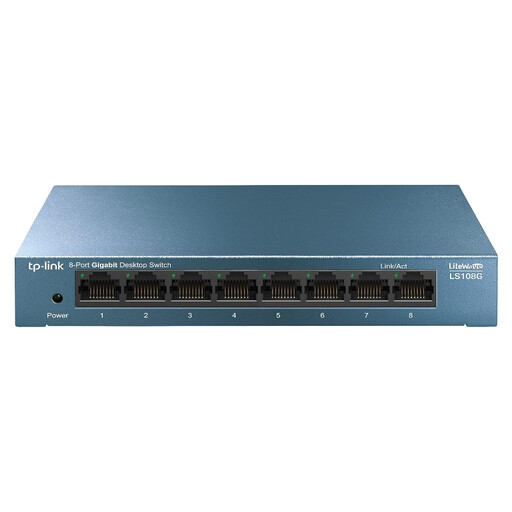
An unmanaged option for a workspace where you need to connect several wired devices.
The product details list eight gigabit RJ45 ports and a plug-and-play setup. Check in advance that the size and number of ports suit the space and connections available.
 No image available
An option if you’re connecting several wired devices and need both Easy Smart features and PoE.
The product title lists eight gigabit ports and four PoE ports. Check the exact PoE specifications and consult IT before using management features on a company network.
 No image available
An option if you need an unmanaged switch with PoE and the stated port speed is compatible with the rest of your network.
The product details list five 2.5-gigabit ports, four PoE+ ports and a total budget of 60 W. Check whether connected devices require these PoE specifications.
Connect one port to an existing network connection you’re authorised to use, and another to your laptop’s Ethernet port or a suitable adapter; then connect the power supply. A switch doesn’t create a new internet connection on its own. If you’re using a managed company network, follow IT’s instructions.
First, check the power supply, cable and connections. TP-Link lists an unsuitable cable and an issue with automatic speed negotiation among the possible causes for unmanaged switches. Don’t change settings on a managed work laptop without authorisation.
Don’t assume it can. PoE is intended for compatible Ethernet devices; check the laptop’s power requirements and the peripheral’s PoE requirements separately.
According to the Dutch government, you’re entitled to a product that works as it should, and the legal guarantee doesn’t have a fixed two-year term. If there’s a fault, contact the seller; a manufacturer’s warranty is in addition to your legal rights.
Check which EU product rules apply to the exact version and whether CE marking is required. Your Europe states that CE marking is only compulsory for products covered by harmonised EU rules that require it. A marking or declaration of conformity for another model doesn’t prove that the version on offer complies.