
A workspace with too few network ports
You want to connect a work laptop and a few other devices by cable, without much configuration. TP-Link describes its plug-and-play models as an easy way to expand your network.


To add wired connections to the same authorised network, a compact gigabit switch with enough ports is usually all you need. One port will be used to connect it to the existing network. If work and guest devices need to be kept separate, ask the network administrator to plan the whole network setup first. Choose PoE or 2.5 Gbit/s only if the connected devices and the network path need and support these features.
You want to connect a work laptop and a few other devices by cable, without much configuration. TP-Link describes its plug-and-play models as an easy way to expand your network.
You share the space with others and need to work with the network administrator to separate work devices from other devices. TP-Link describes VLAN settings, while the NCSC stresses that network segmentation needs to be carefully configured.
You’re considering powering a wired access point or IP phone, or you have a demonstrable need for faster local connections. NETGEAR, Ubiquiti and TP-Link describe different PoE and port-speed options for specific models.
First, work out how many devices need a wired connection and whether they can share the same network. Then check whether you actually need PoE outputs or faster local speeds.
| What to consider | What should you check? | Who is this important for? |
|---|---|---|
| Ports and installation | Remember to count the connection to the existing network. Also check whether your laptop has an ethernet port or an approved adapter, and whether a power socket is available. | If I want to connect my laptop and other devices by cable without dealing with lots of settings, having enough ports is my top concern. Around 34% of consumers give extra connections top priority. |
| Network separation | Ask the network administrator what separation is needed and permitted, and whether the other network equipment supports the design. VLAN features do not automatically provide secure isolation. | If work devices and other studio users shouldn’t share the same traffic, I want the network layout decided in advance. Around 33% of consumers prioritise network separation. |
| PoE power | Check whether the connected device supports PoE, then compare its required standard and power with the PoE outputs and the total power budget. A PoE input that powers the switch itself is not a PoE output. | If I want to power a compatible access point or IP phone through its network cable, the switch must explicitly support this. Around 20% of consumers give PoE power top priority. |
| Local speed | Check the speed of your laptop adapter, uplink and other devices. A 2.5G port won’t make a gigabit connection elsewhere on the network any faster. | If I exchange files locally between devices that support 2.5 Gbit/s, I want to know whether the whole connection path can handle that speed. Around 13% of consumers prioritise faster local speeds. |
The cable to the existing network will usually use one of the ports too, leaving fewer for your devices.
Count the uplink and all your devices in advance, then check how many spare ports you want to have.
Incorrect configuration can disrupt network operations or create security risks. The NCSC warns that business networks need to be segmented carefully.
Ask the network administrator to decide what separation and configuration the entire network needs.
A PoE input can power the switch itself, but that doesn’t mean the switch can power connected devices over ethernet.
Check the number of PoE outputs, the standard and the total power budget for the devices you want to connect.
A switch’s higher stated port speed won’t make a laptop adapter, uplink or other device that only supports gigabit any faster.
Check the connections at both ends and work out whether you need the speed for local traffic or internet access.
The models mentioned range from basic gigabit switches to options with VLAN settings or 2.5G ports.
The GS305 is a basic gigabit switch; the GS305PPv3 is a separate option with PoE+ outputs.
The USW-Flex-Mini is a compact five-port gigabit switch. How the switch itself is powered may be an important consideration.
The DGS-105 is designed to add five gigabit ports for simple wired network expansion.
The GS1200-5 range is worth considering if you want web management and VLAN settings.
This selection includes network switches for adding wired connections, with options for gigabit connections, PoE and network management. Check that each model’s features and connections suit your network.
 No image available
An option for adding wired connections to the same network if you want to keep configuration to a minimum.
The product name lists five ports, gigabit speed and a metal case. Remember to count the uplink when working out how many ports you need.
 No image available
Worth considering if you want to connect other compatible network devices by cable as well as your laptop, and may need to power them over ethernet.
The product name lists five gigabit ports and PoE. Before choosing, check the number and type of PoE outputs and the power budget for your devices.
 No image available
An option to consider if you need more wired connections and want to weigh up the management features.
The product name lists eight gigabit ports, Easy Smart features and four PoE ports. Check the PoE standard you need and whether the configuration fits the network plan set by the administrator.
 No image available
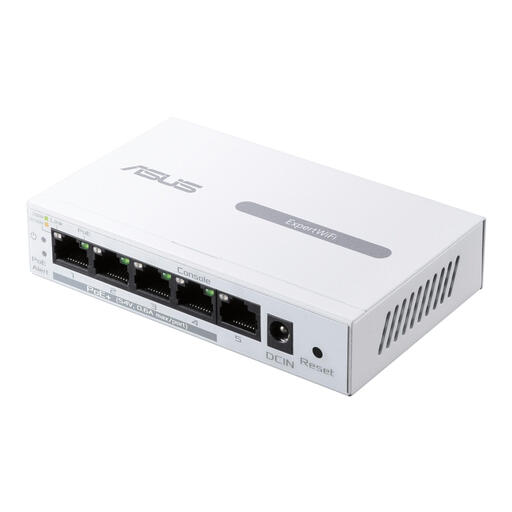
A model to compare if you’re considering both faster local port speeds and PoE for compatible devices.
The product name lists five ports, 2.5 GB, PoE and an unmanaged design. Check the exact speed, PoE standard and power budget for the connection you have in mind.
 No image available
An option to consider if you need management features for wired gigabit connections.
The product name lists gigabit ethernet and PoE. Check whether the specific version supplies PoE through its outputs and what power requirements apply.
Yes, if you want extra connections on the same authorised network. Check whether your laptop has an ethernet port or an approved adapter, and ask the network administrator whether connecting to the shared network is permitted. A switch doesn’t replace network authorisation or security measures.
No, VLAN settings don’t automatically separate devices. The TP-Link TL-SG105E offers VLAN features, but the NCSC warns that segmentation needs to be configured carefully to avoid disruption or security risks. Agree the configuration with the administrator responsible for the whole network.
Agree who is responsible for managing the settings, and check the documentation and firmware information for your exact model. For the GS1200 variants mentioned in its support article, Zyxel recommends updating the firmware. First check that this advice applies to your model and version.
Check that the right power adapter and ethernet cables are included, and that a power socket is available. For a consumer purchase in the Netherlands, the seller must provide a remedy if a product is faulty; any additional manufacturer’s warranty is separate.
Check which European requirements and any CE obligations apply to the exact model. The Netherlands Enterprise Agency states that CE marking is mandatory for certain product groups and that exceptions exist. A CE marking alone doesn’t amount to a complete assessment of compliance.