What should you look for?
First, work out how many devices and network connections you want to connect. Then check whether gigabit is enough or whether both your workstation and NAS support 2.5GbE; management features and PoE are separate considerations.
| What to consider |
What to look for |
Who is this important for? |
| Enough ports |
Count the connection to your existing network as well as the devices on your desk. Also compare the exact model’s dimensions with the space available; TP-Link Netherlands lists the TL-SG105 as measuring 100 × 98 × 25 mm. |
I want to connect my workstation and other devices without the switch taking up too much space. Around 30% of consumers rank having enough connections and a suitable size as their top priority. |
| Local transfer speed |
Check the Ethernet ports on your workstation and NAS, as well as the connection path between them. TP-Link Netherlands and D-Link Netherlands specify five 2.5GbE ports for the TL-SG105-M2 and DMS-105 respectively. |
If I move large files between my workstation and NAS, I want to know whether both connections support 2.5GbE. Around 30% of consumers put this transfer speed ahead of other buying priorities. |
| Quiet, compact placement |
Check whether the model is fanless and whether there is room around the casing for cables and the power supply. A fanless design means the switch itself won’t make fan noise, but says nothing about noise from other equipment. |
My switch will be close to my workspace, so I’m considering the available space and fan noise. Around 20% of consumers make quiet, compact placement their top priority. |
| Management or PoE |
Choose VLAN management only if you need that network configuration. For PoE, check the standard, power per port and the total power budget for the connected devices. |
For example, I want to separate network traffic or power a compatible device over Ethernet; basic wired connectivity won’t do that. Around 20% of consumers prioritise a specific management or PoE requirement like this. |
Joybuy products for a small studio setup
These products include wired gigabit connectivity, models with PoE or management features, and a 2.5GbE option. Check each model’s port count and features to make sure they suit your devices.
 Image unavailable
TP-Link TL-SG105 5-Port Metal Gigabit Switch
Suitable for a basic wired gigabit setup that doesn’t need 2.5GbE.
Five RJ45 ports with 10/100/1000 Mbps; plug-and-play operation; metal casing; desktop or wall mounting listed.
View at Joybuy
 Image unavailable
TP-Link 5-Port Gigabit Desktop Switch with Four PoE Ports
Worth considering if you want to power compatible PoE devices through the switch as well as connect them at gigabit speeds.
Five gigabit ports, including four PoE ports; 802.3af; total PoE budget of 56 W. Check that the standard and budget suit your devices.
View at Joybuy
 Image unavailable
Netgear GS108E-400EUS
An option for connecting more wired devices if you also need VLAN or QoS features.
Eight 10/100/1000 Mbps ports; VLAN, QoS and IGMP Snooping listed; metal casing and browser-based management listed. 2.5GbE isn’t listed.
View at Joybuy
 Image unavailable
Linksys 5-Port 2.5GbE Switch with PoE+
Suitable for a setup with 2.5GbE devices and compatible devices that need PoE+.
Five 2.5GbE ports; four PoE+ ports; up to 30 W per PoE+ port and a total budget of 60 W. Check that this meets the required PoE standard and power needs.
View at Joybuy
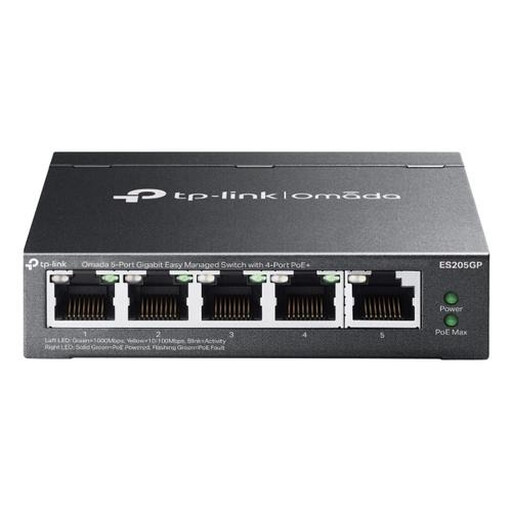 Image unavailable
TP-Link Omada ES205G
An option if you want to combine gigabit ports and configurable features with PoE+ for compatible devices.
Five gigabit ports, including four PoE+ ports; VLAN, QoS and link aggregation listed; total PoE budget of 65 W. Check how much power your connected devices need.
View at Joybuy
Frequently asked questions
How do I connect a network switch to my existing network?
Connect one of the switch’s ports to your existing network, then connect your wired devices and the power supply. Count the network port you’ve used when working out how many connections you need. TP-Link describes the TL-SG105 as a plug-and-play model that requires no configuration.
Can a PoE switch power my workstation or NAS?
Only if the connected device supports the PoE standard being used; don’t assume a workstation or NAS can be powered over Ethernet. For the TP-Link TL-SG105PE, TP-Link Netherlands specifies four PoE+ ports, up to 30 W per port and a total budget of 65 W.
What do the legal guarantee and right to return mean when buying online?
According to Your Europe, consumer purchases from a professional seller in the EU come with a legal guarantee of at least two years from receipt. Online consumer purchases usually come with a 14-day withdrawal period, subject to legal exceptions, as explained by the Council of the European Union. A business purchase for a studio isn’t automatically covered by the same consumer rules.
What should I check to make sure an electrical switch complies with regulations?
The Dutch Government states that electronic products placed on the market in the EU must carry a CE mark. Check the product information and marking on the specific version and power supply; a model name alone doesn’t confirm that the item being offered complies.


