
Home worker who needs more network ports
You have a working wired connection and want to connect other devices to Ethernet as well as your work laptop.


If your existing Ethernet connection works and additional devices are allowed, an unmanaged gigabit switch is usually a simple way to connect more devices by cable; TP-Link and NETGEAR describe these as plug-and-play models. First check the rules for your accommodation’s network and your employer, then count the uplink when working out how many ports you need and check whether your laptop needs an adapter or dock for Ethernet.
You have a working wired connection and want to connect other devices to Ethernet as well as your work laptop.
Your connection is subject to rules or device registration. First check whether your work laptop and any additional devices are allowed to access the network.
You want a simple connection for your workspace and need to check whether your laptop requires an Ethernet port, adapter or dock.
Choose this if: you use one wired device and the existing connection works for it.
Bear in mind: you won’t get any extra Ethernet ports; if your laptop doesn’t have a port, you may need a suitable adapter or dock.
Choose this if: multiple devices are allowed and you need extra wired connections.
Bear in mind: a five-port model leaves four ports for devices when one is used for the uplink; a switch doesn’t manage network access itself.
Choose this if: you want your own Wi-Fi or a different network setup, and the network administrator allows it.
Bear in mind: a standard switch doesn’t provide Wi-Fi; the options allowed may vary from one building to another.
| What to consider | What should you look for? | Who is this important for? |
|---|---|---|
| Enough Ethernet ports | Count the uplink and all the devices that need a cable at the same time. According to TP-Link Netherlands, a five-port model with one uplink provides four ports for devices; an eight-port model provides seven. | If I want to connect other devices by cable as well as my work laptop, I’ll first count how many ports will be left. Around 36% of consumers say that extra wired connections are their main concern when buying. |
| Access to the accommodation network | Ask the network administrator which equipment and additional devices are allowed. The University of Twente describes, among other things, wired access and device registration for its own accommodation and network services. | If my connection is managed by the building, I want to know whether my work laptop and switch setup will be allowed to access the network. Around 29% of consumers prioritise being allowed to connect to the existing network. |
| Connecting your laptop | Check whether your laptop has an Ethernet port or needs a compatible adapter or dock. TP-Link Netherlands and NETGEAR specify gigabit ports for the models mentioned; the connection you can achieve also depends on the other components in the setup. | If my work laptop doesn’t have a suitable Ethernet port, I’ll first check how to connect it by cable. Around 21% of consumers say laptop and network compatibility is their main concern when buying. |
| A quiet, straightforward setup | Check whether each model is fanless and whether you need management features. TP-Link and NETGEAR list fanless models; TP-Link describes some models, including the TL-SG105, as plug-and-play. | In a small room, I want to keep noise to a minimum and avoid unnecessary setup at my workspace. Around 14% of consumers prioritise a quiet, straightforward setup. |
The cable to the existing network will usually use one port. That leaves four ports for devices on a five-port model.
Remember to count the uplink, and choose an eight-port model if four ports for devices aren’t enough.
A switch doesn’t bypass access rules. For example, the University of Twente describes requiring MAC address registration to access its wired network; the services available may vary by accommodation.
Test the existing connection and ask your building’s network administrator about the rules for additional devices.
A switch with configurable features offers different options from a plug-and-play model, but it won’t change your building’s access rules.
Choose an unmanaged model if you only need extra connections. Opt for management features only if you have a specific configuration goal and they’re allowed.
The range includes straightforward five- and eight-port gigabit switches, as well as models with configurable features.
According to NETGEAR, the GS305v3 is an unmanaged five-port gigabit switch.
The DGS-105 is an unmanaged five-port gigabit option; the specifications cited apply to hardware version G1.
This selection includes five- and eight-port gigabit switches, including unmanaged models and models with PoE or management features. Remember to count the uplink when choosing, and check which features you need and are allowed to use in your setup.
 Image unavailable
A good choice if you want a straightforward way to add wired connections and four ports for devices will be enough after connecting the uplink.
Five 10/100/1000 Mbps RJ45 ports; the product description lists plug-and-play setup, QoS, IGMP Snooping, and desktop or wall mounting.
 Image unavailable
Suitable for a wired setup where you also want to connect PoE devices; check that the specified ports meet your needs.
The product description lists five gigabit ports, PoE on four ports, a metal casing and fanless operation. With one port used for the uplink, four ports remain for devices.
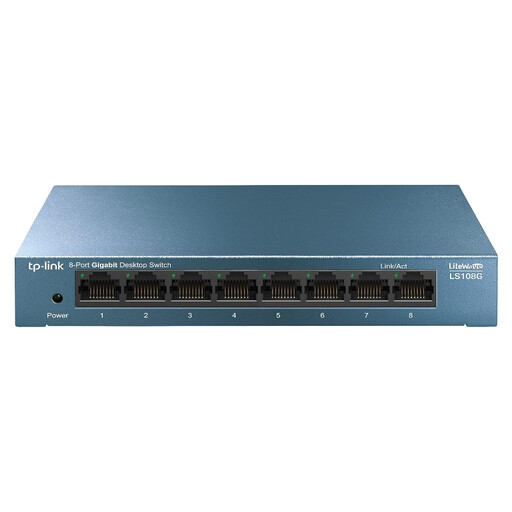 Image unavailable
Suitable when you need more ports for devices than a five-port model has left after connecting the uplink.
Unmanaged model with eight RJ45 gigabit ports; the product description lists plug-and-play setup. With one port used for the uplink, seven ports remain for devices.
 Image unavailable
Suitable for a setup that needs multiple wired connections and PoE ports; choose management features only if you have a specific use for them.
The product title lists eight gigabit ports and four PoE ports; the description mentions management and monitoring features. With one port used for the uplink, seven ports remain for devices.
 Image unavailable
Suitable if you need eight wired ports and have a specific use for configurable features.
The product description lists eight 10/100/1000 Mbps ports, smart management, VLAN support, QoS and a metal casing. With one port used for the uplink, seven ports remain for devices.
Connect the existing, authorised network connection to one Ethernet port on the switch, then connect your work laptop to another port. TP-Link describes the TL-SG105 as plug-and-play. If you’re on a managed network, check separately whether your laptop will be allowed access.
No. The switches described provide wired Ethernet ports, not Wi-Fi or a laptop adapter. If your laptop doesn’t have an Ethernet port, check whether you need a compatible adapter or dock. If you want your own Wi-Fi, ask your building’s network administrator which router or access point options are allowed.
It depends on the terms for your connection and accommodation. The University of Twente describes different services at different accommodation locations, as well as registration for access to its wired network. Ask your building’s network administrator which rules apply to you.
Yes. Follow your employer’s instructions for your work laptop. A switch on its own doesn’t provide a secure connection to your company network. VeiligInternetten discusses using a VPN on public Wi-Fi; that advice doesn’t necessarily apply to every wired connection.
For online consumer purchases, you generally have a statutory cancellation period of up to 14 days after delivery, subject to exceptions; ACM ConsuWijzer explains the conditions. If a product is faulty, the seller must resolve the issue under consumer law. This does not mean that every switch has a fixed statutory guarantee period of two years.