Who needs a switch for their home office?

Wiring up a streaming box and work PC

You want to connect several devices in one place to your existing router and are looking for a simple, quiet switch with enough free ports. Ziggo explains how to connect devices such as TV boxes and other equipment by cable.

Using interactive TV through a switch

You may have a TV receiver that uses multicast and want to check whether IGMP snooping is needed before placing a switch between the router and receiver. KPN explains IGMP snooping for multicast TV traffic.

Working from home with a growing network

You want to connect more wired devices, or have a specific use for configurable network features or multi-gigabit ports.

What should you look for when choosing one?

What to consider What to look for Who is this important for?
Simple connection Check that the box has an Ethernet port and your router has a free port. Remember to include the router connection when counting the switch ports you need. I want to connect my streaming box and work devices without having to configure network features. Around 36% of consumers are mainly looking for a simple wired connection.
Enough ports Count the router connection and all the devices that need to be connected at the same time, then compare the total with the number of physical ports. I want to connect my computer, streaming box and other devices in the same place, while allowing for future expansion. Around 29% of consumers mainly need more connections.
Multicast and IGMP snooping Check the type of receiver, provider and TV mode, then see whether the specific switch model supports IGMP snooping. I use interactive TV and want to know whether my receiver uses multicast traffic before adding a switch. Around 21% of consumers mainly want to check this compatibility.
Management features or higher speeds Check that devices at both ends support the port speed you want, and consider which management feature you will actually use. I have a specific use for faster local file transfers or configuring network traffic. Around 14% of consumers are mainly looking for these advanced features.

Common buying mistakes

  • Assuming every streaming box has the same network requirements

    The term ‘streaming box’ doesn’t tell you whether your device uses multicast TV traffic. KPN explains IGMP snooping for multicast, but this doesn’t automatically apply to every app-based box.

    Check the exact receiver model, your provider and the TV mode in use before choosing a switch feature.

  • Counting every port as a connection for a device

    On a five-port switch, the connection to the router uses one port, leaving four for devices.

    Remember to include the router connection and work out how many ports you need to use at the same time.

    If there aren’t enough ports, you may need a second or larger switch.

  • Assuming 2.5 Gbit/s or PoE is essential for streaming

    Higher port speeds and PoE are separate features for different uses. A streaming box doesn’t need either simply to connect via Ethernet.

    Choose a higher speed only if the connected devices and link support it. Use PoE only for a compatible device that needs power through the network cable.

Brands to compare

TP-Link

The TL-SG105 and TL-SG105E models reviewed are five-port gigabit switches. The TL-SG105 is designed for straightforward connections, while the TL-SG105E adds web management.

  • TP-Link says the TL-SG105 offers plug-and-play setup and IGMP snooping. The TL-SG105E has web management, according to TP-Link.
  • Management features are mainly useful if you’ll actually use them. Features of these models don’t automatically apply to every switch from the brand.

NETGEAR

The GS305E reviewed is a five-port gigabit switch with management options for small offices and home offices.

  • NETGEAR lists VLAN, QoS, IGMP snooping and a fanless design for the GS305E.
  • These are the manufacturer’s specifications, not independently measured performance benefits. Management features may be unnecessary for a simple connection.

Zyxel

The GS1200v3 series includes gigabit variants with and without PoE.

  • Zyxel clearly distinguishes between models with and without PoE.
  • Check the full model number. Features of a PoE version don’t automatically apply to the non-PoE variant.

Linksys

The LN2305-KE is a multi-gigabit option reviewed for networks with compatible devices.

  • Linksys lists five 2.5 Gbit/s Ethernet ports and plug-and-play setup for the LN2305-KE.
  • A higher port speed alone doesn’t mean a standard streaming box will benefit. Check the regional model designation too.

Joybuy products for this setup

This selection of Joybuy products includes switches for straightforward wired connections, as well as models with extra ports, management features or PoE. Check that the features of each version suit your devices and how you plan to use them.

TP-Link TL-SG105 five-port metal gigabit switch

TP-Link TL-SG105 5-Port Metal Gigabit Switch

A straightforward option for a streaming box and a small number of wired work devices. TP-Link lists five gigabit ports, plug-and-play setup and IGMP snooping for the TL-SG105. One port is needed to connect to the router.

Joybuy
TP-Link five-port gigabit desktop switch with PoE

TP-Link 5-Port Gigabit Desktop PoE Switch with 4-Port

An option to consider if you want to power a compatible device over Ethernet as well as connect it to the network by cable. The product title describes a five-port gigabit switch with PoE. Check the PoE support and exact version to make sure they suit your equipment.

Joybuy
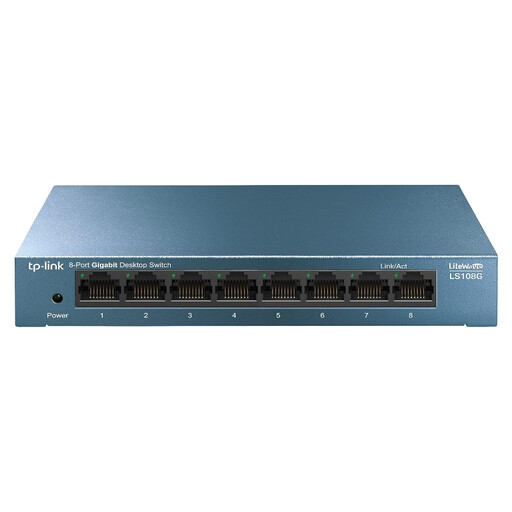
TP-Link LiteWave LS108G switch

TP-Link LiteWave LS108G

The title describes an unmanaged switch for anyone who doesn’t want to configure network management. Before you buy, count the router connection and the devices you need to connect at the same time. Also check the number and type of ports on the version being offered.

Joybuy

TP-Link eight-port gigabit Easy Smart switch with PoE

TP-Link 8-Port Gigabit Easy Smart Switch with 4-Port PoE

An option if you have several wired devices to connect and need management features or PoE. The product title describes eight gigabit ports and 4-Port PoE. Check which ports and features are included in the version being offered, and whether you want to configure the management features.

Joybuy

NETGEAR GS108E-400EUS switch

NETGEAR GS108E-400EUS

Worth considering if you need configurable network features, for example to create a specific home network setup. Before ordering, check which ports and features are included with this full model number and whether they’re compatible with your receiver and other devices.

Joybuy

Frequently asked questions

Do I need IGMP snooping for every streaming box?

No, not just because the device is called a streaming box. KPN describes the feature for TV traffic that travels through a switch as multicast. Check the exact receiver model, your provider and the TV mode in use. Ziggo’s connection information for the Mediabox Next and Next Mini doesn’t set a general IGMP requirement for all boxes.

How do I connect the switch, and what should I check if it isn’t working?

Connect a port on the switch to your existing router, then plug your devices into the other ports. TP-Link says the TL-SG105 doesn’t need configuring. If you have a problem, first check the cable connection and the box’s internet connection. Ziggo explains how to check and restart its own media boxes.

Do I need PoE to connect a streaming box via Ethernet?

No, PoE isn’t needed for the network connection itself. It’s designed to power compatible devices over Ethernet. NETGEAR lists four PoE+ ports and a total power budget of 63 W for the GS305EP. Check the power requirements of any device you want to connect via PoE.

What if I’m unhappy with a switch I bought online, or it breaks soon after purchase?

ACM ConsuWijzer says that online purchases come with a cooling-off period of up to 14 days after delivery, with some exceptions depending on the purchase. You’re also entitled to a legal guarantee: if a product doesn’t meet what you could reasonably expect under normal use, the seller must offer an appropriate free solution.

What compliance checks matter when buying a switch?

The Dutch Authority for Digital Infrastructure states that electrical and electronic equipment must carry the correct CE marking, and that only compliant products where required may be sold in Europe. Check the marking on the device being offered and follow the instructions. A CE marking doesn’t prove that the switch will work with your specific TV receiver.
