For a streaming box on a small desk, a compact, fanless gigabit switch with enough spare ports is a sensible starting point, provided your exact box model supports Ethernet. If a multicast TV receiver is also connected through the switch, check separately that the switch supports IGMP snooping and meets your TV provider’s requirements. According to the KPN Community Knowledge Base, this feature is relevant to the multicast TV setup described.
Who is this switch guide for?
A streaming box on a small desk
You want to connect your box and perhaps a few other devices by cable, but size, the power adapter and fan noise matter too. TP-Link Netherlands and Zyxel Networks publish dimensions and design features for specific models, so check the version you’re considering.
A TV receiver on the same network
You use a TV service alongside your streaming box that sends multicast traffic through a switch. According to the KPN Community Knowledge Base, IGMP snooping may be relevant in this case. It’s a specific requirement, not something every streaming box needs.
A desk with additional wired devices
You also want to connect a computer, console or other Ethernet devices. Count the port used for the router connection before working out how many ports will be left for your devices. KPN Home Equipment explains that a five-port switch provides four additional device connections.
What should you look for?
First, check that your streaming box has Ethernet and count how many devices you want to connect. Then consider whether the size and any TV network features suit your desk and connection.
| What to consider |
What should you check? |
Who is this for? |
| Ethernet and ports |
Check the connection on the exact version of your box and count the router cable along with all your devices. With a five-port switch, one port connects to the router; KPN Home Equipment describes the other four as device ports. |
If I want to connect my box and other devices by cable, the box needs Ethernet and there must be enough ports left after the router connection. Around 36% of consumers put compatibility and port layout first. |
| Space and noise |
Compare the dimensions of the exact switch and leave room for the adapter and cables too. If you want to avoid fan noise, check whether the model is fanless. |
On a small desk, I want the switch, cables and adapter to fit together without a fan making noise. Around 29% of consumers prioritise a compact, quiet setup. |
| Multicast TV |
Check whether your TV receiver uses multicast through the switch and whether the exact switch supports IGMP snooping. Follow your provider’s guidance too. |
If my TV receiver uses multicast through the same switch, I want to compare my provider’s requirements with the switch’s features. Around 21% of consumers prioritise this TV connection. |
| Expansion and power use |
Count how many devices you want to connect now and in the future. If you want to estimate electricity costs, use the specifications for the exact model, your usage time and your own electricity tariff. |
If I want to connect more devices later, I need enough ports without taking up unnecessary desk space. Around 14% of consumers focus mainly on expandability and being able to assess power use. |
Common buying mistakes
-
Buying a switch before checking for an Ethernet port
Not every version of the same device has an Ethernet connection. For example, Apple Support lists Ethernet for the Apple TV 4K (3rd generation) with Wi‑Fi + Ethernet, but not for the Wi‑Fi version.
Check the exact model and physical connection before choosing a switch.
-
Assuming five ports means five free device connections
You need one port to connect to the router. KPN Home Equipment therefore describes a five-port switch as providing four additional Ethernet ports for devices.
Count the router connection and all the devices you want to connect.
-
Confusing ‘suitable for streaming’ with support for multicast TV
IGMP snooping may be relevant when a multicast TV receiver is connected through the switch. That doesn’t mean every streaming service needs this feature.
For a TV service where this applies, check both your provider’s requirements and the features of the exact switch.
Relevant brands
TP-Link
TP-Link Netherlands offers, among other models, the five-port TL-SG105 and eight-port TL-SG108. The model name determines which features apply.
- TP-Link Netherlands lists a fanless design and IGMP snooping for the TL-SG105.
- These features are manufacturer specifications, not independent performance measurements. Check the exact version and your TV provider’s requirements.
Zyxel
Zyxel Networks’ GS-100 series includes the five-port GS-105B v5 and an eight-port version.
- Zyxel Networks specifies dimensions of 82,5 × 46,8 × 24 mm and a fanless design for the GS-105B v5.
- These features don’t confirm that the model meets a particular provider’s multicast TV requirements.
NETGEAR
The NETGEAR GS305 is an unmanaged five-port gigabit switch. The GS105E is a different, configurable five-port option described by KPN.
- NETGEAR describes the GS305 as plug-and-play. KPN Home Equipment lists features including IGMP snooping and VLANs for the GS105E.
- Don’t assume the GS105E’s features are available on the GS305; check the exact model.
D-Link
D-Link Netherlands describes the DGS-105 as an unmanaged desktop switch with five gigabit ports.
- The five ports give you room to expand a small network.
- The product description doesn’t confirm whether this version meets your provider’s multicast TV requirements.
Joybuy products
The Joybuy products below include five- and eight-port gigabit switches, including models with PoE or network management features. Check each model to make sure its connections and features suit your streaming box, TV service and desk.
 No image available
TP-Link TL-SG105 5-port metal gigabit switch
A compact five-port option if you’re looking for a wired gigabit connection. TP-Link Netherlands also lists IGMP snooping for the TL-SG105.
Five 10/100/1000 Mbps ports; metal casing.
Joybuy
 No image available
TP-Link 5-port gigabit desktop switch with 4 PoE ports
An option if you want to connect PoE devices as well as standard Ethernet devices. Check that the PoE feature is compatible with the devices you use.
Five gigabit ports; the product description lists four PoE ports and a metal casing.
Joybuy
 No image available
TP-Link 8-port Gigabit Easy Smart Switch with 4 PoE ports
Worth considering if five device connections aren’t enough and you also want to connect PoE devices.
Eight gigabit ports; the product name lists four PoE ports.
Joybuy
 No image available
TP-Link TL-SG1008P unmanaged gigabit switch
An unmanaged eight-port option if you need more wired connections and want a plug-and-play model.
Eight gigabit ports; the product name lists Power over Ethernet (PoE).
Joybuy
 No image available
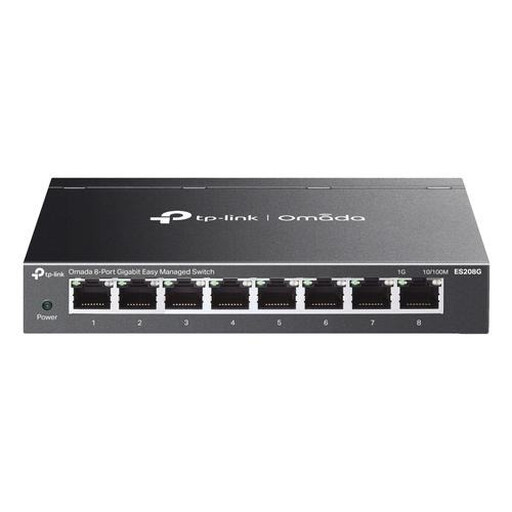
TP-Link Omada ES208G managed L2 gigabit switch
A managed eight-port option to consider if you need network features such as VLAN, QoS or IGMP snooping. Check the settings required for your network.
Eight gigabit ports; stated dimensions: 158 × 100,7 × 25,4 mm.
Joybuy
Frequently asked questions
Can any streaming box connect to a switch with a network cable?
No, the exact version needs to have Ethernet. Apple Support lists gigabit Ethernet for the Apple TV 4K (3rd generation) with Wi‑Fi + Ethernet, but not for the Wi‑Fi version. So check the model you own.
How many devices can I connect to a five-port switch?
If one port connects to the router, four ports are left for devices. KPN Home Equipment describes this setup for the five-port GS105E. Count your own connections before choosing a switch.
Do I need IGMP snooping to stream video?
Not just because you use a streaming box. The KPN Community Knowledge Base mentions IGMP snooping for its multicast TV signal when a switch sits between the modem and TV receiver. Check whether your TV connection works in the same way.
How do I connect the switch on my desk?
Connect one port to the router, plug in the power adapter and connect your devices to the remaining ports. Then check the link lights and follow the instructions for your exact model.


