What should you look for when choosing one?
One port connects to the router, leaving four ports for wired devices on a five-port switch. Coolblue and TP-Link Netherlands support this way of counting ports; the KPN Community Knowledge Base links IGMP snooping to using a KPN TV receiver through a switch.
| What to consider |
What should you check? |
Who is this important for? |
| Enough connections |
Count the port for the router and each device separately. A five-port switch leaves four connections for devices. |
I want to connect a TV and other devices without management settings. Around 33% of consumers prioritise having enough connections. |
| Size and noise |
Allow space for the cables once they’re plugged in, too. TP-Link lists the TL-SG105 as measuring 100 × 98 × 25 mm; NETGEAR gives the GS108 dimensions as 158 × 102 × 27 mm. If you’re placing it somewhere quiet, check that the model is fanless. |
I want to keep the switch close by on a small desk without hearing a fan. Around 27% of consumers prioritise placement and quiet operation. |
| TV receiver |
If you’re connecting a KPN TV receiver through the switch, check for IGMP snooping and follow your provider’s connection instructions. This isn’t automatically necessary for streaming apps on a smart TV. |
If I’m connecting a KPN TV receiver, I want to know whether this network setup is suitable. Around 20% of consumers prioritise compatibility with a receiver like this. |
| Room to expand |
Count how many devices you’re connecting now and are specifically planning to add soon. With five ports, four connections remain after the router cable; with eight ports, seven remain. Check that the larger casing will fit, too. |
I want to connect more wired devices than will fit on a five-port switch. Around 13% of consumers prioritise a specific plan to expand. |
| Management or PoE |
Choose VLAN or web management only if you want to configure your own network. Check PoE separately if a connected device needs power over Ethernet; NETGEAR states that the GS305v3 has no PoE budget. |
I have a specific plan for network management or power over Ethernet. Around 7% of consumers prioritise one of these features. |
Joybuy products for this setup
This selection includes five- and eight-port switches, including models with PoE or configurable network features. Remember to count the port for the router, and check the product information for the exact model, the features you need and whether a mains adapter is included.
 No image available
TP-Link 5-Port Gigabit Desktop PoE Switch with 4-Port PoE
Consider this model if you need PoE as well as network ports for compatible devices.
The product name lists five ports, including four PoE ports.
View at Joybuy
 No image available
TP-Link TL-SG105 5-Port Metal Gigabit Switch
A good fit for a small wired setup where five ports and straightforward connectivity are all you need.
TP-Link describes the TL-SG105 as fanless, plug-and-play and equipped with IGMP snooping. One of the five ports is used to connect to the router.
View at Joybuy
 No image available
TP-Link 8-Port Gigabit Easy Smart Switch with 4-Port PoE
Consider this option if you need more connections than a five-port switch offers and want to explore PoE or management features, too.
The product name lists eight ports, including four PoE ports. Check the product information to see which management features are available on this model.
View at Joybuy
 No image available
NETGEAR GS108E-400EUS
Take a look at this model if you’re looking for management features as well as a way to connect your devices.
Before ordering, check the number of ports and management options on the model being offered.
View at Joybuy
 No image available
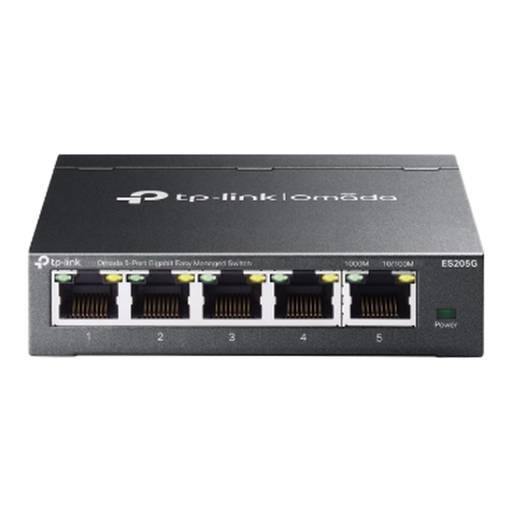
TP-Link Omada ES205G 5-Port Gigabit Easy Managed Switch
A good fit for a five-port setup if you want to manage your own network features.
Check that the available settings suit your needs, and that the exact model supports IGMP snooping if you’re connecting a TV receiver through the switch.
View at Joybuy
Frequently asked questions
How do I connect a switch if my TV and PC are next to each other?
Connect a port on the switch to a working LAN port on your router, then connect the TV and PC to other ports. TP-Link explains that for the TL-SG105, you should plug the switch into the power supply and then connect your network devices. With five ports, this setup leaves room for four devices in addition to the router connection.
Do I always need IGMP snooping to stream apps on my smart TV?
No. Don’t assume you need it just because you have a smart TV. KPN explains that IGMP snooping is used for its TV signal when a TV receiver is connected through a switch. So first check whether you’re using that receiver and network setup.
What should I consider when placing and using a switch on a small desk?
Before setting up the switch, check its dimensions, allow space for connected cables and make sure you have the right power supply. Keep the setup dry and well ventilated; the product instructions for the TP-Link TL-SG105 warn against moisture and extreme temperatures.
Am I always limited to a two-year guarantee after buying online?
No. ACM ConsuWijzer explains that your statutory guarantee rights exist alongside any manufacturer’s or seller’s guarantee. With normal use, a product should last as long as you could reasonably expect it to. For a typical online purchase, you’ll generally also have a 14-day cooling-off period from delivery, subject to legal exceptions.
What product safety checks should I make when buying in the Netherlands?
Check that the model on offer and any mains adapter comply with the rules that apply to them. According to information from the Dutch government, a CE mark is the manufacturer’s declaration that a product meets the EU product rules for its category; CE is not a quality mark.


