
NAS user with limited desk space
Wants to connect a NAS, computer and network neatly, and is considering the number of ports and where to place the switch.


A Gigabit switch is enough if your NAS and computer have Gigabit ports; 2.5GbE only makes sense if both devices support that speed. Take the connection to your router into account too, and only choose management features if you’re happy to configure and use them.
Wants to connect a NAS, computer and network neatly, and is considering the number of ports and where to place the switch.
Wants a wired 2.5GbE connection and checks that both devices and the rest of the network connection support it.
Has a specific reason to configure features such as VLANs and wants to manage the settings themselves.
First, count all the connections you need, including the cable to your existing network. Then check the ports on your NAS and computer, and only then decide whether you need 2.5GbE or management features.
| What to consider | What should you check? | Who is this important for? |
|---|---|---|
| Ports and size | Count the NAS, computer, connection to your router or existing switch, and any additional devices. Also compare the model’s dimensions and placement options. | If I want to connect everything on a small desk, I need enough ports without an awkwardly large device; around 40% of consumers prioritise this. |
| Connection speed | Check the Ethernet ports on both your NAS and computer, and make sure the cables are suitable for the connection. | If I want to transfer files between my NAS and computer over 2.5GbE, both devices need to support that speed; around 30% of consumers put speed first. |
| Noise and placement | Check whether the exact model is fanless and whether desk or wall mounting suits your workspace. | If the switch is near my workspace, I want to know whether it’s fanless and where the power supply and cables will go; around 20% of consumers prioritise quiet operation and placement. |
| Management features | Decide which feature you want to configure and check that it works with your network setup; also consider whether Gigabit ports are enough. | If I need VLANs or link aggregation, I want to use those settings for a specific purpose rather than leave extra features unused; around 10% of consumers prioritise management features. |
A five-port switch has five connections in total, so the cable to your existing network uses one of them.
Before buying, count the connections for your NAS, computer, network and any future additions.
If all the ports are already in use, expanding your setup may mean adding a second or larger switch.
The speed of the switch alone doesn’t determine the speed of the connection between your NAS and computer.
Check the ports on both devices and the cable before choosing 2.5GbE.
For the NAS setup discussed, Synology explains that multiple clients are needed to increase total bandwidth; a single client uses one of the aggregated interfaces.
Choose link aggregation only if your NAS and switch support the feature and your network setup can make use of it.
The TL-SG105 and TL-SG105E have five Gigabit ports, while the TL-SG105-M2 has five 2.5GbE ports.
The QSW-1105-5T is an unmanaged switch with five 2.5GbE ports, designed for devices and NAS systems that support this speed.
According to NETGEAR Netherlands, the MS305 is an unmanaged switch with five RJ45 ports that support 100 Mbit/s, 1 Gbit/s and 2.5 Gbit/s.
The Linksys LN2305-KE is an unmanaged switch with five 2.5GbE ports.
These Joybuy products are aimed at Gigabit connections for a NAS, with both basic and managed switches available.
 Image unavailable
A straightforward choice if your NAS and computer have Gigabit ports and you don’t need management settings.
Five 10/100/1000 Mbps ports; plug and play; metal casing; suitable for desk or wall mounting.
 Image unavailable
Suited to a Gigabit network where you want to connect your NAS and configure features such as VLANs.
Eight Gigabit ports; the product description lists VLAN, QoS and IGMP snooping.
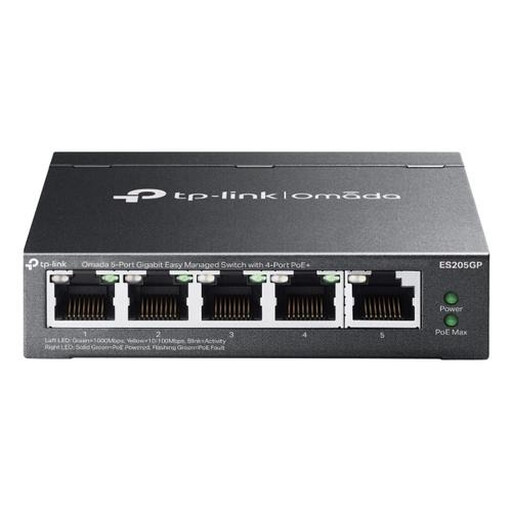 Image unavailable
A Gigabit option if you need management features and want to power compatible devices via PoE+.
Five Gigabit ports; four PoE+ ports; the product description lists VLAN, link aggregation and QoS.
No. For a 2.5GbE connection between your computer and NAS, the ports used on both devices need to support that speed. Check the cabling too: the specified port speed isn’t the same as a measured file transfer speed.
Connect one port to your existing network, then use the other ports for your NAS and computer. A plug-and-play model such as the TP-Link TL-SG105 doesn’t need to be configured; just remember to count the network connection when working out how many ports you need.
Not automatically. According to Synology, total bandwidth in the NAS setup described only increases when multiple clients are connected; a single client is served through one aggregated interface. Check that your NAS and switch support the feature and that it suits your network setup.