
Studio with a NAS
You move large project files between your workstation and a local NAS, and want to know whether both devices would benefit from 2.5 GbE.


First, count the connection to your router and all your wired devices, then choose a switch with enough ports. Gigabit is suitable for standard wired connections; 2.5 GbE is mainly worth considering if your workstation, NAS and the connection between them all support that speed. Only choose PoE, configurable VLANs or a 10G-SFP+ uplink if you need those features.
You move large project files between your workstation and a local NAS, and want to know whether both devices would benefit from 2.5 GbE.
You want to connect, for example, a NAS, printer and access point alongside your workstation. Remember to allow for the port used to connect to your router, too.
The switch is close to microphones or your listening position. In that case, a clearly stated fanless design may matter more than features you won't use.
First count the connections you need, then check the speed of the entire workstation-to-NAS link. Finally, weigh features such as quiet operation, VLAN management and PoE against how you actually plan to use the switch.
| Buying priority | What to check | Who should consider this? |
|---|---|---|
| Local file speeds | Check the network speed of both your workstation and NAS, as well as the connection between them. TP-Link lists five 2.5GbE ports for the TL-SG105-M2; QNAP specifies Cat 5e cabling for the QSW-1105-5T. | If you move large project files between your workstation and NAS, you'll want to know whether both devices can handle the faster connection. Around 31% of consumers say local work file speeds are their top priority. |
| Enough connections | Count your router, workstation, NAS and other wired devices separately. Decide how many ports you need to keep free, then compare five-port and eight-port models. | If you want to connect several studio devices by cable, every connection you need counts, including the one to your router. Around 25% of consumers prioritise having enough ports. |
| Noise at your workstation | Check whether the exact model is fanless and consider where you'll place the switch and power supply. | If the switch is next to a recording or listening space, you'll want to avoid fan noise. Around 19% of consumers prioritise a quiet recording space. |
| Configurable network segmentation | Check explicitly whether the exact model supports configurable VLANs and whether your other network equipment can handle your preferred setup. | If you want to configure studio device traffic separately, management on the device itself matters. Around 13% of consumers give network segmentation top priority. |
| Power over Ethernet | Check PoE support, the power available per port and the total PoE budget, as well as the number of data ports. | If you want to power a compatible access point or other peripheral via Ethernet, both the standard and the available power need to be suitable. Around 12% of consumers prioritise PoE equipment. |
The connection to your router usually uses one of the switch's ports, leaving fewer connections for studio devices.
Count your router, workstation, NAS and other wired devices before choosing a five- or eight-port model.
If you run out of connections later, you may need to add a switch with more ports.
A port specification does not tell you the measured speed of the entire link between your workstation and NAS.
Check the connections and network interfaces at both ends before choosing multi-gigabit.
A faster connection may also require you to upgrade a network card or other parts of the setup.
The TP-Link TL-SG105E lists web management and 802.1Q; that doesn't make the basic TL-SG105 and the 2.5GbE TL-SG105-M2 the same type of managed switch.
Check the exact model for configurable VLAN support if you want to separate network traffic.
The models listed by TP-Link offer a choice of basic Gigabit ports, 2.5GbE and configurable management.
The QSW-1105-5T is designed for local connections, with five 2.5GbE ports.
According to NETGEAR Netherlands, the MS305 is an unmanaged five-port 2.5GbE switch for desk or wall mounting.
The Zyxel XMG-105 combines five 2.5GbE RJ45 ports with an SFP+ uplink.
Linksys lists the LN2308 in its range of multi-gigabit switches; the model name alone doesn't provide full details of the version.
According to Ubiquiti, the UniFi Lite 8 PoE is a managed Layer 2 switch with eight Gigabit ports and PoE.
These products are designed to add wired connections to a home studio, from Gigabit ports to models with PoE or 2.5GbE.
 No image available
A straightforward way to add extra wired Gigabit connections.
Five RJ45 ports with 10/100/1000 Mbps; the description mentions plug-and-play use and desk or wall mounting.
 No image available
A good fit if you need wired Gigabit connections and PoE for compatible equipment.
Five 1Gbps ports, four of which are PoE ports according to the product specifications. The description mentions a fanless design.
 No image available
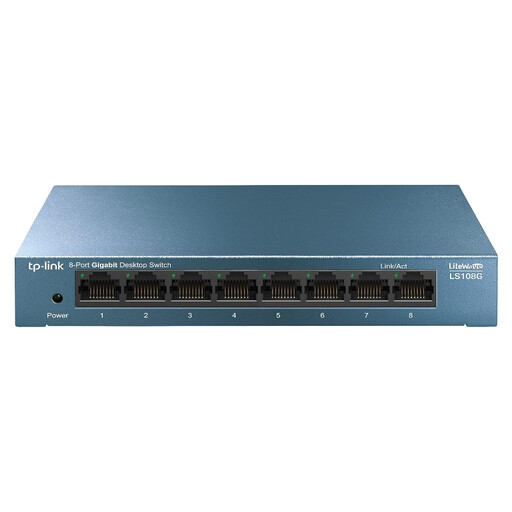
An unmanaged option if you want to connect several devices to a Gigabit network.
Eight RJ45 ports with Gigabit connections; the product description mentions plug-and-play use.
 No image available
A good fit for a setup with several wired devices and compatible PoE peripherals.
Eight Gigabit ports, four of which are PoE ports according to the product title; the description mentions web interface management.
 No image available
An option if you need 2.5GbE ports and PoE+ for compatible network equipment.
Five 2.5Gbps ports, four PoE+ ports and a 60 W PoE budget according to the product description. Use the supplied power adapter, don't exceed the PoE budget, and keep the switch ventilated and away from moisture.
No, not by itself. For a faster local connection, the devices and connections involved also need to support it; a switch port specification isn't a measurement of file transfer speeds.
For an unmanaged model, Linksys recommends this order: connect the switch to the power supply, connect it to the router, then connect the other devices using Ethernet cables. Check the manual and supplied power supply for your specific model.
Check which EU product rules apply to the exact model. The European Union's Your Europe website explains that CE marking is mandatory when applicable harmonised rules require it; a CE statement for a different model version doesn't confirm that the version you're buying complies.
Not automatically. According to the Dutch government, consumer purchases come with a legal guarantee, and you should contact the seller if a product is faulty. The Netherlands has no fixed statutory guarantee period; consider whether a paid extension genuinely gives you extra rights.
Follow the placement and temperature instructions for your chosen model, and keep the ventilation openings clear. QNAP describes the QSW-1105-5T as fanless, but that alone doesn't tell you whether other switches have a set maintenance interval.