First, decide how your home and garden office will be connected. Fibre could be an option for a link between buildings, but it requires compatible connections and equipment at both ends. Then choose a switch to match your server and uplink speeds, the number of devices, and any VLAN or PoE requirements. A faster server port won’t make a slower connection to your home any faster.
Who is this guide for?
Anyone connecting their home and garden office
You’re still deciding how to link the two buildings and want to take the cable route and connections at both ends into account. Fluke Networks gives a standards limit of 100 metres for a typical copper Ethernet channel.
Anyone making large backups
You want to match the speeds of your server, switch and uplink. TP-Link and Zyxel’s manufacturer information describes different port speeds and connection types for each model.
Anyone expanding their garden office network
You may also be connecting other devices and want to know whether you need extra ports, VLAN configuration or PoE. TP-Link and NETGEAR describe these features for specific models; they aren’t automatically available on every version.
What should you consider?
First, decide how to connect the buildings. Then choose the port speed and number of connections, adding management features or PoE only if you need them.
| What to consider |
What should you check? |
Who is this important for? |
| Connection between buildings |
Check the existing or planned cable route, the connections at both ends, and whether the uplink is RJ45 or optical. Fluke Networks gives a standards limit of 100 metres for a typical copper Ethernet channel. |
If I still need to connect my home and garden office, I first want to know which installation and connections are suitable. Consumers who prioritise the connection between buildings account for around 36% of consumers in this breakdown. |
| Speed across the entire connection |
Note the supported speeds of the server, switch ports and uplink; if you’re using fibre, check both optical connections too. |
For large backups, I want to avoid a slower link holding things back. Around 29% of consumers give the speed of the entire backup connection the highest priority. |
| Ports and management |
Count the server, uplink and other wired devices separately. Check whether the exact version supports VLAN configuration and whether your other network equipment is compatible. |
If I’m connecting more than just the server or want to separate networks, I’ll consider the number of ports and management features. Consumers who prioritise expansion or segmentation account for around 21%. |
| PoE for extra devices |
Check the required PoE standard and power for each device, then compare these with the total budget of the exact switch version. |
If you want to power a compatible access point or another PoE device, make sure the standard and available power are suitable. Around 14% of consumers prioritise PoE for extra devices. |
Common mistakes when choosing
-
Looking only at the server port speed
The speed of a single port doesn’t determine the speed of the entire backup connection. A slower uplink or connection at the other end can limit the link.
Before choosing a switch, note the supported speed of every connection between the server and the device in your home.
A faster switch won’t make much difference to this connection if other components can’t support the speed you’re aiming for.
-
Assuming an SFP+ port is a complete fibre connection
An optical port on one switch won’t, by itself, create a working connection between buildings.
Before choosing the switch, check the equipment, modules, fibre and speed at both ends.
To complete the connection, you may still need compatible optical components, a connection at the other end and installation work.
-
Judging a PoE model by its name alone
Different versions of a model can have different PoE standards and total power budgets. For example, TP-Link lists different PoE specifications for versions of the TL-SG108PE.
Check the hardware version, number of PoE ports, standard and total power budget of the specific product.
If a version doesn’t meet your PoE requirements, you may need a different switch or a separate power solution.
-
Confusing a switch with a complete backup strategy
A network connection doesn’t determine how backup copies are protected or whether data can be restored.
Assess your backup storage and security separately, and test that recovery works. Veeam’s backup guidance discusses, among other things, keeping a copy away from the primary location and ensuring it can be restored.
Brands to consider
TP-Link
The Dutch product range includes basic gigabit models, a 2.5GbE desktop switch, and Easy Smart versions with VLAN or PoE.
- TP-Link specifies eight gigabit ports for the TL-SG108 and five 2.5GbE ports for the TL-SG105-M2.
- Check the hardware version of the TL-SG108PE: TP-Link lists versions with different PoE standards and total power budgets, including 55 W and 64 W.
NETGEAR
The GS305EP may be worth considering if you want to connect compatible PoE devices as well as your server in the garden office.
- NETGEAR specifies five RJ45 copper ports for the GS305EP, four of which are PoE+ ports, with a total PoE budget of 63 W.
- According to NETGEAR, the GS305EP has RJ45 copper ports and isn’t, on its own, an optical connection between buildings.
Zyxel
The XGS1210-12 is worth considering if you want to combine RJ45 devices with an optical uplink and web management.
- Zyxel Networks Netherlands lists two 2.5GbE ports, two 10GbE SFP+ ports and web management for the XGS1210-12.
- The actual speed also depends on compatible optical components and the equipment at the other end. The port specification doesn’t measure the complete connection.
Joybuy products
These switches are designed for a wired connection in your garden office, with gigabit or multigigabit ports and, depending on the model, PoE. Check separately how you’ll connect your home and garden office; choosing a switch alone won’t complete that connection.
 Image unavailable
TP-Link 5-port Gigabit Desktop PoE Switch
An option for a gigabit network with a compatible PoE device in your garden office.
The product information lists five gigabit ports and four PoE ports. Use the switch indoors, away from damp and rain.
View at Joybuy
 Image unavailable
TP-Link 8-port Gigabit Easy Smart Switch with 4 PoE ports
Suitable for a gigabit setup with several wired devices and a need for PoE, provided the version you choose is compatible with your equipment.
The product title lists eight gigabit ports and four PoE ports. The product information warns against damp and extreme temperatures; check the hardware version and PoE specifications of the product on offer.
View at Joybuy
 Image unavailable
Linksys 5-port 2.5GbE unmanaged PoE+ switch
An option if both your server and uplink support 2.5GbE and you also want to connect compatible PoE devices.
The product information lists five 2.5 Gbps RJ45 ports, four PoE+ ports and a total budget of 60 W. Not suitable for wet or very damp environments.
View at Joybuy
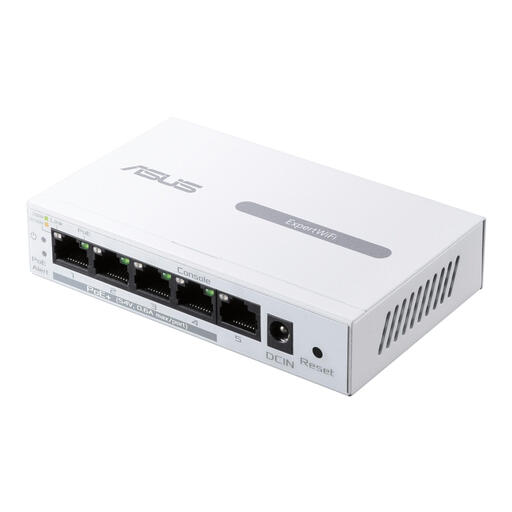 Image unavailable
ASUS ExpertWiFi EBP15 managed gigabit Ethernet switch with PoE
An option for a managed gigabit setup with compatible PoE devices, as long as the port speed suits your server and uplink.
The product information lists five Ethernet connections of up to 1 Gbps and a PoE budget of 60 W. According to the product information, this device is for indoor use only.
View at Joybuy
 Image unavailable
TP-Link TL-SG1008P unmanaged gigabit switch with PoE
An option for a gigabit network with several wired connections and compatible PoE devices.
The product information lists eight RJ45 gigabit ports and four PoE ports. Don’t use the switch where it could be exposed to damp or rain.
View at Joybuy
Frequently asked questions
Is one switch in the garden office enough for a fibre connection to my home?
No, not without a compatible connection at the home end. Check the switch or converter, optical module, fibre and intended speed at both ends; an SFP+ port on one device doesn’t make a complete connection.
Can a faster switch compensate for a copper cable that’s too long?
No. Fluke Networks gives a standards limit of 100 metres for a typical copper Ethernet channel. Assess the entire cable route separately from the switch’s port speed.
Can a PoE switch power my backup server?
You can’t tell from the switch specification alone. The server must support the relevant PoE standard. Check the server’s power specifications and compare them with the PoE capabilities of the exact switch version.
Will a server in the garden office automatically keep my backups safe?
No. A switch doesn’t determine how your copies are protected or restored. Veeam’s backup guidance discusses, among other things, keeping a copy away from the primary location and testing recovery. Consider these steps separately from your network equipment.
What should I look for in the product information for a switch in the Netherlands?
The Dutch government states that electronic devices placed on the market in the EU must carry a CE mark. Check the product information for the specific version; a CE mark alone doesn’t mean the switch is suitable for outdoor use or a particular cable installation.


