If your access point needs power through the network cable, choose a switch whose PoE standard, power per port and total power budget are suitable for the access point and any other PoE devices. If the access point has its own power supply, a standard gigabit switch may be enough. Count the connection to your home and all local devices, and assess the cable route between the buildings separately from your choice of switch.
Who should choose a switch for an access point in a garden office?
Connecting a PoE access point
You want to power the access point through the network cable. So, compare the access point’s power standard with that of the switch port and check the total PoE budget. TP-Link Netherlands lists support for 802.3at (PoE+) and DC power for the EAP610 V1.
Adding wired devices
Your access point already has a suitable power supply, and you also want to connect a PC or another device. In that case, the number of gigabit ports may matter more than PoE. TP-Link describes the TL-SG105 as a five-port gigabit switch that requires no configuration.
Keeping a guest network separate
You want to separate networks using VLANs and are prepared to configure your router and access point too. Zyxel lists 802.1Q VLAN support for the GS1200-5HP v2; check the regional version when looking at a specific offer.
What should you look for in a switch for your garden office?
| What to consider |
What should you check? |
Who is this important for? |
| PoE power and compatibility |
Check the exact access point model, the PoE standard it requires and the power per port. Add together the power requirements of all your PoE devices too. |
I want to power my access point through the network cable and make sure its power requirements are met. Around 36% of consumers prioritise PoE compatibility. |
| Ports and switch power supply |
Count the connection to your home, the access point and any other devices. Decide whether the switch needs its own power socket or will be powered through PoE; with PoE power, the available output budget depends on the input. |
In my garden office, the connection from my home needs to serve a PC or other wired devices as well as the access point. Around 29% of consumers prioritise extra connections or a suitable power supply for the switch. |
| Network management |
Check whether you need VLANs and whether the switch, router and access point support your preferred configuration. |
For example, I want to keep a guest network separate and am prepared to configure my network devices to do so. Around 21% of consumers prioritise configurable network separation. |
| Cable route between buildings |
Map the full route, its length and its exposure to the elements. Check the installation requirements for the switch and power supply too; if you’re unsure about the installation, seek expert advice. |
For a cable running between my home and a separate garden office, I mainly want to know what installation method and precautions are suitable for the route. Around 14% of consumers consider the cable route the most important factor. |
Common mistakes when choosing a switch
-
Looking only at the maximum PoE power per port
Power per port and the total budget are two different limits. TP-Link Netherlands’ specifications for the TL-SG1005P list a maximum of 30 W per PoE port and 65 W across all PoE ports.
Compare the requirements of your exact access point with both the per-port limit and the combined power needs of all connected PoE devices.
If the total budget isn’t enough, you may need a different suitable switch or power source.
-
Assuming every PoE switch supplies enough power
For the TP-Link TL-SG1005P-PD, the stated output budget depends on the PoE input standard: TP-Link lists 9 W, 21 W, 47 W or 66 W.
Check the entire power supply chain, from the source to the access point, and compare the available output power with your equipment’s requirements.
If the power supply at the home end isn’t suitable for the required output, you may need a different PoE power source.
-
Treating the connection between buildings as just a choice of switch
Switch specifications won’t tell you on their own which installation method is suitable for the route between your home and garden office. Ubiquiti warns that electrostatic discharge can damage network equipment.
Assess the actual route and its exposure to the elements separately. If you’re unsure about installing the cable between the buildings, seek expert advice.
Assessing the route or having the cable installed may involve extra installation work.
Brands to consider
TP-Link
The models mentioned offer a range of options: a gigabit switch with no specified PoE outputs, models with PoE outputs, and a switch that is itself powered through PoE.
- According to TP-Link Netherlands, the TL-SG1005P has four 802.3af/at ports, with a maximum of 30 W per port and 65 W in total. The TL-SG1005P-PD has an output budget that depends on the PoE input.
- Don’t confuse the models or their power supply arrangements. If you’re installing a switch in your garden office, check the environmental requirements too; the product information on the Joybuy listing warns against moisture and rain.
NETGEAR
The GS305EP is a five-port gigabit switch with four PoE+ ports and management features.
- NETGEAR lists a total PoE budget of 63 W for this model.
- The total budget doesn’t mean unlimited power per output. Compare the requirements of your access point and any other PoE devices with the specifications for the exact model.
Zyxel
The GS1200-5HP v2 combines PoE+ ports with web management and 802.1Q VLAN support, making it an option if you need configurable network separation.
- For this specific model, Zyxel lists four PoE+ ports and a PoE budget of 60 W.
- The specification consulted is for a US product page. Before you buy, check that the regional version and power supply meet your needs.
Joybuy products for a wired access point
These PoE switches let you connect a wired access point and add more connections in your garden office; some models also offer network management.
 No image available
TP-Link 5-port Gigabit desktop PoE switch with 4 PoE ports
A good option if you want to power an access point through PoE and connect wired devices too.
Five gigabit ports and four PoE ports. The product information warns against exposing the switch to moisture or rain.
View at Joybuy
 No image available
TP-Link 8-port Gigabit Easy Smart switch with 4 PoE ports
Suitable for a setup with several wired devices and an access point that needs PoE.
Eight gigabit ports and four PoE ports; the product information lists 802.3af/at support and management features. Keep it away from moisture and extreme temperatures.
View at Joybuy
 No image available
Linksys five-port 2.5-Gigabit PoE+ switch
An option if you want to combine 2.5-Gigabit ports with PoE+ for an access point.
Five 2.5-Gigabit ports, four PoE+ ports, up to 30 W per port and a total budget of 60 W. The product information recommends good ventilation and advises against use in wet or very humid environments.
View at Joybuy
 No image available
TP-Link TL-SG1008P unmanaged gigabit switch
An option if you want to connect several wired devices and need PoE for your access point.
Eight gigabit ports and four PoE ports. The product information lists plug-and-play use and an included power supply; don’t place the switch in a damp, enclosed space.
View at Joybuy
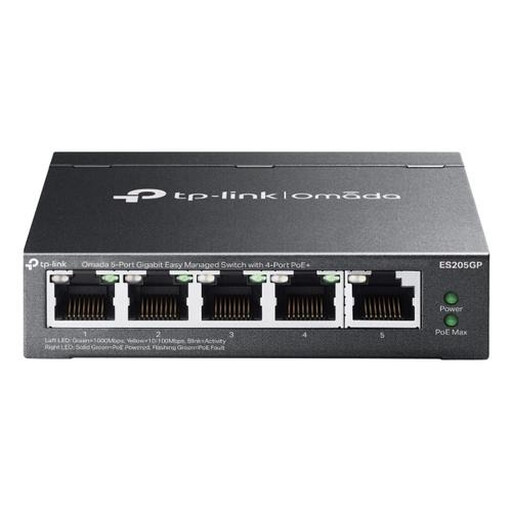 No image available
TP-Link Omada ES205G managed Gigabit PoE switch
An option if you want to combine PoE with management features such as VLANs for a network you configure yourself.
The product information lists four PoE+ ports, up to 30 W per port and 65 W in total, as well as VLAN and QoS features. Wall mounting and a power supply are also listed.
View at Joybuy
Frequently asked questions about switches for a garden office
Can I connect a PoE+ access point to a standard gigabit switch?
The switch can transmit data, but a model without a PoE output won’t power the access point through the network cable. The TP-Link TL-SG105 has no specified PoE output; the TP-Link EAP610 V1 can also be powered using DC, as well as 802.3at. Check the power options for your exact access point model.
How do I connect the switch in my garden office?
Reserve a port for the connection to your existing network, then count the ports needed for the access point and any other devices. Check how the switch itself is powered and whether the access point uses PoE or its own power supply. The Netherlands specifications for the TP-Link TL-SG1005P list a maximum of 100 m for 1000BASE-T using the cable types specified; assess the full route and the conditions on site.
Do I need a managed switch for a guest network?
Only if you want to configure VLANs and the rest of your network supports that configuration. Check that your router and access point support your preferred network setup, and find out what management features the exact switch model offers.
Is a switch with a PoE input automatically suitable for powering an access point?
No. The output power may depend on the PoE standard and power supply at the input. For the complete power supply chain, compare the available output budget with the requirements of your access point and any other connected devices.


