
Console and PC users with one network cable
If you want to connect several devices by wire at your desk using one existing connection, a switch lets you share the ports. TP-Link Netherlands and D-Link describe their simple models as plug-and-play.


If you have one network cable by your desk and want to connect several devices, an unmanaged five-port gigabit switch is a simple option: one port connects to the network, leaving four for devices, according to specifications from TP-Link Netherlands, NETGEAR and D-Link. If you only need the connection for your console, you can connect it directly. For a Nintendo Switch, a wired internet connection depends on the dock having a LAN port or on using a compatible adapter, according to Nintendo Support. Choose extra ports, management features, PoE or 2.5 gigabit only if you have a specific networking need for them.
If you want to connect several devices by wire at your desk using one existing connection, a switch lets you share the ports. TP-Link Netherlands and D-Link describe their simple models as plug-and-play.
If your workspace is small, the switch’s dimensions, room for plugs and power supply, and where you place the unit all matter. TP-Link Netherlands, NETGEAR and Ubiquiti publish model information that you can use to compare these details.
Extra ports, VLAN management or PoE power may be useful if you actually need them. TP-Link Netherlands and Ubiquiti describe these features for specific models; they are not necessarily needed for a console alone.
If you only need your console online, first check whether a direct cable connection will do. If you want to connect a console and other wired devices, the number of usable ports is the first thing to consider; specialist features only matter if you know you need them.
| What to consider | What to look for | Who is this important for? |
|---|---|---|
| Enough Ethernet ports | Count the connection to your existing network, as well as your console, PC and other devices. With five ports, one is used for the uplink to the network, leaving four for devices; this follows the port layout of models from TP-Link Netherlands and D-Link, among others. | If I want to connect several devices at once through one connection, I need enough spare ports. Around 36% of consumers give extra connections the highest priority. |
| Space, cables and noise | Compare the dimensions of the exact model and leave enough room for plugs and the power supply. Also check whether a fanless design matters for your workspace. | On a cramped desk, I want to fit the switch and cables without losing valuable workspace; quiet operation may matter too. Around 29% of consumers focus mainly on space, cable placement and noise. |
| Speed and console connection | Check the speed of the switch ports, uplink and other network equipment. Nintendo Support says that a Nintendo Switch dock without a LAN port needs a compatible LAN adapter for a wired internet connection. | If I’m looking for a wired connection for my console, I first want to know which port my console or dock has and what speed the rest of my network supports. Around 21% of consumers prioritise the connection and a suitable speed. |
| Management and power | Consider whether you need VLAN or other management features. For PoE, check whether the port receives or supplies power, and which power supply is included with the exact model; TP-Link Netherlands and Ubiquiti describe different features for different models. | If I have a configured home network, management features or a suitable alternative power source may be useful. Without a plan for them, I don’t want to configure extra features. Around 14% of consumers prioritise management or power. |
The connection to your router or existing network also uses a port. That leaves four ports for devices on a five-port model.
Count the uplink first, then all the devices that need to be connected by cable at the same time.
An extra Ethernet port on the switch does not change the physical connection on your console or dock. Nintendo Support says that a Nintendo Switch dock without a LAN port needs a compatible LAN adapter.
Check the exact console and dock model before choosing cables or an adapter.
If your dock has no LAN port, you’ll need a compatible adapter.
Ubiquiti says the USW-Flex-Mini itself can be powered through a compatible PoE connection. This does not mean the switch supplies power to your console over Ethernet.
Check whether each port receives or supplies power, and find out which power supply is included with the version on sale.
A manufacturer’s warranty has its own terms and conditions. The Dutch government explains that there is no fixed statutory warranty period for all products in the Netherlands, and that the retailer is your point of contact for statutory claims relating to a product being fit for purpose.
Keep your proof of purchase and check the retailer’s and manufacturer’s terms separately.
The TL-SG105 and TL-SG108 are unmanaged options with five and eight gigabit ports respectively. The TL-SG105E is a separate model for anyone who needs management features, according to TP-Link Netherlands.
NETGEAR describes the GS105 as a compact, unmanaged switch with five gigabit ports, a fanless design, and options for desktop or wall mounting.
D-Link presents the DGS-105 as an unmanaged five-port gigabit switch for straightforward network expansion.
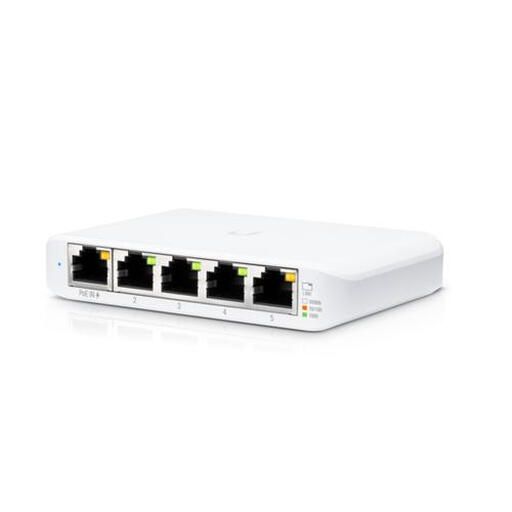
The USW-Flex-Mini is a compact five-port gigabit switch with management features. Ubiquiti says it can be powered through a compatible PoE input or USB-C.
These Joybuy products suit different needs for a wired desk setup, from a straightforward five-port connection to models with PoE or network management. Check that the features and connections on each model are right for your equipment.
 No image available
Suitable for connecting several wired devices through one existing network connection, without setting up management features.
TP-Link Netherlands lists five 10/100/1000 Mbps RJ45 ports and a fanless design for the TL-SG105. Check that there’s enough room on your desk for the plugs and power supply.
 No image available
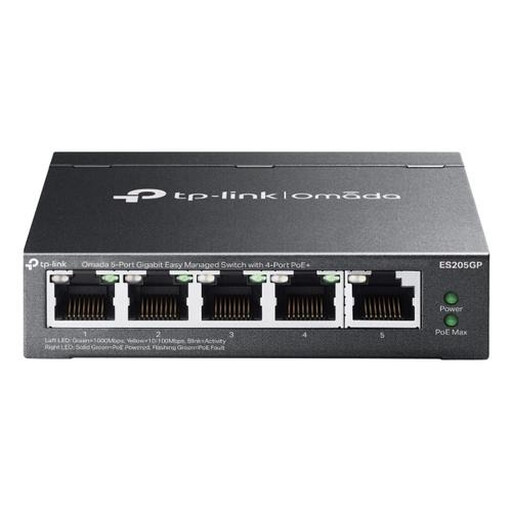
A good fit for a setup with several wired devices if PoE for connected equipment is part of your plan.
The product name lists five gigabit ports and four PoE ports. Check which ports supply power on the exact version, and whether your connected equipment is compatible.
 No image available
Worth considering if the devices and network connection in your setup support the speed stated in the product name.
The product name lists an unmanaged switch with five ports and 2.5 GB. Check the speed rating and connections on the exact version before comparing it with other models.
 No image available
A good fit for a desk setup where you need network management or PoE as well as wired connections.
The product name lists a managed gigabit Ethernet switch with PoE. Check which management options, ports and PoE features are included with this exact version.
 No image available
Suitable for a compact wired setup if you use the management features or want to connect the switch to a compatible power source.
Ubiquiti lists five gigabit ports and power via USB-C or a compatible PoE input. The PoE input powers the switch itself; it does not mean the switch supplies power to a console over Ethernet. Check which power supply is included with the product bundle on sale.
If you only need one existing network connection by your desk for your console, you can connect it directly. First check whether your console or dock has a LAN port; according to Nintendo Support, some Nintendo Switch docks need a compatible LAN adapter.
Connect one port to your existing network, plug your console and other devices into the free ports, and use the required power supply. With a five-port model, one uplink leaves room for four devices. For wired internet on a Nintendo Switch, check whether the dock has a LAN port or needs a compatible adapter.
Not just because you’re connecting a games console. A higher port speed only matters if your connected devices and uplink support it; TP-Link Netherlands describes 2.5-gigabit use for compatible equipment. PoE is relevant if you have a compatible power source or device. Check whether the port receives or supplies power.
For distance purchases from a business, you usually have a 14-day cooling-off period, according to the Dutch government. You’re also entitled to a product that is fit for purpose, and the retailer is your point of contact for statutory claims; there is no fixed statutory warranty period for all products. A manufacturer’s warranty is in addition to your statutory rights and may have its own terms.
Electrical and electronic equipment placed on the market in the Netherlands must meet the applicable European safety and electromagnetic compatibility requirements. According to Ondernemersplein, the Dutch government’s business information service, after assessment the manufacturer must affix a CE mark to the device and draw up an EU declaration of conformity. Check the exact model and power supply; information about one model does not prove that another version is compliant.