What should you look for when choosing?
First check whether there’s already a working connection between your router and garden office. Then work out how many ports you need and whether you require any additional features.
| What to consider |
What should you check? |
Who is this important for? |
| Working console connection |
Check that the network socket in your garden office is actually connected to the router. Then see whether your devices support gigabit Ethernet; a gigabit port doesn’t mean you’ve measured your internet speed. |
I want to use my gaming console over a wired connection and first check that the garden office can reach the router. Around 36% of consumers prioritise having a working console connection. |
| Enough ports |
Count the connection to the router, the gaming console and all your other wired devices. TP-Link Netherlands lists models with five and eight gigabit ports; if one port is used to connect to the router, there’s one fewer available for devices. |
If I want to connect work equipment as well as my gaming console, every connection counts. Around 29% of consumers give the number of ports top priority. |
| Connection between buildings |
Check whether there’s already a usable connection. If you’re installing a new one, assess the outdoor route and the cable protection or equipment required. The Land Registry says a KLIC notification is compulsory for mechanical excavation. |
I first need to get a network connection to the garden office before a switch can connect anything there. Around 21% of consumers prioritise the connection between the buildings. |
| PoE or network management |
For PoE, check the device’s standard and power requirements, as well as the switch’s limits. TP-Link lists PoE+ for specific models; VLAN or diagnostic features are only relevant if you intend to use them. |
If I want to power a compatible access point or camera over Ethernet, or manage the network, these features are relevant. Around 14% of consumers give PoE or management features top priority. |
Joybuy products
These products are designed to expand an existing wired network in your garden office, with options for different numbers of ports and additional features.
 No image available
TP-Link 8-Port Gigabit Easy Smart Switch with 4-Port PoE
A good fit if you want to connect several wired devices as well as your gaming console, and need PoE for compatible equipment.
The product name lists eight gigabit ports and four PoE ports. Check that the PoE standard and power output are suitable for the device you’re connecting.
View at Joybuy
 No image available
TP-Link TL-SG1008P Gigabit Ethernet switch with PoE
An option for expanding an existing wired network if you also want to connect compatible PoE devices.
The product name lists an unmanaged Gigabit Ethernet switch with PoE. Before buying, check the PoE standard and the power available for your devices.
View at Joybuy
 No image available
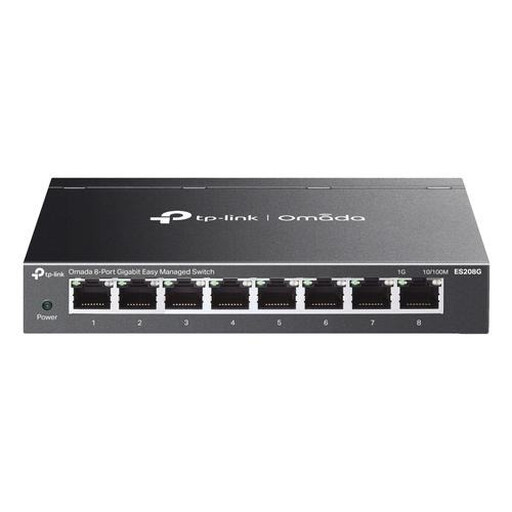
TP-Link Omada ES208G Managed L2 Gigabit Ethernet Switch
A good fit if you’re specifically looking for a managed gigabit switch for your garden office network, rather than just a basic connection for your gaming console.
The product name lists Managed L2 and Gigabit Ethernet. Check that the port configuration and any extra features suit your equipment.
View at Joybuy
 No image available
TP-Link TL-SG105 5-Port Metal Gigabit Switch
A good fit for a simple expansion of an existing wired network for your gaming console and a few other devices.
The product name lists five gigabit ports. The connection to the router uses one port, leaving up to four for other devices.
View at Joybuy
 No image available
TP-Link 5-Port Gigabit Desktop PoE Switch with 4-Port
A compact option for an existing network if you want to connect compatible PoE equipment as well as standard wired devices.
The product name lists five gigabit ports and four PoE ports. Check that the PoE standard and power output are suitable for the device you’re connecting.
View at Joybuy
Frequently asked questions
Can I connect my gaming console to a switch if there isn’t a network cable to the garden office yet?
No, not if you want internet access through the switch alone. First connect the switch to the router over a working network connection, then connect your gaming console using a LAN cable. PlayStation describes both wireless and wired connection settings for PS5 and PS4.
Do I need to buy a PoE switch for my gaming console?
Not just for the wired connection described here. PoE is a separate feature for compatible devices, such as certain access points or cameras. If you want to connect one, check its PoE standard and power requirements.
How do I connect the devices, and what should I check if it doesn’t work?
Connect the working connection from the router and your gaming console to the switch’s Ethernet ports, and use the supplied power adapter as directed. Check the link indicators, then test the internet connection in your console’s settings. A lit indicator on its own doesn’t prove that the internet is working.
Do I need to submit a KLIC notification when installing a connection to the garden office?
In the Netherlands, you must submit a KLIC digging notification in advance if you’re using or hiring a mechanical digger. According to the Land Registry, the legal notification requirement doesn’t apply when digging with a spade, but you could still damage cables and pipes.
What are my rights in the Netherlands if the product is faulty?
As well as any manufacturer’s or seller’s warranty, you have a statutory guarantee when you buy as a consumer. ACM ConsuWijzer says the seller is responsible for providing an appropriate free solution if a product proves faulty under normal use; there isn’t one fixed warranty period for every switch.


