If your existing network connection allows multiple devices, a compact, unmanaged gigabit switch is usually the easiest way to connect a games console and other devices by cable. Count the connection to your existing network as a port in use, and choose extra ports, VLAN management or 2.5 Gbit/s only if your setup needs those features. Also check that your console has a suitable LAN port, dock or adapter: a switch cannot replace one.
Who is this choice relevant to?
Gamer with one shared network connection
You want to know whether your console can connect to the network by cable alongside existing devices. The available connection and the way your console supports LAN will help determine what you need. PlayStation explains how to connect the PS5 by cable, while Nintendo recommends a LAN dock or USB LAN adapter for certain Switch setups.
Studio with several wired devices
You share the space with devices that each need a network cable, and want to work out in advance how many free switch ports you’ll need. With the usual connection to the existing network, that connection also uses a port.
Shared network administrator
You’re allowed to adjust the network setup and are considering configurable features such as VLANs. The rest of the network must also support the intended configuration; changing a switch setting alone won’t create a working network separation.
What should you look for when buying?
First, check whether the existing connection supports multiple devices and whether your console can connect by cable. Then count the ports you’ll need, and only after that decide whether network management or a higher port speed is relevant to your setup.
| What to consider |
What should you check? |
Who is this important for? |
| Existing connection |
Check with the network administrator whether multiple devices are allowed and whether the connection is working. Also check whether your console needs a LAN port, dock or adapter. |
If you first want to find out whether the console can use the shared network, check the connection and any console accessories in advance. Consumers with this priority account for around 36% of consumers with this purchase question. |
| Number of ports |
Count the connections needed for all your devices and allow one port for the connection to the existing network. According to TP-Link Netherlands, the TP-Link TL-SG105 has five gigabit ports, while the TL-SG108 has eight. |
If several people want to connect devices, it’s best to work out how many cables you’ll need at once rather than choosing ports you won’t use. Consumers who focus mainly on the number of connections account for around 29% of consumers with this purchase question. |
| Network management |
Check whether you’re allowed to configure network features and whether the rest of the network supports them. Zyxel lists a web interface and 802.1Q VLAN for the GS1200-5; these features don’t automatically mean that network traffic is already separated. |
If you need VLANs or other configurable features, you’ll also need permission to adapt the shared network accordingly. Consumers with a specific management requirement account for around 21% of consumers with this purchase question. |
| Space and placement |
Check the dimensions, whether the switch is described as fanless, and whether there’s room for the cables and power adapter. TP-Link lists the TL-SG105 as fanless and gives its dimensions as 100 × 98 × 25 mm. |
If the switch needs to sit in a small shared space, check in advance where the device and power adapter will fit. Consumers who focus mainly on a compact, fanless setup account for around 14% of consumers with this purchase question. |
Common buying mistakes
-
Assuming five ports means five free device connections
In this setup, the cable to the existing network also uses a port, leaving fewer connections available for your devices.
List all the devices that need a wired connection at the same time, then add one port for the connection to the existing network.
-
Buying a switch without checking the shared connection
A switch adds connections to an existing network connection, but it doesn’t determine whether the shared network allows or supports multiple devices.
Test the connection and ask the network administrator about the terms of use before choosing a switch.
-
Confusing port speed with internet or console speed
A port specification describes the switch port; it doesn’t automatically tell you the speed of connected devices or the internet connection.
Check the port speed of your console, other devices and the connection to the existing network separately.
-
Forgetting the LAN dock or adapter you need
For a Nintendo Switch dock without a LAN port, Nintendo recommends a USB LAN adapter for a wired connection.
Check the exact console system and dock you’re using, and find out whether you need a compatible adapter.
Brands to consider
TP-Link
The models listed differ in the number of ports and their management features.
- TP-Link Netherlands lists five gigabit ports for the TL-SG105, eight for the TL-SG108, and web management for the TL-SG105E.
- The manufacturer describes the TL-SG105 and TL-SG108 as plug-and-play, and lists VLAN settings for the TL-SG105E. Check that the management features suit your shared network setup.
NETGEAR
The GS305v3 is an unmanaged switch for a simple wired network expansion.
- NETGEAR lists five 10/100/1000-Mbit/s ports for the GS305v3.
- NETGEAR doesn’t list a PoE budget for this model. The GS305v3 is also a different model from the GS105.
D-Link
The DGS-105 is designed to provide extra wired connections without network management.
- D-Link lists five gigabit ports and plug-and-play functionality for revision E1.
- A reference to online gaming in product information isn’t, in itself, a measurement of gaming latency.
Zyxel
The GS1200-5 is a web-managed five-port gigabit switch for situations where network configuration is needed.
- Zyxel lists a web interface and 802.1Q VLAN for the GS1200-5.
- Whether you can use these features also depends on your permissions and how the wider network is set up.
Linksys
The LN2308 is an unmanaged switch with several 2.5-gigabit ports.
- Linksys lists eight 2.5-Gbit/s ports for the LN2308.
- That port specification alone doesn’t mean a specific console or shared internet connection will be faster.
Joybuy products for wired connections
This selection includes unmanaged five- and eight-port gigabit switches, models with PoE features and a 2.5-gigabit switch. Check how many ports you need for your setup and whether your connected devices support the listed features.
 No image available
TP-Link TL-SG105 5-Port Metal Gigabit Switch
An unmanaged five-port switch for connecting a console and other devices by cable, provided your existing network connection is suitable.
Five gigabit ports; plug-and-play; metal casing; suitable for desktop or wall mounting, according to the product description. The connection to the existing network also uses a port.
View at Joybuy
 No image available
TP-Link 5-Port Gigabit Desktop PoE Switch with 4-Port
This unmanaged switch could be a good fit if you need five gigabit connections and also want to connect compatible PoE devices.
Five gigabit ports, four of which support PoE according to the product description; metal casing and fanless design. The network connection to the existing network uses one port.
View at Joybuy
 No image available
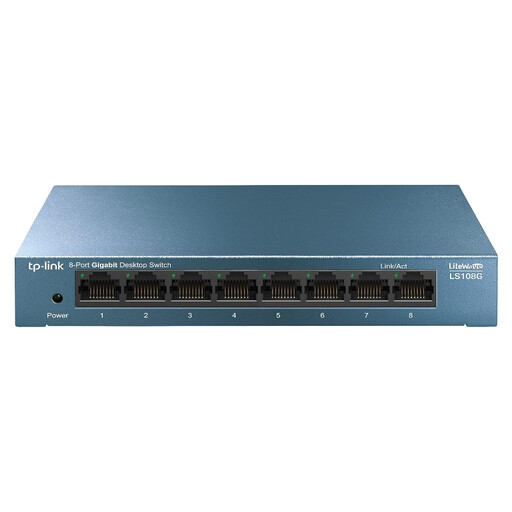
TP-Link LiteWave LS108G
An unmanaged option for a studio where you need to connect more wired devices or want extra ports to spare.
Eight RJ45 gigabit ports and plug-and-play functionality, according to the product description. Once connected to the existing network, seven ports remain available for devices.
View at Joybuy
 No image available
TP-Link 8-Port Gigabit Easy Smart Switch with 4-Port PoE
This could be a good option if you need eight gigabit connections and management or PoE features are useful for your setup.
Eight gigabit ports and four PoE ports, according to the product name. Check whether you actually need the listed PoE features and management options.
View at Joybuy
 No image available
Linksys 5-Port 2.5 GB Unmanaged PoE+ Switch
An unmanaged 2.5-gigabit switch to consider if your connected equipment and network connection support that capacity.
Five 2.5-Gbit/s Ethernet ports and four PoE+ ports, according to the product description; plug-and-play and a fanless metal casing. The port speed doesn’t guarantee that your console or internet connection will be faster.
View at Joybuy
Frequently asked questions
How do I connect a switch and my console?
Connect one port on the switch to a suitable connection on the existing network, then connect the console to another port. If needed, set up a wired connection on the console. PlayStation explains how to connect the PS5 via LAN; for a Nintendo Switch, check which dock or adapter suits your setup.
Does every Nintendo Switch setup automatically have a LAN connection?
No, it depends on the system and dock you’re using. Nintendo lists a LAN port in the dock for the Switch OLED model and recommends a USB LAN adapter for a dock without a LAN port. Check your exact setup before choosing accessories.
Do I need a managed switch or PoE for online gaming?
Not just to connect a console by cable. An unmanaged gigabit switch adds ports without requiring you to configure network features; web management is useful if you have a specific management requirement. PoE is for compatible devices that need power via Ethernet, and isn’t required for the simple console connection described here.
What should I expect from cooling-off periods and warranties when buying online in the Netherlands?
According to the Dutch government, online purchases from a business often come with a 14-day cooling-off period; check the terms for your specific purchase. If a product is faulty, the seller is your point of contact under the statutory guarantee. The Netherlands doesn’t have a fixed statutory guarantee period.


