Who is this suitable for?

Parents who manage the music

They want to choose children's music and stop different users from accidentally changing the playlist or volume. Spotify describes a setting for tracks marked Explicit for each member; Sonos separately describes an adjustable volume limit.

People with existing speakers

They want to add network streaming to an existing sound system. The available inputs and, for passive speakers, whether you have an amplifier determine whether a standalone streamer is suitable. WiiM documents analogue and optical outputs for the Mini.

People managing multiple rooms

They may also want to play music in other rooms. Check which models and streaming methods work together within your chosen system; Denon, WiiM and Yamaha each describe options for their own supported set-ups.

What should you consider when choosing?

Standalone network streamer

Choose this option: if you already have active speakers, a suitable amplifier or an AV receiver.

Bear in mind: passive speakers also need an amplifier; check that the streamer's outputs are compatible with your system.

All-in-one Wi-Fi speaker

Choose this option: if you don't yet have a suitable sound system and want to play music in one room.

Bear in mind: features such as volume limits and controls on the speaker vary by model. The Sonos Era 100 must first be set up over Wi-Fi, even if you use Bluetooth afterwards.

Multi-room system

Choose this option: if you want to play music in other rooms later on.

Bear in mind: don't assume that all brands work together. Yamaha states that streaming service availability may vary and change by region.

What to consider What should you look for? Who is this important for?
Suitable music and volume Check the content settings in the service you use, and separately check whether the device has a volume limit. I want the children's music and volume to be suitable for a shared space. Around 31% of consumers prioritise this need.
Control by multiple adults Check whether you can select your preferred source using a button, who manages the app and what network connection is required. If not everyone uses the same phone, I want adults to be able to start or adjust the music easily. Around 31% of consumers prioritise simple shared controls.
Using your existing system Check that there is a suitable analogue or optical input and that passive speakers are connected to an amplifier. I want to keep using my existing speakers if they're compatible with a standalone streamer. Around 23% of consumers prioritise reusing their sound system.
Adding other rooms Check which exact models and streaming methods work together. If I want to add other rooms later, I want to know in advance which devices I'll need. Around 15% of consumers put expanding to multiple rooms first.

Common buying mistakes

  • Mistaking a standalone network streamer for a complete speaker

    A standalone streamer sends audio to external sound equipment and cannot power passive speakers on its own.

    Before buying, check which speakers and inputs you already have. If your system has passive speakers, also check that you have an amplifier.

  • Assuming an explicit music setting also limits the volume

    A music service's content settings and a speaker's volume control do different things. Spotify Premium Family describes an option to filter tracks marked Explicit for each member; Sonos describes a volume limit for a Sonos product.

    Check both settings separately for the account and device you plan to use.

  • Assuming a personal subscription allows use in an organisation

    BumaStemra states that a licence is required to play music in a nursery. Spotify describes its standard service as being for personal, non-commercial use.

    Establish whether the space is used privately or by an organisation. If it's for an organisation, check both the music licensing rules and the terms of your chosen service.

  • Assuming multi-room works across all brands

    Manufacturers describe grouping specific devices and streaming methods; a stated multi-room feature doesn't guarantee that all brands work together.

    Check the exact models and your preferred streaming method before choosing devices for additional rooms.

Brands to consider

WiiM

The WiiM Mini is a standalone network streamer for people who already have suitable sound equipment. According to WiiM, this model supports Spotify Connect and AirPlay 2, among other features.

  • WiiM documents analogue and optical outputs.
  • The Mini needs external sound equipment; passive speakers also require an amplifier.

Sonos

The Era 100 is an all-in-one Wi-Fi speaker for people who don't yet have a separate sound system in their shared space.

  • Sonos documents controls on the speaker and a volume limit that can be set in the app.
  • The Era 100 must first be set up over Wi-Fi, even if you use Bluetooth afterwards. According to Sonos, you'll need an adapter for a wired line-in connection.

Denon

The Denon Home 150 is an all-in-one speaker in Denon's HEOS system. Its on-device controls may be useful when several adults need to start playing music.

  • The manual documents three customisable Quick Select buttons.
  • Check whether your chosen service and settings work with the buttons; this doesn't mean every playlist can be controlled universally with a single press.

Yamaha

Yamaha describes the MusicCast 20 as a speaker that can be used on its own or with compatible MusicCast devices.

  • Yamaha lists Wi-Fi, Bluetooth and MusicCast.
  • Yamaha says streaming service availability may vary and change by region; check that your chosen service is supported by the exact model.

Joybuy products

Joybuy product picks for wireless music playback and app control.
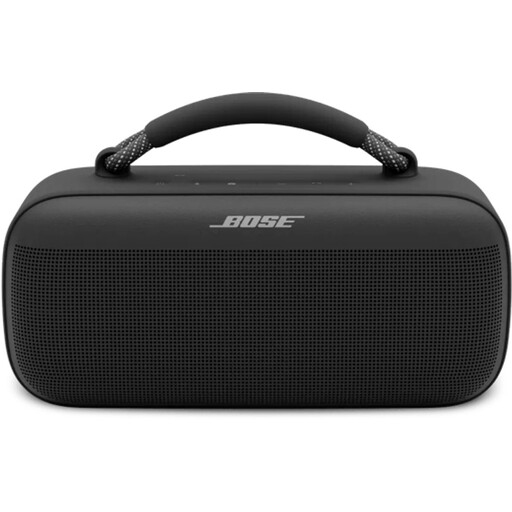
Bose SoundLink Max Bluetooth speaker in Black

Bose SoundLink Max Bluetooth speaker, Black

Worth considering if you're looking for a Bluetooth speaker that you can control using a mobile app.

The product information lists Spotify Connect and AirPlay; check that the service and connection you want suit your needs.

View at Joybuy

Edifier ES300 Wi-Fi and Bluetooth speaker, 60W

Edifier ES300 Wi-Fi and Bluetooth speaker, 60 W

Worth considering if you're looking for network playback and app control.

The product name lists Wi-Fi, Bluetooth and 60 W. The product information mentions AirPlay 2 and grouping; check that they work with your chosen devices and set-up.

View at Joybuy

Frequently asked questions

Which connection should you check if you already have speakers?

Check whether your active speaker, amplifier or AV receiver has a suitable analogue or optical input. The WiiM Mini has both types of output; passive speakers also need an amplifier.

Can the Sonos Era 100 play over Bluetooth straight away without Wi-Fi set-up?

No. According to Sonos, the Era 100 must first be set up on a Wi-Fi network; you can then use Bluetooth.

How can you filter out unwanted tracks and prevent the volume getting too high?

These are separate settings. Spotify Premium Family lets each member choose whether to play tracks marked Explicit; the Sonos app can limit the maximum volume of a Sonos product. Check which accounts and devices you're using.

Can you play children's music in any shared space using a personal streaming account?

It depends on how and where the music is used. Rules for public or commercial use don't necessarily apply to a private living room. BumaStemra states that a licence is required to play music in a nursery; Spotify describes its standard service as being for personal, non-commercial use only. If an organisation is using the service, check both the music licensing rules and the terms of your chosen service.

What if a network streamer or Wi-Fi speaker doesn't work properly?

For a consumer purchase in the Netherlands, the seller must resolve problems with a faulty product. The Dutch government states that there is no fixed statutory warranty period in the Netherlands; what you can reasonably expect from a product depends, among other things, on the product and the information provided at the point of sale.
