
Vandaag of morgen in huis

Kwaliteit gegarandeerd

Welkomstaanbiedingen ontgrendelen: GRATIS bezorging | Tot 80% korting | Gratis 30 dagen JoyPlus-proefperiode
Download de app
A Neomounts monitor arm can free up space, position your screens more effectively and keep cables out of sight. However, not every monitor mount is suitable for every desk or monitor. The wrong choice can result in a wobbly setup, an arm that gradually sinks or a mounting solution that does not fit.
So do not just look at the brand or an attractive product photo. Pay particular attention to the technical specifications, mounting method and weight of your screen.
A monitor arm for 32 inches is not automatically suitable for every 32-inch monitor. The weight of the screen and the position of its centre of gravity are just as important. For example, an ultrawide monitor may be wider and heavier than a standard model with the same diagonal screen size.
Always check:
Most models in this selection use VESA 75 × 75 mm or 100 × 100 mm. These are the distances between the mounting holes on the back of your monitor. If your monitor has a different hole pattern, an adapter plate may be required.
A monitor stand without a suitable VESA connection cannot be used, even if the size and weight match.
A monitor arm with a clamp is practical for a desk with a sturdy edge. A model with through-desk mounting, also known as a grommet mount, uses an existing hole in the desktop. A top-fix clamp can be useful if you want to install the mount from above.
Pay attention to your desk’s construction. Glass, a thin chipboard desktop or an unstable surface may be unsuitable for a heavy monitor arm. Also check that there is enough room for the clamp and that the arm can move without hitting a wall or partition.
Load capacity is usually specified per monitor. For example, a model rated at 6 kg per screen is suitable for a monitor that is comfortably below that limit. Remember to take any VESA adapters and accessories into account.
Models with load capacities of 8, 9, 10 or even 18 kg are available for heavier screens. With a curved ultrawide monitor, it is wise to pay extra attention to compatibility and balance.
An adjustable monitor arm can be adjusted manually or using a spring system. A gas-spring monitor arm is particularly useful if you regularly change the height and viewing distance. Check the stated range, such as a height adjustment of 21.5 to 49.5 cm.
The movement angles also vary by model:
A wide range of movement is not always necessary. For a fixed home office, a simpler model may be sufficient.
A monitor arm with cable management routes cables along the arm or through clips. This keeps the desk tidier, but check that the cables are long enough for the full range of movement.
For a compact workspace, the distance from the wall is also important. Short arms or a 180° stop mechanism can help limit collisions with a wall or partition.
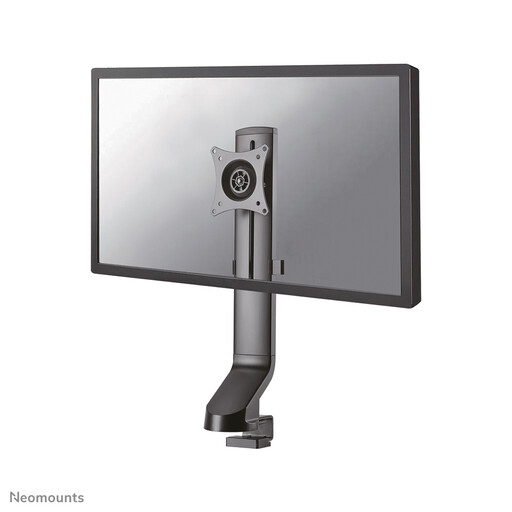
Why it suits this profile: This black monitor arm supports one screen from 10 to 32 inches and has a load capacity of 8 kg. The manual height adjustment is suitable for a straightforward home office.
The specifications clearly state the maximum screen size, load capacity and VESA 75 × 75 and 100 × 100 mm compatibility. This lets you check in advance whether your monitor will fit.
Supports screens up to 32 inches and 8 kg, with tilt, rotation and swivel functions.

Why it suits this profile: This model is designed for one flat or curved screen from 17 to 35 inches. The gas spring makes frequent height and depth adjustments easier.
The load capacity of up to 9 kg and suitability for curved screens help prevent you from choosing an arm that is too light for a large monitor.
Gas spring adjustment from 21.5 to 49.5 cm, depth adjustment up to 52.5 cm, cable management and a 180° stop.
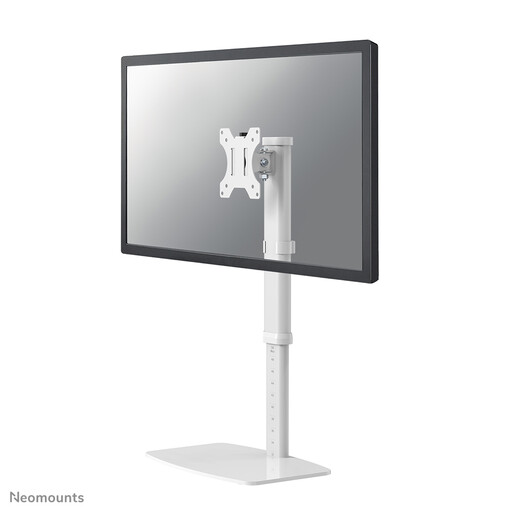
Why it suits this profile: This dual or triple monitor arm is designed for three screens from 10 to 27 inches. It is ideal for multitaskers, traders, designers and office setups with multiple windows.
The model specifies the number of screens, the maximum weight of 6 kg per screen and the VESA dimensions. This makes it clear in advance whether your complete setup will remain within the limits.
Suitable for three monitors, full-motion adjustment, cable management and clamp or grommet mounting.
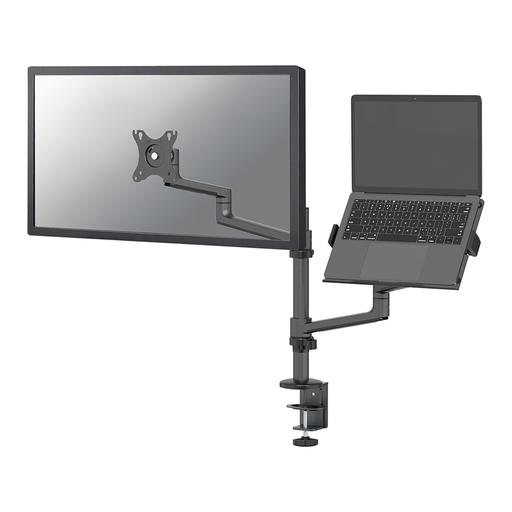
Why it suits this profile: Combining a monitor arm with a laptop stand is practical for home workers who switch between using a laptop and an external screen.
There is no need to combine a separate laptop stand with a monitor arm. The specifications state separate load capacities of 8 kg for the screen and 5 kg for the laptop.
Supports a monitor up to 27 inches and a laptop up to 17.3 inches, with cable management and both clamp and grommet mounting.
We have compiled a complete, up-to-date list of products that fully meet these strict selection criteria and the applicable European safety regulations.
Do not use a monitor arm above its stated load capacity. Keep your fingers away from hinges and gas springs while making adjustments.
No. Check whether your monitor has a VESA pattern of 75 × 75 mm or 100 × 100 mm and whether its weight is within the chosen arm’s limit. A suitable adapter plate may be required for other hole patterns.
That depends on how you use it. If you frequently move the screen higher, lower, closer or further away, a gas spring offers greater convenience. For a fixed workstation, a manually adjustable monitor arm or monitor stand may be sufficient.
Its lifespan depends on the installation, load and usage. Do not exceed the load capacity and check the fixings regularly. Some Neomounts models in this selection state a five-year manufacturer’s warranty; others are covered at least by the statutory guarantee under EU consumer rules. Check the warranty terms on the product page.
