
Vandaag of morgen in huis

Kwaliteit gegarandeerd

Welkomstaanbiedingen ontgrendelen: GRATIS bezorging | Tot 80% korting | Gratis 30 dagen JoyPlus-proefperiode
Download de app
A Neomounts monitor arm can free up desk space and let you position your screen exactly where you need it. However, it is not wise to focus solely on the maximum screen size or an attractive product photo. The right choice depends on your monitor’s weight, its VESA mount, the number of screens and how the arm is attached to the desk.
For home workers, office professionals, gamers, receptionists and businesses, these three pitfalls are particularly important:
Do not just look at the total load capacity. Pay particular attention to the maximum weight per monitor. With a monitor arm for 1 monitor, this is usually straightforward to check. With a dual monitor arm or monitor arm for 3 monitors, each screen must remain within the limit.
Examples from the product specifications:
With a gas spring or spring-assisted arm, always stay within the stated weight range. A screen that is too light or too heavy can prevent the arm from remaining stable.
VESA refers to the distance between the mounting holes on the back of your monitor. Measure this distance horizontally and vertically before ordering a VESA monitor arm. The models mentioned here generally support 75 × 75 mm or 100 × 100 mm.
Also pay attention to the difference between:
A maximum diagonal size of 35 inches does not automatically mean that every ultrawide monitor falls within the specifications. The weight, VESA position and balance of the screen remain decisive.
A basic monitor stand is sufficient if you usually leave the screen in one position. Choose an adjustable monitor arm if you regularly switch between sitting at your desk, collaborating with others or turning a screen towards a counter.
Check for these features:
A clamp attaches the arm to the edge of the desk. A grommet mount passes through an opening in the desktop. So check in advance which mounting method is suitable for your desk.
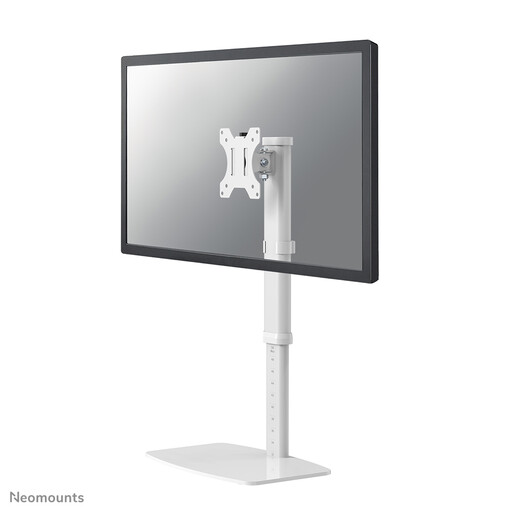
Why it suits this profile: For one screen and a desk where a compact monitor stand is preferred. This model supports screens up to 30 inches and has a stable desktop base.
The specifications clearly state a 6 kg load capacity and VESA 75 × 75 and 100 × 100 mm. This lets you check in advance whether your screen is compatible.
Manual height adjustment from 36 to 54 cm, tilting up to 80° and 360° rotation.

Why it suits this profile: For anyone who wants to position a single monitor flexibly and values a gas spring, quick-release VESA system and tidy desk setup.
The arm is suitable for both flat and curved screens up to 35 inches and supports up to 9 kg. Even so, check this against the exact weight of your monitor.
Gas spring height adjustment from 21.5 to 49.5 cm, cable management and Topfix or grommet mounting.
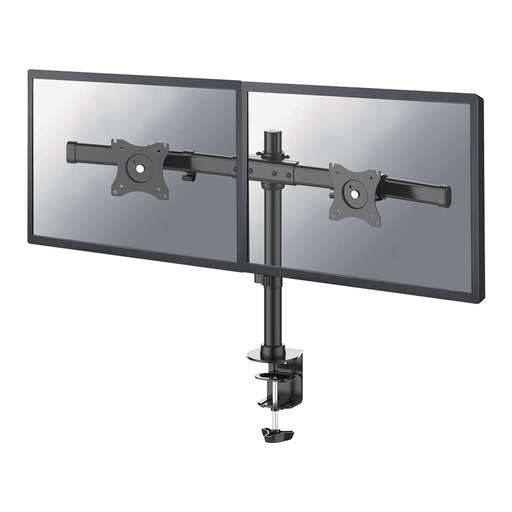
Why it suits this profile: For a workstation with two heavier screens, such as a fixed office setup, reception desk or gaming desk.
With a load capacity of 10 kg per screen, there is a clear limit for heavier models. However, the dual crossbar requires a sturdy desk.
Two screens up to 27 inches, height adjustment from 0 to 45 cm and cable routing.

Why it suits this profile: For multitasking, CCTV monitoring, financial dashboards or a wide gaming and work setup with three monitors.
The arm explicitly states that it supports three screens, up to 27 inches and 6 kg per screen. This means you can check the capacity before ordering.
Quick-release VESA, height adjustment from 14 to 40 cm, cable management and clamp or grommet mounting.
We have put together a complete, up-to-date list of products that fully meet these strict selection criteria and the applicable European safety regulations.
Before fitting the arm, check the thickness and sturdiness of the desktop. Position a clamp fully over the edge and tighten all fixings according to the instructions. With a grommet mount, the opening must be large enough, and the desktop must not be damaged or unstable.
Next, attach the VESA plate to a flat part of the monitor. Hold the screen securely while attaching it and check that all screws are suitable for the mounting holes. With a gas spring monitor arm, adjust the tension after the screen has been mounted. Route the cables along the arm with enough slack so that they do not become taut when you turn the screen.
No. At a minimum, check the screen weight, screen size and VESA pattern. The models mentioned generally support 75 × 75 mm and 100 × 100 mm. A VESA adapter plate may be required for different patterns.
That depends on the model and its weight range. According to the product specifications, the DS70-250BL1 and DS70-810BL1 support up to 9 kg. The NM-D775BLACKPLUS supports up to 18 kg and is intended for larger curved screens up to 49 inches. Always check the actual weight of the monitor, including any accessories attached to the screen.
Its lifespan depends on how it is mounted, the load and how often you adjust the arm. Regularly check the clamp, screws and VESA mount. Do not exceed the load capacity, and replace components if you notice play, damage or instability. Some Neomounts models state a 5-year manufacturer’s warranty; statutory warranty rights under the applicable consumer protection regulations also apply.
