
Vandaag of morgen in huis

Kwaliteit gegarandeerd

Welkomstaanbiedingen ontgrendelen: GRATIS bezorging | Tot 80% korting | Gratis 30 dagen JoyPlus-proefperiode
Download de app
Mounting or positioning a screen sounds simple, until you find that the VESA size is wrong, the stand cannot support the weight or cables are left trailing in view. Neomounts offers a range of TV and monitor stands, including TV stands, TV brackets, TV floor stands, monitor arms, laptop stands and tablet holders.
The right choice depends on more than screen size. The mounting method, weight, available space and level of adjustability you need all determine whether a product will work for you in practice.
A 55-inch screen won’t automatically fit every stand designed for 55-inch TVs. Check the weight and the VESA pattern on the back, too. A screen may fall within the stated size range but still not fit if its mounting points are different.
The maximum load capacity is a technical limit, not a target to make full use of. Include the weight of any accessories, such as a video bar, soundbar or camera. A video bar mount must also support the combined weight of the screen and video bar.
A swivel TV stand isn’t the same as a fully adjustable TV stand. Check the difference between swivelling, tilting, height adjustment and depth adjustment. A motorised TV bracket also needs a power connection and enough clear space to move.
VESA refers to the distance between the screw holes on the back of the screen, for example 100 × 100 mm, 200 × 200 mm or 800 × 600 mm. Measure horizontally and vertically between the centres of the holes. Also check that the supplied screws fit the screen’s threads.
A VESA bracket with a range of 100 × 100 to 200 × 200 mm will fit many smaller screens. Large commercial displays may need a range of up to 800 × 600 mm.
Always check both:
A tabletop TV stand sits on furniture and needs a flat, stable surface. A TV wall bracket or ceiling mount, on the other hand, needs a load-bearing structure and suitable fixings.
A desk mount or tabletop TV stand means you won’t need to drill. A bolt-down model is screwed to a desk, so it’s less straightforward to move. A wall or ceiling solution saves space, but requires more thought about the mounting surface and installation.
Cable management is useful in offices, schools and meeting rooms. Internal cable routing keeps cables tidy along a column or arm. With motorised systems, check that cables won’t become taut as the stand moves.
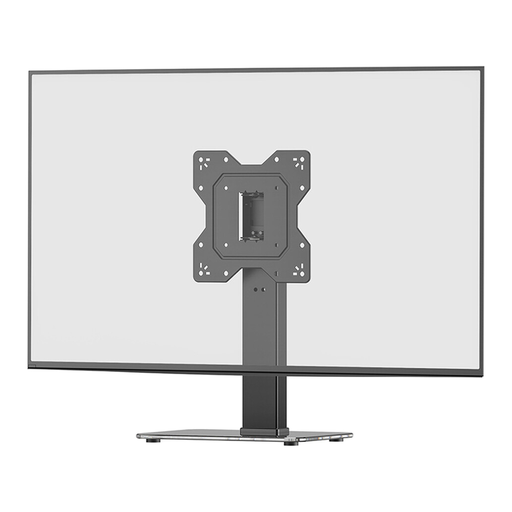
Why it suits this user: This tabletop TV stand is suitable for screens from 23 to 43 inches and is a practical choice if you don’t want to drill into the wall.
The product specifications state both the screen size range and a load capacity of 40 kg. The three height settings and swivel function are clearly specified.
Suitable for VESA 100 × 100 to 200 × 200 mm, swivels up to 70° and includes cable clips.
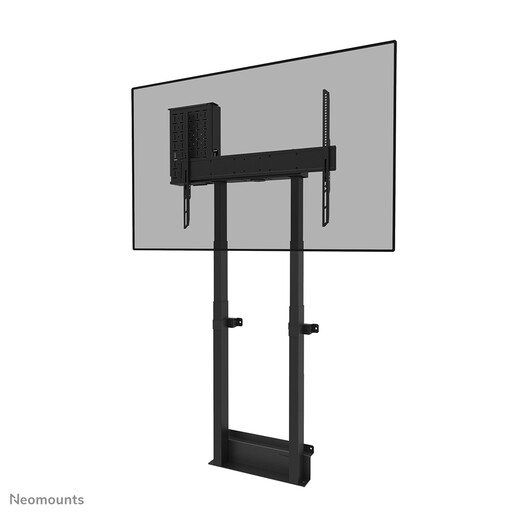
Why it suits this user: For large displays in meeting rooms, reception areas or presentation spaces, this motorised TV bracket offers features that take the place of manual adjustment.
The specifications give a clear range: 55–100 inches, up to 110 kg and VESA 100 × 100 to 800 × 600 mm. The anti-collision function doesn’t replace correct installation.
65 cm of height adjustment, a wired remote control, integrated cable management and a lockable compartment.
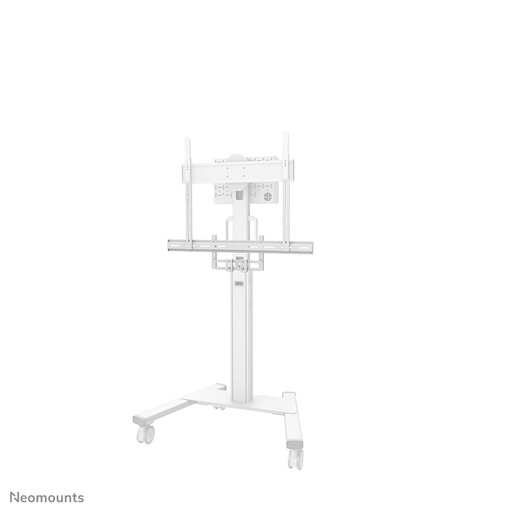
Why it suits this user: This video bar mount is designed for meeting rooms and audiovisual installations with screens from 43 to 110 inches.
The mount supports up to 10 kg and has an adjustable VESA range of 200 × 200 to 800 × 600 mm. Check the video bar’s weight and mounting points beforehand.
Can be positioned above or below the screen, with an adjustable frame and compatibility with many video bars, PTZ cameras and soundbars.
For working from home, a monitor arm or laptop stand can free up desk space. The Neomounts DS20-425BL1 is suitable for laptops up to 17.3 inches and 5 kg. The arm can be adjusted manually for height and depth, and features an internal cable management system.
A tablet holder is handy for video calls, reception areas or displaying instructions. The DS15-545BL1 supports tablets from 4.7 to 12.9 inches and up to 1 kg. The holder can rotate 360°, tilt 270° and swivel 104°.
For ceiling mounting, the Neomounts CL35-340BL12 is an option for screens from 23 to 42 inches and up to 50 kg. The height can be adjusted from 106 to 156 cm. If you have a sloped ceiling, adjust the mount to suit. Always check that the ceiling structure can support the combined weight.
A laptop stand for a trolley, such as the PLASMA-M2SIDESHELF, supports up to 3 kg and has a steel platform measuring 29,5 × 41,5 cm. This accessory is designed for specific Neomounts trolleys and is not a universal freestanding TV stand.
We’ve put together a complete, up-to-date list of products that meet these strict selection criteria and current European safety regulations.
No. Check the screen size, weight and VESA pattern. A stand for 23–43 inches won’t automatically suit a larger screen, even if the VESA pattern matches.
It can be. A floor stand avoids drilling and may be easy to move. A TV wall bracket usually saves floor space, but needs a suitable load-bearing wall and correct installation. With large screens, you’ll need to check the mounting surface.
Check the screws, VESA fixings, swivel points and cables periodically. Keep the movement area clear around a motorised TV bracket. Never exceed the stated load capacity, and follow the manufacturer’s installation instructions.
