
Vandaag of morgen in huis

Kwaliteit gegarandeerd

Welkomstaanbiedingen ontgrendelen: GRATIS bezorging | Tot 80% korting | Gratis 30 dagen JoyPlus-proefperiode
Download de app
A monitor arm, TV mount or projector ceiling mount can make your workspace or living room more organised. However, things often go wrong when buying one. A mount that is advertised as suitable for your screen may, in practice, have insufficient load capacity, too little freedom of movement or an unsuitable mounting option.
As a Joybuy Product Recommendation Officer, I filter product specifications down to useful buying information. Below, you’ll find what to look for when choosing Neomounts monitor and TV mounts, which common pitfalls are often overlooked and which type is right for your needs.
A 27-inch screen is not automatically suitable for every desk monitor arm. Weight and the VESA mounting pattern are just as important. For example, a heavy ultrawide monitor may fall within the stated size range but exceed the load capacity of a compact arm.
Always check:
A full-motion monitor arm can often tilt, rotate and swivel. That does not mean you can safely use the screen in every position. The edge of the desk, wall, cables and adjacent screens can all restrict its range of movement.
A 180° stop, for example, is useful when a monitor arm for 2 or 3 screens is positioned close to a wall. This mechanism limits rotation towards the wall, but it is not a substitute for secure mounting.
A desk clamp, grommet mount, wall mount or projector ceiling mount each requires a different type of supporting surface. A thin desk, glass worktop or hollow wall may be unsuitable. Use fixings that are appropriate for the wall or ceiling, and follow the installation instructions.
With a TV wall mount, you must also take pipes and electrical cables into account before drilling.
VESA indicates the distance between the mounting holes, such as 75 × 75 mm, 100 × 100 mm or 400 × 400 mm. Measure the horizontal and vertical distance between the holes on the back of your screen.
For smaller monitors, 75 × 75 and 100 × 100 mm are common. Larger televisions often use wider patterns. For example, the Neomounts WL40S-850BL18 supports VESA sizes from 200 × 100 to 800 × 400 mm.
A VESA mount with a different pattern can sometimes be used with an adapter plate, but check beforehand that the adapter is available and suitable.
Don’t choose a mount right at its limit. A monitor arm with a maximum load of 7 kg is intended for a screen that weighs less than this. For an arm designed for multiple screens, the maximum weight usually applies per screen. For example, the Neomounts DS60-600BL3 is designed for three screens weighing up to 6 kg each.
Also consider the weight of a curved or ultrawide screen. A gas-spring monitor arm, such as the DS70-250BL1, must be correctly adjusted to the actual weight. A screen that is too heavy can cause the arm to drop or place unnecessary strain on the structure.
A tilting TV mount is suitable when you mainly want to adjust the viewing angle vertically. A TV mount with a swivelling function is more convenient if you watch from different positions in the room.
For a monitor wall mount, check the minimum and maximum distance from the wall. Some models remain compact against the wall, while others extend much further forwards. The same applies to a desk: measure whether the arm provides enough depth for your seating position and screen arrangement.
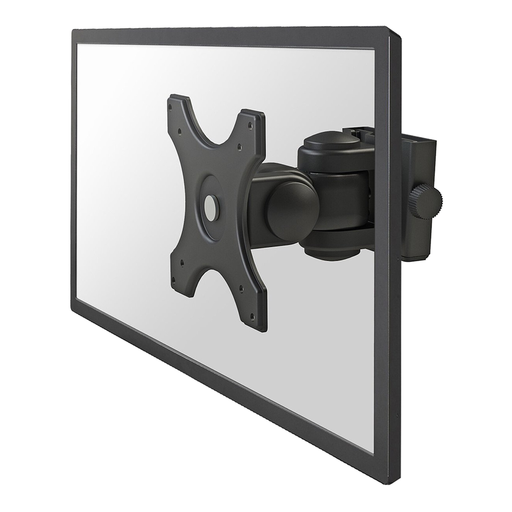
Why it suits this profile: For a compact monitor or small television, a simple wall-mounted solution is often sufficient. This model supports screens from 10 to 30 inches and has a maximum load capacity of 12 kg.
The product specifications clearly state the screen size, weight and VESA range. However, check these details against your screen before ordering.
Tilting and swivelling function, suitable for VESA 75 × 75 and 100 × 100 mm, with a fixed depth of 12 cm.
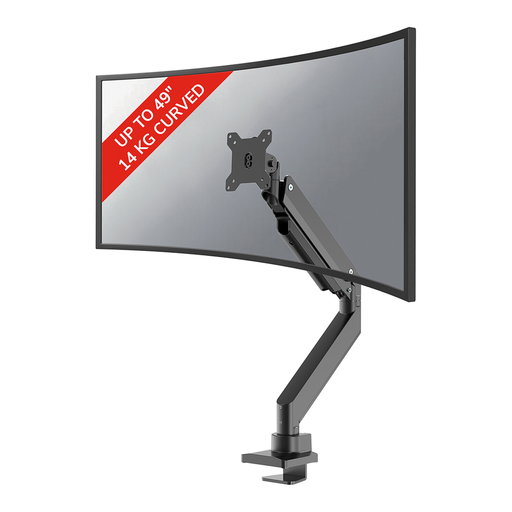
Why it suits this profile: This gas-spring monitor arm is designed for large, curved screens up to 49 inches and weighing up to 18 kg. It is well suited to a professional home office, reception area or workspace with an ultrawide monitor.
According to the product description, the reinforced head is designed for curved screens. The 180° stop mechanism helps limit contact with a wall or partition.
Height adjustment of up to 60 cm, depth adjustment from 0 to 63 cm, and support for VESA 75 × 75 and 100 × 100 mm.

Why it suits this profile: For gamers, IT administrators and professionals who work with three screens, this monitor arm for 2 or 3 screens provides secure desk mounting with adjustable viewing angles.
The capacity is stated as a maximum of 6 kg per screen. Both clamp and grommet mounting are available; check whether your desk supports both options.
Suitable for three screens from 10 to 27 inches, with tilting, rotation, swivelling, cable management and a quick-release system.
For a large television, choose a TV wall mount based on its VESA range and load capacity. The Neomounts WL35-350BL14 supports screens from 32 to 65 inches and has a stated load capacity of 35 kg. The mount tilts and, according to the product specifications, remains approximately 4.5 cm from the wall.
A TV wall mount with a greater range of movement, such as the WL40S-850BL18, supports screens from 43 to 86 inches, weighing up to 60 kg, with VESA support up to 800 × 400 mm. Depending on its position, this model extends 5 to 61 cm from the wall.
For a projector ceiling mount, consider not only the weight but also the ceiling height, cable routing and ceiling angle. The CL25-530BL1 has a fixed height of 25.5 cm and, according to the product description, supports up to 45 kg. The CL25-550BL1 is adjustable from 74.5 to 114.5 cm and has a stated capacity of 35 kg. If you find conflicting information, always check the latest manual and product specifications before installation.
We’ve compiled a complete, up-to-date list of products that fully meet these strict selection criteria and the applicable European safety regulations.
No. Check the screen size, weight and VESA size. Many compact models support 75 × 75 and 100 × 100 mm, but a larger monitor or television may require a wider VESA range.
Not always. Check the thickness, strength and available space at the back of the desk. A clamp mount and a grommet or through-desk mount have different installation requirements. Do not attach a mount to a surface that could crack, deform or lack sufficient load-bearing capacity.
Its lifespan depends on the load, installation quality and how often you move the screen. Check screws, clamps and pivot points regularly. Do not use the mount if any parts are bent or damaged, and never exceed the stated load capacity.
