
Vandaag of morgen in huis

Kwaliteit gegarandeerd

Welkomstaanbiedingen ontgrendelen: GRATIS bezorging | Tot 80% korting | Gratis 30 dagen JoyPlus-proefperiode
Download de app
Mounting a screen or freeing up desk space by moving it onto a stand seems straightforward. In practice, though, many purchases turn out not to suit the screen, the wall or the way you use it day to day. With a Neomounts monitor or TV mount, the key factors are the VESA size, weight capacity and range of movement.
A 65-inch TV won’t automatically fit every 65-inch TV wall mount. The mounting holes on the back can vary between models, so always check the VESA size – for example, 200 × 200, 400 × 400 or 800 × 400 mm.
The same applies to monitor arms. A 32-inch screen may weigh more than a smaller model. So don’t just check the maximum screen size in inches; check the permitted weight per screen too.
A heavy-duty TV mount isn’t automatically suitable for every wall. Brick or concrete walls need different fixings from plasterboard or lightweight partition walls. According to the product specifications for various Neomounts models, the wall must have sufficient load-bearing capacity. With heavier screens, you’ll need to check the wall structure.
A monitor arm also needs a sufficiently stable desk surface. A desk clamp may not be suitable for a thin, fragile or hollow desktop.
A tilting TV mount or full-motion TV mount needs space behind and beside the screen. If the TV is close to a cabinet or wall, a swivel function may offer little practical benefit. With monitor arms, cables can become taut when you pull the screen forwards.
So check the cable management, the minimum and maximum distance from the wall, and the available swivel, tilt and rotation angles.
VESA refers to the distance between the mounting holes on the back of a screen. Measure horizontally and vertically – for example, 75 × 75 mm, 100 × 100 mm or 600 × 400 mm. A VESA mount is suitable only if the screen’s hole pattern falls within the mount’s supported range.
Compare your screen’s weight with the mount’s maximum weight capacity. For a dual monitor arm or an arm for 2 screens, check the weight limit per screen. The same applies to a monitor arm for 3 screens across all three positions.
Examples from the range:
An adjustable monitor arm with a gas spring is useful if you regularly switch between sitting at your desk, collaborating and presenting. A fixed or manually adjustable monitor stand is often simpler if the screen stays in roughly the same position.
Here’s what to look out for:
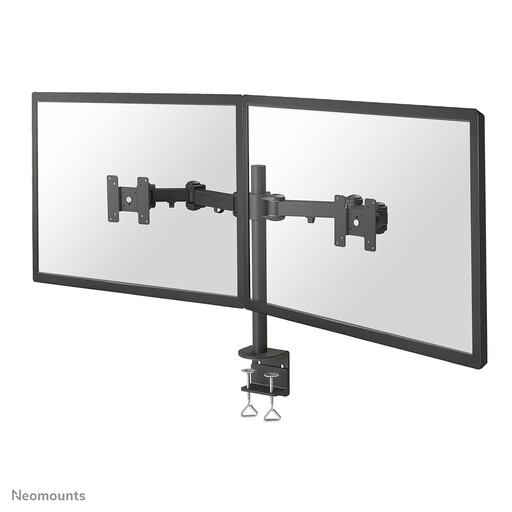
Why it suits this user: This dual monitor arm is designed for two screens measuring 10 to 27 inches and attaches with a desk clamp. Manual height adjustment ranges from 0 to 45 cm.
The specifications state the screen size, a weight capacity of 8 kg per screen, and VESA compatibility of 75 × 75 and 100 × 100 mm.
For two screens, with 360° rotation, tilt, cable management, and manual height and depth adjustment.
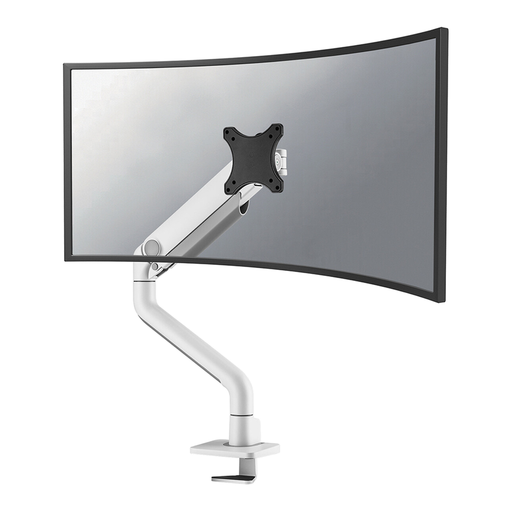
Why it suits this user: This gas-spring monitor arm is suitable for large, curved and ultrawide screens up to 49 inches.
The arm supports screens weighing up to 18 kg, or 15 kg for curved screens. The 180° stop limits movement towards a wall or partition.
Gas-spring height adjustment, a quick-release VESA system, cable management, and support for 75 × 75 and 100 × 100 mm.
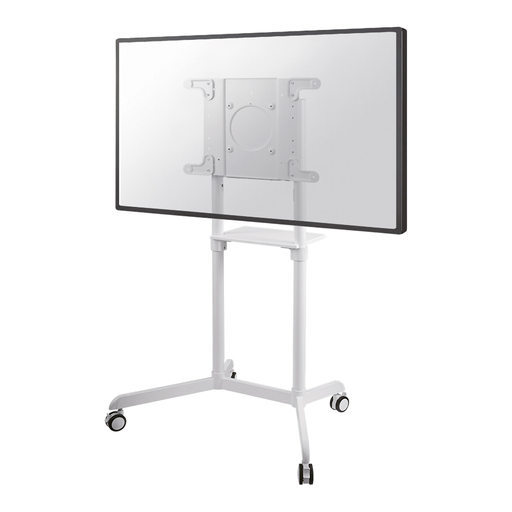
Why it suits this user: This floor TV stand is ideal for mobile presentations, meeting rooms and flexible setups without wall mounting.
The specifications list a weight capacity of 70 kg and a VESA range of 200 × 200 to 600 × 400 mm. Two of the wheels have brakes.
90° rotation, integrated cable management, a laptop or media player shelf, and wheels with brakes.
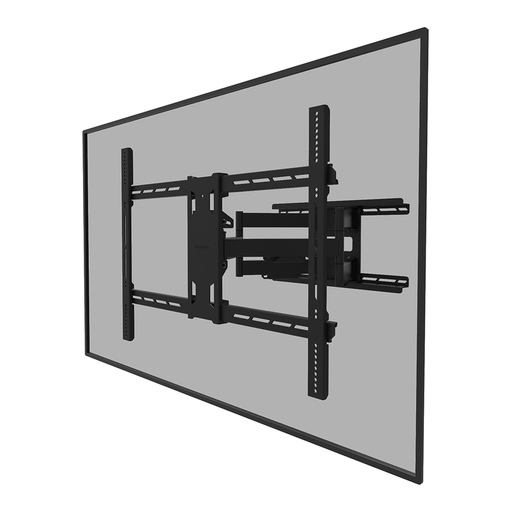
Why it suits this user: This heavy-duty TV wall mount is designed for large screens in living rooms, meeting rooms and professional installations.
The model specifies a maximum load of 125 kg, supports screens from 55 to 110 inches, and accommodates VESA sizes up to 800 × 600 mm.
Full-motion adjustment, an easy-release system, a spirit level included, and cable management.
We’ve put together a complete, up-to-date list of products that meet these strict selection criteria and current European safety regulations.
Before installation, check the following:
For a large TV or motorised wall mount, it’s best to get help with installation. The motorised WL55-875BL1 models support screens from 55 to 100 inches and weighing up to 110 kg. The product information highlights the importance of installation by a qualified person, checking the wall and keeping the movement area clear.
No. Check the VESA size, weight and maximum screen diagonal. Many monitor arms support 75 × 75 and 100 × 100 mm, but not every screen uses one of these patterns.
That depends on the structure behind the board and the fixings used. A heavy-duty TV wall mount shouldn’t be attached to a weak surface without suitable anchors. Check the wall and follow the manufacturer’s installation instructions.
Lifespan depends on the load, installation quality and how often you adjust the arm. Check the screws, clamps and moving parts regularly. Never exceed the stated weight capacity, and replace any damaged mount.
