
Vandaag of morgen in huis

Kwaliteit gegarandeerd

Welkomstaanbiedingen ontgrendelen: GRATIS bezorging | Tot 80% korting | Gratis 30 dagen JoyPlus-proefperiode
Download de app
A Neomounts monitor arm can free up desk space and make it much easier to position your screen at the ideal height and viewing angle. However, not every monitor bracket is suitable for every workstation. A screen that’s just a little too heavy, a desk that can’t handle the clamp, or an unusual VESA pattern can cause problems after purchase.
So, it’s worth looking beyond just screen size or the term “gas spring.” Below are the key points to check, along with some popular choices for home workers, offices, gamers, and creative users.
A 32-inch screen isn’t automatically compatible with every monitor arm. The weight, including the stand but excluding any loose accessories, is at least as important. A monitor arm rated for 9 kg, for example, cannot be used with an 11 kg screen, even if the screen falls within the stated inch range.
With ultrawide screens, the shape also plays a role. A curved monitor can place a different load on the arm than a flat screen. Always check the permitted weight for both flat and curved screens.
The VESA measurement is the distance between the screw holes on the back of your monitor. Many desk models use VESA 75 x 75 mm or 100 x 100 mm, but larger screens can have different patterns.
A VESA monitor arm will only fit if the hole pattern matches, or if you use a suitable adapter plate. Measure the horizontal and vertical distance before you order. Also, pay attention to the screw length: screws that are too long can damage the screen.
A desk clamp distributes pressure over a limited area. A thin desktop, a glass top, or brittle chipboard can warp. A grommet mount (also known as a through-desk mount) can sometimes be more practical if your desk is suitable for it.
Also, check that the arm has enough room to move. A wall or partition can restrict its range of motion. Some models feature a 180° stop mechanism to prevent the arm from hitting the wall, but this is no substitute for a secure installation.
For a single monitor arm, the maximum weight is usually clearly stated. For a dual monitor arm or a triple monitor arm, you need to check the weight capacity per screen. An arm with a capacity of 6 kg per screen is not the same as a total capacity of 18 kg that can be freely distributed across the arms.
Remember to account for any accessories attached to the screen, such as a webcam, laptop holder, or videobar bracket.
A traditional spring mechanism can be suitable for standard monitors. A gas spring monitor arm generally offers smoother height adjustment, but the tension must match the weight of your screen. A screen that is too light or too heavy may drift upwards or slowly sink after installation.
Look at the specified ranges for:
A monitor arm for an ultrawide monitor must support not only the size, but also the weight and construction of the screen. The Neomounts DS70PLUS-450WH1, for example, is designed for screens from 17 to 49 inches. The stated maximum weight is 18 kg for flat screens and 14 kg for curved screens. The VESA range is 75 x 75 to 100 x 100 mm.
For large presentation screens, a standard monitor mount is not sufficient. A videobar kit or dual screen adapter can be an additional solution, but these accessories do not replace the underlying wall, floor, or desk mount.
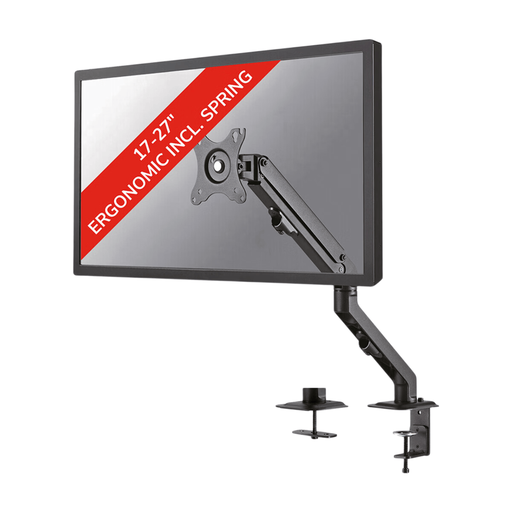
Why this fits the profile: This monitor bracket is suitable for two screens from 17 to 27 inches and comes with both a desk clamp and a grommet mount. That makes it practical for a simple home workstation with two standard monitors.
The maximum weight of 7 kg per screen and the VESA sizes 75 x 75 and 100 x 100 mm are clearly specified. Just check that both monitors fall within these limits.
Two screen positions, tilt, swivel and rotate; cable clips for routing.

Why this fits the profile: This adjustable monitor arm is aimed at larger flat and curved screens, including ultrawide models. The gas spring supports height adjustment from 26.1 to 55 cm.
The product lists separate weight capacities for flat and curved screens. Adjust the gas spring tension to match your actual screen weight.
Up to 18 kg for flat screens, 14 kg for curved screens; 180° stop and cable management.

Why this fits the profile: For a workstation with three compact screens, this monitor arm accommodates screens from 10 to 27 inches, with a weight capacity of 6 kg per screen.
The weight capacity is stated per screen. The 180° stop limits contact with a wall or panel, but mounting on a sturdy desk remains essential.
Suitable for three screens; Quick-Fix system and integrated cable management.
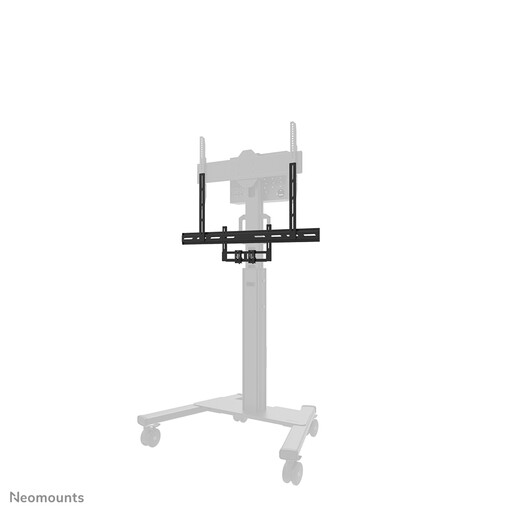
Why this fits the profile: This is an accessory for large screens from 43 to 110 inches. It supports a videobar, PTZ camera, or soundbar above or below the screen.
The VESA range of 200 x 200 to 800 x 600 mm and the maximum weight of 10 kg can be checked in advance. The screen mount itself is not included.
Independent height adjustment; suitable for wall, floor, desk and ceiling mounting when combined with a compatible base.
We’ve put together a full, up-to-date list of products that fully meet these strict selection criteria and comply with current European safety regulations.
Use this short list before ordering a monitor mount or monitor stand:
A Neomounts monitor bracket comes with product-specific instructions. Follow these during installation and periodically check that the screws and clamps are still tight afterwards.
No. Always check the screen size, weight, and VESA pattern. For many desk models, 75 x 75 mm and 100 x 100 mm are common, but unusual patterns may require an adapter plate.
That depends on the load and installation. Stay within the specified weight range, set the tension correctly, and prevent the desk from bowing. If you move the arm frequently, periodically check the screws, clamp, and moving parts.
Not always. A dedicated dual monitor arm is designed for two monitors on a single desk fixing. A dual screen adapter such as the Neomounts ADM-875BL2 is intended for specific large screen setups and must be combined with a compatible underlying wall or floor bracket. So, check both systems before you order.
