
Text reader on a long-haul flight
You want to read in comfort for longer periods and are looking for a handy screen, lighting and easy controls.


If you mainly read continuous text, a compact black-and-white e-reader with adjustable lighting should suit you well. If meaningful colour illustrations matter, it’s worth comparing colour e-readers. Before buying, check that the exact edition and its file protection work on the device, then open the book before you set off. A colour screen won’t automatically make a hard-to-read PDF with a fixed page layout more enjoyable.
You want to read in comfort for longer periods and are looking for a handy screen, lighting and easy controls.
You want to view drawings or colour images and are mindful of how well pages can be read on a small e-ink screen.
You already have a book you’ve bought or borrowed and want to check that its file format and protection work with your chosen e-reader.
Start by asking whether the journal is mainly continuous text or contains lots of colour and fixed page layouts. Then check that your book opens on the device and is available offline before you leave.
| What to consider | What to look for | Who should consider this? |
|---|---|---|
| Reading comfort | Compare screen size, weight, adjustable lighting and page-turn controls. Bear in mind your usual font size. | If I’m reading for a long time in an aeroplane seat, I want a screen and controls that stay comfortable in my usual position and under changing cabin lighting. Around 33% of consumers put reading comfort first. |
| Opening your book offline | Check the exact edition, file format and any DRM. Download and open the book before you set off. | If I’m relying on one particular journal I’ve bought or borrowed, I want to know that this exact edition will open on my e-reader without an internet connection. Around 27% of consumers give access to the book their highest priority. |
| Illustrations and layout | View a sample page from the exact edition and check whether the text can be resized. | If colour images or drawings matter, I want to check that details and captions will remain readable on the screen I choose. Around 20% of consumers make illustrations and page layout their top priority. |
| Size and power | Compare screen size and device weight. Charge it at home and check your airline’s own rules for devices and any power bank. | For consumers who want an e-reader that’s easy to carry and don’t want to rely on being able to charge it during the flight, portability is the deciding factor. Around 20% of consumers put this first. |
A small e-ink screen may not be ideal for large pages with a fixed layout. Colour alone won’t automatically make these pages easier to read.
View a sample from the exact edition on a similar screen. If the journal contains lots of large images or PDF pages, also consider whether a tablet would handle the layout better.
An e-reader may support EPUB, but that doesn’t mean every protected library book will open on it. The Online Library says that its Adobe DRM e-books don’t work on Kindle.
Before choosing a device, check whether the exact title is available, what DRM it uses and how you’ll need to transfer it.
You could still run into download or authorisation problems. On 23 October 2026, the Online Library reported an outage that temporarily prevented e-books from being downloaded to e-readers.
Download the book well before you leave and open it on your e-reader. Don’t rely on downloading it at your destination to read on board.
Worth comparing if you’re choosing between a compact black-and-white e-reader and a larger colour screen, depending on the contents of your nature journal.
Worth considering if you want to compare compact black-and-white and colour models, or check support for e-book files.
One e-ink option to look into if you want to use Android apps or take notes as well as read.
This selection includes colour-screen e-readers and an MP3 player whose product title also mentions an e-reader function. If you’ll be reading for a long time, pay particular attention to screen size and the stated features.
 No image available
Colour may be useful if illustrations are important in your nature journal. Do check that the exact book layout is comfortable to read on the screen.
The product title lists a 7-inch colour screen, 4+64GB, 300 ppi and front light with 36 levels.
The product description says that no power adapter is included and specifies a CCC-certified adapter for use.
 No image available
This model may suit you if you want to use a reading app, but check in advance that the app and the book files you want will work on the device.
The product information lists a 6.13-inch colour e-ink display, Android 14 and 8GB+256GB.
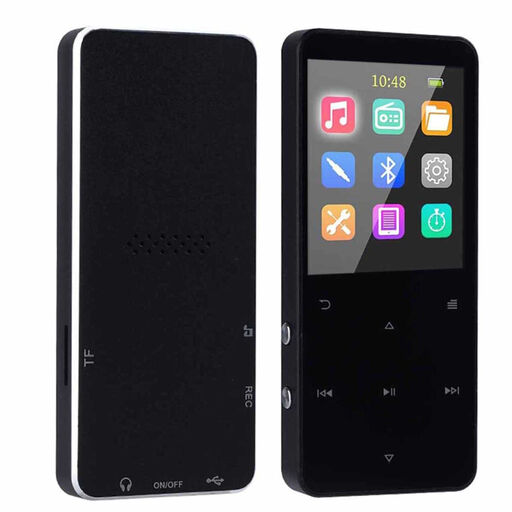 No image available
The product title mentions both music playback and an e-reader function. According to the product information, the 1.8-inch screen leaves little room for longer reading sessions.
The title lists a 1.8-inch colour screen and 16GB of storage.
No, it depends on the title, file format and protection. The Online Library says that its Adobe DRM e-books don’t work on Kindle, so check the specific title and your e-reader’s compatibility.
Download the book before you leave and open it on your chosen e-reader. Also check in advance that any authorisation and transfer are complete. On 23 October 2026, the Online Library reported an issue with downloads to e-readers.
It depends on the layout. The Consumentenbond points out that large PDF pages can be hard to read on small e-readers. View a sample from the exact edition and, if it contains lots of images, consider comparing it with a tablet.
KLM allows e-readers in hand luggage and states that devices with a lithium battery are subject to a limit of 100 Wh without prior approval, among other conditions. This information is from KLM; check your own airline’s rules and any conditions for a power bank.
Under Dutch consumer rules, the seller must provide a solution if there’s a problem with a product, according to the Dutch government. Online purchases from a business also often come with a 14-day cooling-off period. Check which terms apply to your purchase.