First, decide how much room you need to read your essay and a source on the laptop screen at the same time. A larger screen gives you more space, while a more compact model is easier to carry around. Then check that the keyboard, writing software and file formats suit the way you work, and consider which ports and offline features you need.
Who is this choice relevant to?
Writer who keeps sources beside their text
This writer wants to view their manuscript and a source window at the same time while writing. Microsoft Support explains how to snap windows in Windows, while Apple Support explains how to use apps side by side on a Mac.
Writer on the go
This writer takes their laptop with them to make notes or draft text, and weighs portability against the space available on the built-in screen. Lenovo lists the ThinkPad E14 as an example of a 14-inch configuration.
Writer who works for long sessions
This writer types for extended periods and wants to set up their keyboard and screen comfortably. Arboportaal explains that employees who work at a screen for more than 2 hours a day must be able to use a separate monitor or keyboard when working on a laptop.
What should you look for when choosing?
Start by considering how much space you need for your text and source. Then think about how often you move your laptop, how you type, and whether your software and files work offline.
| What to consider |
What should you check? |
Who should give this more weight? |
| Space for text and source |
View your essay and a representative source together at the screen size you’re considering, using your usual font size. |
If I want to read and take notes at the same time while writing, both windows need to remain comfortable to read. Around 33% of consumers give screen space for their manuscript and source the highest priority. |
| Taking it with you and working elsewhere |
Compare the dimensions, weight and charging options of the exact configuration. |
When I write in different places, I don’t want to carry more than I need, but I still want enough room to work. Around 27% of consumers give portability the highest priority. |
| Typing setup |
Try the keyboard layout and key feel. Check the ports if you want to use a separate screen or keyboard at home. |
For long writing sessions, I want a setup that suits the way I type. Around 20% of consumers put their typing setup ahead of the other considerations. |
| Software and offline files |
Test your writing app and file formats on the operating system you’ve chosen. If you have a Chromebook, make the Drive files you need available offline in advance and check that they’ve synced. |
If my essays and sources depend on specific apps or files, I want to be able to open them where I’m writing, too. Around 20% of consumers prioritise software and offline access. |
Common pitfalls
-
Choosing based on screen size alone
The usable space for two windows also depends on the font size, window layout and the exact screen configuration.
View your own text alongside a representative source before choosing a screen size.
-
Assuming maximum battery life equals writing time
Apple quotes up to 18 hours of video streaming and up to 15 hours of wireless web browsing for the 15-inch MacBook Air with M5. These figures are for stated usage scenarios, not a measure of how long a writing session will last.
Compare battery life claims based on their test conditions, and check which charging accessories are included with the configuration you choose.
-
Assuming cloud files will automatically be available offline
Google says some Drive files need to be made available offline in advance, and some apps won’t work offline.
Open the files you need and test your writing app without an internet connection before writing elsewhere.
-
Confusing the manufacturer’s warranty with your statutory rights
According to ACM ConsuWijzer, your statutory guarantee is separate from any additional seller or manufacturer’s warranty.
Compare what an additional warranty covers, and remember that the seller is your point of contact if a product is faulty.
Brands to consider
Lenovo
A ThinkPad E14 configuration could suit you if a more compact built-in screen is important and you might use a separate workstation at home.
- Lenovo lists a 14-inch anti-glare screen with 1920 × 1200 pixels for one E14 Gen 8 configuration.
- Check the memory, ports and keyboard for each configuration; these specifications don’t automatically apply to every E14.
Dell
The Dell 16 range offers a larger Windows laptop for viewing text and sources on the built-in screen.
- Dell lists a configurable version of model DC16251 with a 16-inch anti-glare 2K IPS screen.
- Configurations can vary; this screen specification doesn’t apply to every Dell model.
Apple
The 15-inch MacBook Air with M5 is a macOS option if you want a larger built-in screen and the ability to use windows side by side.
- Apple specifies a 15.3-inch screen, 16 GB of base memory and 512 GB of base storage for this model.
- Check that your writing software and file formats work with macOS, and see what’s included for charging.
HP
HP’s OmniBook 5 range includes Windows laptops with 14-inch and 16-inch screens.
- HP lists screen options of up to 3K OLED for some 16-inch OmniBook 5 configurations.
- “Up to” doesn’t apply to every configuration. Check the exact screen option and whether your writing apps work on the system you’ve chosen.
Joybuy laptops for this writing task
These laptops are aimed at anyone looking for a fixed workstation with enough room to view essays and sources on the built-in screen.
 No image available
ASUS Vivobook 17 X1704MA-AU153W, QWERTY
The 17.3-inch screen is suited to anyone who wants to view text and a source on one built-in screen.
17.3 inches; Core 5 320; 8 GB RAM; 256 GB SSD; QWERTY keyboard.
View at Joybuy
 No image available
HP OmniBook Ultra Next Gen AI 16-bk0004nd, QWERTY
This 16-inch configuration is designed for anyone who wants a larger built-in screen for their manuscript and source.
16 inches; 3K OLED touchscreen with 120 Hz; 128 GB RAM; 2 TB SSD; Windows 11 Pro; QWERTY keyboard.
View at Joybuy
 No image available
MSI Venture 16 AI A2HMG-068NL
This 16-inch configuration is designed for anyone who wants to view text and a source on one screen at a fixed workstation.
Intel Core Ultra 7 255H; 32 GB DDR5 RAM; 512 GB PCIe 4.0 SSD; Intel Arc Graphics; 1920 × 1200 screen with 144 Hz; Windows 11 Pro.
According to the product information, this configuration is supplied without a power adapter; check which compatible adapter you’ll need.
View at Joybuy
 No image available
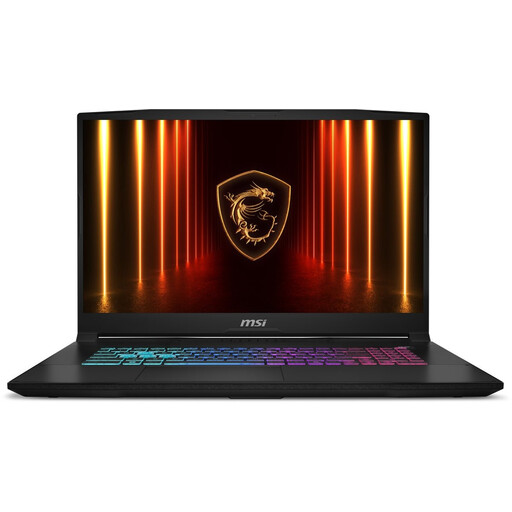
MSI17 HX B14WFK-021NL, QWERTY
This configuration is designed for anyone who wants to view text and a source on the built-in screen while seated at a table.
QWERTY keyboard.
View at Joybuy
 No image available
MSI Vector A16 HX A8WIG-025NL, QWERTY
This 16-inch configuration is suited to anyone looking for room for a manuscript and source at a fixed workstation.
AMD Ryzen 9 8940HX; 16 GB DDR5-SDRAM; 1 TB SSD; NVIDIA GeForce RTX 5080; Quad HD+; QWERTY keyboard.
View at Joybuy
Frequently asked questions
Can I put an essay and a source side by side without a second monitor?
Yes. Microsoft Support explains how to snap windows in Windows, while Apple Support explains how to use apps side by side on a Mac. Whether both windows are comfortable to read depends on the screen size, window layout and font size.
What do I need to set up to write offline on a Chromebook?
Make the Drive files you need available offline in advance and check that they’ve synced. Google warns that some apps won’t work offline.
Do I need an additional warranty for statutory cover?
No. According to ACM ConsuWijzer, the Dutch statutory guarantee is separate from any additional seller or manufacturer’s warranty. The seller is your point of contact if a product is faulty; there isn’t a fixed statutory guarantee period that applies to every laptop.
Can I try out a laptop bought online and return it?
For eligible online consumer purchases, ACM ConsuWijzer says you have a statutory cooling-off period of up to 14 days after delivery. Check the terms for unboxing and trying out the laptop, and for any return costs, beforehand.
Does every writer need to use a separate keyboard?
No. Arboportaal outlines workplace requirements for employees who work at a screen for more than 2 hours a day. In that situation, laptop users must be able to use a separate monitor or keyboard; this isn’t a general purchasing requirement for every individual writer.


