Who is a NAS suitable for when storing school notes?

Protecting irreplaceable notes

You have notes or source material that you can’t collect again. As well as storing them on the NAS, make a separate copy and test that you can restore it. The National Cyber Security Centre recommends keeping multiple copies of important data.

Collaborating on a group project

You want to access project notes from different devices and decide who can view or edit folders. Compare the sharing and account features of the specific NAS model.

Setting up a complete archive

You want to know in advance which drives and separate backup destination you’ll need alongside the NAS enclosure. Check what’s actually included with each version.

What should you look for when buying for a school project?

Two-bay NAS

Choose this if: you want to store project files centrally, access them from multiple devices or share them with selected group members.

Bear in mind: setting up the drives, accounts and backups takes time; two drives in the same NAS do not count as a separate backup.

External drive

Choose this if: you mainly use one computer and want to keep a copy of your completed notes.

Bear in mind: you’ll need to keep copies up to date yourself or automate the process. A drive kept in the same place as the original won’t protect you against every incident at that location.

Cloud storage

Choose this if: access from different devices is important and you don’t want to manage a NAS yourself.

Bear in mind: account access and the terms of the service you choose; also check that you can restore files from it.

What to consider What to check before buying Who is this important for?
Restoring notes Check whether you can back up to a different destination and try restoring a file. Synology says the DS223j can back up PC folders and copy data to other destinations. If I can’t collect my source material again, I want to know how to retrieve it. Around 31% of consumers put restoring notes at the top of their list.
Collaboration and access Check which devices are supported, how shared folders work and whether you can set up separate user accounts. If my project group needs to work with the same files across different devices, I look at sharing and access permissions. Around 25% of consumers give collaboration top priority.
Complete setup Check whether drives are included, which drives are compatible, how much usable space the configuration provides and where the separate backup will be stored. Tweakers distinguishes between NAS enclosures with and without drives included. If I need a complete archive setup, I want to know in advance what I’ll need in addition to the enclosure. Around 19% of consumers put the overall setup first.
Access to personal data Decide who needs access and check the account and sharing features of the model you choose. Names and identifiable recordings may count as personal data, according to the Dutch Data Protection Authority. If my notes contain information about other people, I want to be able to decide who can access those files. Around 13% of consumers make restricted access their top priority.
Ease of management Read the manual, check how the NAS connects to your network and consider whether you want to keep managing the archive and backups yourself. If I’m mainly looking for a straightforward way to store notes, I don’t want to set up more than I need to. Around 12% of consumers give ease of setup top priority.

Common pitfalls when choosing a NAS for school notes

  • Assuming two internal drives or snapshots count as a separate backup

    If copies stay on the same device, they still depend on that device. A snapshot is no substitute for a separately stored copy.

    Before buying, decide where the separate copy will be kept, then try restoring a file. The National Cyber Security Centre recommends keeping multiple copies of important data.

    A separate storage destination requires extra storage space or a suitable service.

  • Comparing the NAS enclosure alone

    NAS devices are sometimes sold without drives. In that case, the enclosure alone doesn’t make a complete archive setup.

    Check whether drives are included with each version and what you’ll need for a separate backup destination.

    A version without drives may also require compatible drives and a separate backup destination.

  • Giving everyone the same unrestricted access

    Research files may contain information that can identify individuals. Sharing permissions determine who can access project folders.

    Decide who needs access to each folder, then set up separate accounts and available security features carefully.

NAS brands to consider

Synology

Synology positions the DS223j as a two-bay NAS for centralised file management and access through Synology Drive.

  • According to Synology, the DS223j can back up PC folders on a schedule or in real time, and copy data to other destinations.
  • Synology says the Btrfs feature is available from DSM 7.2. Check which version is installed and arrange a separate copy as well.

QNAP

QNAP describes the TS-233 as a model for home users who want to store, share and sync files centrally.

  • QNAP lists snapshots, account protection and two-step verification for the TS-233.
  • A snapshot remains part of the recovery plan on or around the NAS and is no substitute for a separately stored copy.

ASUSTOR

The Drivestor 2 Lite AS1102TL is a two-bay model worth comparing if you’re also interested in snapshots.

  • ASUSTOR lists 1 GB DDR4 memory, Gigabit Ethernet and Btrfs/iSCSI snapshots for this model.
  • According to ASUSTOR, its speed figures were achieved in its own optimised laboratory, so they don’t predict the speed of your network or project files.

Products at Joybuy for archiving and sharing

Below are NAS enclosures for central storage and external drives for an archive on a single computer. Check whether drives are included with each NAS, and remember to make a separate backup of important notes.

Synology DiskStation DS1525+ NAS

Synology DiskStation DS1525+ NAS

A good fit if you want to manage project files centrally and expand your storage setup; bear in mind that installation and configuration are required.

Five drive bays; two 2.5GbE ports. Hard drives are not included, and DSM and the storage pool need to be configured.

View at Joybuy

Synology DiskStation DS1825+ NAS

Synology DiskStation DS1825+ NAS

A good fit if you want central storage and file sharing, and plan to configure a multi-drive setup.

Eight drive bays; two 2.5GbE ports. Hard drives need to be installed and DSM configured before use.

View at Joybuy

Synology DiskStation DS925+ without hard drives

Synology DiskStation DS925+, without hard drives

A good fit if you want to manage project files centrally and expand storage as needed.

Four drive bays; two 2.5GbE ports; supports M.2 NVMe SSD caching. Hard drives are not included, and DSM and the storage pool need to be configured.

View at Joybuy

My Passport portable hard drive, 2 TB, blue

My Passport 2TB Blue Portable Hard Drive

A good fit if you want to keep a project archive on one computer; this is an external USB drive, not a NAS for central network access or group sharing.

2 TB storage; automatic backup software; 256-bit AES hardware encryption.

View at Joybuy
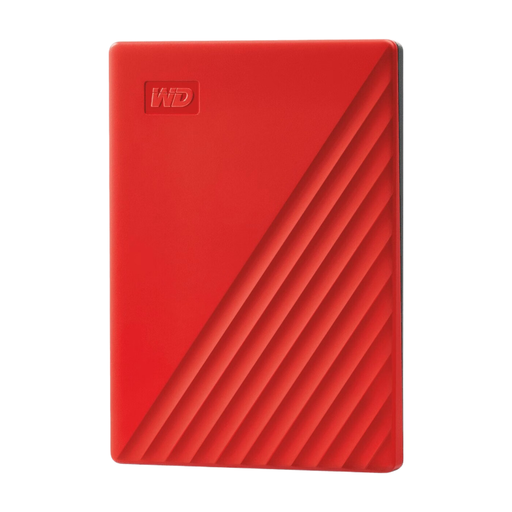
My Passport portable hard drive, 4 TB, red

My Passport 4TB Red Portable Hard Drive

A good fit if you want to keep a larger archive on one computer; this is not a NAS for central network access or group sharing.

4 TB storage; automatic backup software; 256-bit AES hardware encryption.

View at Joybuy

Frequently asked questions about NAS devices for school notes

Does a two-drive NAS provide a complete backup of your notes?

No. Keep a separate copy as well, and check that you can restore a file from it. The National Cyber Security Centre recommends keeping multiple copies of important data, including one in a different location. This is backup advice, not a general legal requirement when buying equipment for a school project.

How do you start archiving your project?

First, work out which devices and folders your notes are stored on. Then decide what to copy automatically or manually, where to keep the separate copy and test restoring a file. Read the manual for the exact model before connecting the NAS to your network.

Do you need to buy drives as well as the NAS enclosure?

It depends on the version. Check whether the NAS on offer includes drives. An empty enclosure needs compatible drives and may also require another storage destination for a separate backup.

What are your rights when buying from a Dutch online shop?

When you buy as a consumer, you’re covered by the statutory guarantee if the product fails to meet what you could reasonably expect under normal use; the retailer is your point of contact. For a standard online purchase of goods, you generally have 14 days from delivery to change your mind, subject to legal exceptions. ACM ConsuWijzer explains these rules; also check the terms that apply to your specific purchase.

Can you store and share interviews or information about classmates on your NAS?

Information that can identify someone, including recognisable audio recordings, may count as personal data. An exception to the GDPR may apply if you’re using it solely for personal or household purposes, but don’t assume this also applies when sharing or publishing on behalf of a school. The Dutch Data Protection Authority sets out specific consent rules for identifiable images made and published by a school. These rules don’t automatically mean consent is required for every research note stored privately.
