A NAS is a good choice if several authorised people need to manage files over a network, or if you want to set up regular backups. For a one-off copy from a single computer, an external drive may be simpler. In either case, make a separate backup and test that you can restore the files you need before the handover, as advised by the National Cyber Security Centre. If the records contain personal data, also decide who is allowed to receive them and what level of security is appropriate for the risks.
Who is this guide for?
Administrator handing over records
You want to know that the right files are in place before the handover, and that you can restore them if they are lost or something goes wrong. The National Cyber Security Centre recommends testing recovery in practice.
Club with shared responsibility for records
Several people or devices use the files, and you want to be able to control access for each person. If the records contain personal data, sharing them requires you to assess the situation. The Dutch Data Protection Authority stresses that organisations must not share personal data without proper consideration.
Buyer with a defined archive
You want to weigh up whether setting up network storage is necessary for this handover, or whether a simple copy from one computer will do. Also consider making a separate backup and testing that you can restore it.
What should you look for when buying?
NAS with a separate backup destination
Choose this option if: several devices or authorised users need the files, or you want to set up regular backups.
Bear in mind: setup and management take time, and snapshots or drive mirroring within the NAS are no substitute for a separate backup.
External drive for a one-off handover
Choose this option if: you want to copy an existing collection from one computer and do not need shared network access.
Bear in mind: manual copying requires discipline and does not automatically manage shared user permissions or backups from multiple devices.
| What to consider |
What should you check? |
Who is this important for? |
| Restorable records |
Check which folders are copied, where the separate copy is stored and whether a restore test recovers the files you need. |
Before I hand anything over, I want to know that I can restore the right folders, not just that a copying task has finished. The ability to restore data is the top priority for around 36% of consumers. |
| Access to club data |
Check whether the files contain personal data, who is allowed to view them and whether the intended recipient needs them. |
If several volunteers need access, I want to decide what each person can see, especially where personal data is involved. Access management comes first for around 29% of consumers. |
| Sharing files |
Check that the computers involved and the recipient can open the files you need, and keep shared access separate from the backup. |
If club members will continue using files on several devices, I want them to be available in one central place. For a one-off handover, network access is less important. Around 21% of consumers prioritise shared access. |
| Complete storage setup |
Measure your current archive and expected growth, check whether compatible drives are included, and factor in a separate backup destination. |
I want to know in advance what I need beyond the enclosure, so my backup plan is complete. The overall setup is the top buying priority for around 14% of consumers. |
Common pitfalls
-
Mistaking snapshots or drive mirroring for a complete backup
Copies within a single NAS do not protect against the same risks as a separate backup. An existing copy may also turn out to be incomplete or unusable.
Set up a separate backup destination and test that you can restore the records before the handover.
Allow for storage for the extra destination and time to carry out a restore test.
-
Mistaking a NAS enclosure for a complete storage solution
A deal may or may not include drives. The usable storage capacity depends on the drives you choose and how you configure them.
Check what is included in the package and whether the drives are compatible with the exact model before comparing the total setup cost.
You may need to arrange compatible drives and a separate backup destination.
-
Mistaking shared access for permission to hand over all records
The fact that files can be shared does not mean that you can hand over all records, or any personal data they contain, without first assessing the situation.
Decide what information the recipient needs and assess the disclosure before granting access. The Dutch Data Protection Authority stresses that personal data must not be shared without proper consideration.
NAS brands compared
The features below apply to the models mentioned and are not a judgement on every product from a brand. Check the model specifications and your intended setup before making a choice.
Synology
The DiskStation DS223j is a two-bay option for small teams that want to share files and access them from different devices.
- Synology lists Synology Drive and Btrfs support with snapshots from DSM 7.2 for this model.
- Check which software version is installed, and plan for a separate backup as well.
QNAP
The TS-233 is a two-bay NAS for centralised files and shared management.
- QNAP lists snapshots and security settings for this model. The specifications state that it has two drive bays and one gigabit network port.
- Its 2 GB of memory is not upgradeable, so check that it suits the way you plan to use it.
ASUSTOR
The Drivestor 2 Pro Gen2, AS3302T v2, is a two-bay alternative with a 2.5-gigabit network port.
- ASUSTOR lists Btrfs snapshots and 2 GB of memory for this model.
- The manufacturer's transfer speed figures are based on laboratory tests. The network port is only useful if the rest of your network equipment can support it too.
UGREEN
The NASync DXP2800 is a two-bay alternative with a 2.5-gigabit network port.
- UGREEN lists support for third-party drives.
- Storage drives are sold separately, so check that the drives you want to use are compatible.
Products for handover and shared storage
This selection includes external hard drives for a one-off copy and NAS models for central storage and shared management. Check which drives are included with the NAS, and set up a separate backup too.
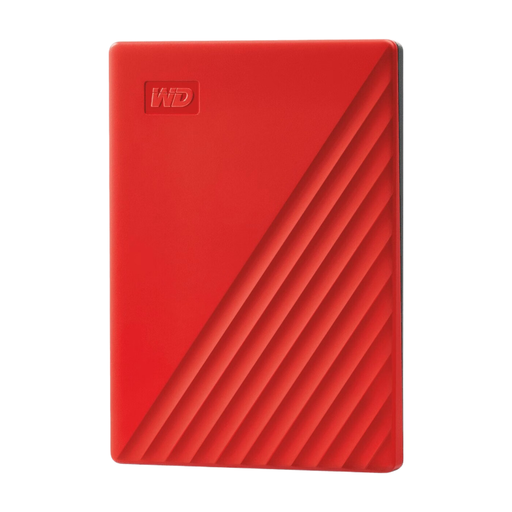 Image unavailable
My Passport 4TB Red portable hard drive
An option for a one-off copy from one computer; the product information lists automatic backups using WD Backup.
4 TB storage, password protection and 256-bit AES hardware encryption.
View at Joybuy
 Image unavailable
Synology DiskStation DS1825+ NAS
A NAS option for files that need to be shared and managed centrally; the product information lists file-sharing and backup applications.
Eight drive bays and two 2.5GbE ports. Drives must be installed and DSM set up before use; expansion with an expansion unit is also listed.
View at Joybuy
 Image unavailable
Western Digital My Passport 2TB Black
A portable option for copying files from one computer; the product information lists scheduled automatic backups.
2 TB storage and 256-bit AES hardware encryption. For macOS 11 or later, the product information lists a downloadable compatibility driver.
View at Joybuy
 Image unavailable
Synology DiskStation DS1525+ NAS
A NAS option for centralised file sharing and backups, with DSM applications listed in the product information.
Five drive bays and two 2.5GbE ports. Hard drives are not included; install compatible drives and set up DSM before use. Expansion with an expansion unit is also listed.
View at Joybuy
 Image unavailable
Synology DiskStation DS925+ NAS, without hard drives
An option for centralised file sharing and backups using DSM applications listed in the product information.
Four drive bays and two 2.5GbE ports. Hard drives are not included; install compatible drives and set up DSM before use. The product information lists expansion to nine bays.
View at Joybuy
Frequently asked questions
Is a second drive in the same NAS enough as a backup before the handover?
No. Make a separate backup too, and test that you can restore the records. The National Cyber Security Centre recommends carrying out a restore to check that the files you need are usable.
What should you check when setting up a NAS for the first time?
Start by listing the essential records and the devices they are stored on. Then check drive compatibility, set up user permissions and the backup task, and restore a selection of files as a test before the handover.
Can you hand over members' data to the client without further checks?
No. First assess the specific purpose and legal basis for sharing it. The Dutch Data Protection Authority says that organisations must not simply pass personal data on to another party. Whether this handover is allowed depends, among other things, on the relationship, the original purpose and the data involved.
Do you always need a data processing agreement for a NAS?
No, not simply because you buy a NAS. According to the Dutch Data Protection Authority, a written data processing agreement is required if another party processes personal data on behalf of the controller. So assess separately what role any cloud or management service plays.
Can you keep club records indefinitely after the handover?
Not if they contain personal data. According to the Dutch Data Protection Authority, personal data must not be kept for longer than necessary for its purpose; the GDPR does not set a single retention period for all cases. Also check whether any other applicable rules specify a retention period.
What should you check in addition to the NAS enclosure?
Check whether the deal includes drives and which drives are compatible with the exact model. Also allow for a separate backup destination and check the current warranty and support terms for the product you are considering.


