Choose a NAS drive with enough usable space for your source files, project versions and expected growth, and check that the exact model is compatible with your NAS. To retrieve earlier versions, you’ll also need supported and configured backup or snapshot features; a separate backup destination helps you recover your files if the entire NAS is lost. The Synology Knowledge Centre explains why local storage on its own is no substitute for a separate backup.
Who is this relevant for?
Videomaker with a growing archive
You store source files and multiple project versions. When choosing capacity, allow for your storage configuration, existing files and room to grow. Western Digital lists nominal capacity in its drive specifications; the available space also depends on the configuration you choose.
Editor who wants to retrieve older versions
You want to be able to go back to an earlier edit or recover a deleted file. So, as well as checking the drive, find out which versioning and recovery options your NAS supports. The Synology Knowledge Centre describes backup options for NAS systems.
Creator with irreplaceable footage
You want to be able to recover your projects if the NAS itself fails or is lost. A separate backup destination is important in this case; QNAP, for example, describes backups to external devices, other systems and cloud services.
What should you look for when buying?
First, work out how much usable space your archive and saved versions will need. Then check the version recovery features, whether you can use a separate backup destination, and whether the exact drive model is compatible with your NAS.
| What to consider |
What to look for |
Who should pay particular attention? |
| Usable capacity |
Allow for source files and versions you want to keep; calculate the space available after your chosen storage configuration and factor in future growth. |
As my archive grows, I want to know how much space will really be left after the chosen storage configuration. Around 29% of consumers give usable capacity for archiving and growth their top priority. |
| Project version recovery |
Check whether your NAS supports the versioned backup or snapshots you need, then configure how long versions are kept and how to restore them. |
If I need to retrieve an earlier edit or a deleted file, I want to know which features my NAS supports. Around 29% of consumers put recovering earlier project versions at the top of their list. |
| Recovery if the NAS is lost |
Check whether you can back up to a separate destination, and try restoring from it. |
If the NAS itself is lost, I still want to be able to access my irreplaceable footage. Around 24% of consumers give recovery from a separate backup destination their top priority. |
| Compatibility and transfer |
Check the full model number, connection and form factor, as well as the compatibility list for your NAS. |
When I transfer large projects to my existing NAS, I want to check that the drive suits my setup first. Around 18% of consumers put compatibility and transfer ahead of other buying concerns. |
Common buying mistakes
-
Assuming a larger drive automatically gives you version history
A drive stores data, but you can only retrieve earlier project versions if the necessary NAS feature is supported and configured.
Check the backup or snapshot options and set how long versions are kept. Then try restoring a file from an earlier version.
Saved versions use extra storage; recovering files if the NAS is lost may also require a separate backup destination.
-
Relying on RAID or local snapshots as your only protection
A local copy won’t protect you in every situation where the entire NAS is lost. The Synology Knowledge Centre explains that data loss can also happen after a drive failure or a problem with the storage configuration.
Plan a copy to another destination and test that you can restore your files from it.
A separate destination needs extra storage and management, such as checking backups and recovery options.
-
Choosing based only on ‘NAS drive’ and capacity
A product range may include several model numbers and variants. You need to check compatibility for the exact drive model and your NAS.
Compare the full model number with the product specifications and the compatibility list from your NAS manufacturer.
An unsuitable model may need to be replaced or exchanged.
Relevant brands to consider
Western Digital
The Red Plus range is designed for NAS storage; Western Digital lists CMR technology for this range.
- According to Western Digital’s product specifications, the WD80EFPX has a nominal capacity of 8 TB.
- A Red Plus 8 TB listing doesn’t automatically confirm that the exact model is the WD80EFPX. Check the model number and compatibility with your NAS.
Seagate
IronWolf is a range of NAS drives. Seagate identifies the ST8000VN004 as an 8 TB IronWolf model.
- Seagate describes IronWolf as CMR storage for NAS use.
- Health monitoring depends on support from your NAS. Check the exact variant and features of your system.
Toshiba
The N300 range includes NAS hard drives designed, among other things, for storing multimedia files.
- For the EMEA region, Toshiba Storage Solutions lists N300 variants from 4 TB up to and including 22 TB, in a 3.5-inch SATA format.
- Specifications, including the number of supported drive bays, can vary by capacity. Check the exact variant against your NAS.
Synology
Synology offers Plus Series drives for use with Synology systems and publishes separate specifications for the 8 TB HAT33008T.
- Synology lists firmware management through DSM and publishes a compatibility overview for its products.
- Check the list for your specific NAS model. The drive itself doesn’t determine how version history is configured.
QNAP
Relevant if you have a QNAP NAS or are choosing a NAS enclosure: Hybrid Backup Sync is software for backups and recovery.
- QNAP describes backups to external devices, other systems and cloud services, among other destinations.
- These are software features that you need to install and configure; this isn’t a recommendation for a specific standalone hard drive.
NAS drives at Joybuy
These drives are storage options for a compatible NAS. A drive doesn’t provide version history on its own: check which NAS features you need, and plan a separate backup destination if you want to recover your files if the NAS is lost.
 No image available
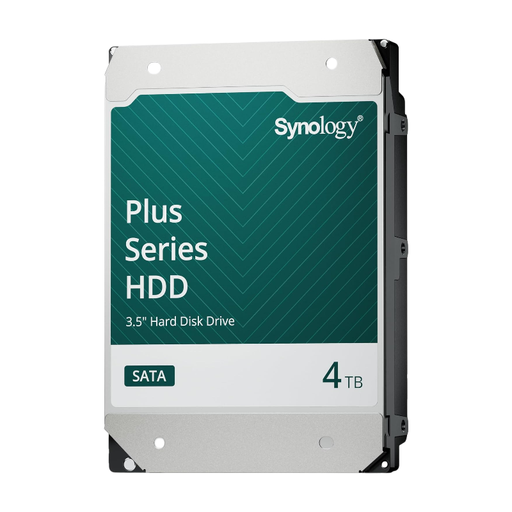
Synology SATA HDD 4 TB
A storage option for a compatible Synology NAS. The drive has a capacity of 4 TB; check the full model for compatibility with your NAS. Recovering earlier versions requires supported and configured NAS features; recovering files if the NAS is lost requires a separate backup destination.
View at Joybuy
 No image available
Synology SATA HDD 16 TB, 7,200 rpm
A storage option for a compatible Synology NAS. The product name lists 16 TB and 7,200 rpm; check the full model for compatibility with your NAS. Recovering earlier versions requires supported and configured NAS features; recovering files if the NAS is lost requires a separate backup destination.
View at Joybuy
 No image available
WD Red Plus 6 TB, 256 MB cache
A NAS drive option for a setup that’s compatible with this model. The product name lists 6 TB and 256 MB cache; check the full model and compatibility with your NAS. Recovering earlier versions requires supported and configured NAS features; recovering files if the NAS is lost requires a separate backup destination.
View at Joybuy
 No image available
Western Digital WD Red Plus 8 TB
A NAS drive option for a setup that’s compatible with this model. The product name lists 8 TB, 5,640 rpm, SATA 6 Gb/s, CMR and 256 MB cache; check the full model and compatibility with your NAS. Recovering earlier versions requires supported and configured NAS features; recovering files if the NAS is lost requires a separate backup destination.
View at Joybuy
Frequently asked questions
Is RAID the same as backing up my video projects?
No. Local versions or RAID don’t replace a separate backup destination if the entire NAS is lost. Keep a separate copy of irreplaceable projects and test that you can restore your files from it.
How do I retrieve an older edit?
Check which versioned backup or snapshot features are supported by your NAS model and file system. Then configure your retention policy and try restoring a file; available features and requirements vary by platform and configuration.
Can I install any 3.5-inch NAS drive in my Synology?
Don’t assume so. Look up the full drive model in the compatibility list for your specific Synology NAS, and check the capacity and variant too.
What extra costs should I allow for besides the drive?
If you don’t already have a suitable NAS or separate backup destination, you’ll need to factor one into your choice. Costs depend on the setup or service you choose, so first work out how much storage you need and what backup destination to use.


