If you already have a NAS, choose an internal drive that is confirmed to be compatible with your exact enclosure model; a standalone drive does not provide network access by itself. You should also keep a separate backup and test whether you can restore your scans from it: a NAS, RAID or snapshot is no substitute for a backup.
Who is this choice relevant to?
Keeper of irreplaceable letters
You want to be able to restore your scans if they are lost or a drive fails. So you need to consider not just the drive, but also a separate backup and a recovery test. The National Cyber Security Centre and Safe Online explain why backups matter.
Owner of an existing NAS
You’re looking for a replacement or extra drive and need to check that the complete drive model is compatible with your enclosure. The National Cyber Security Centre describes a NAS as a device with storage, a network connection and management software; you should also check compatibility between the specific models.
Private archivist with sensitive post
You want to decide who can open your letters and whether you need internet access. The National Cyber Security Centre recommends paying attention to access permissions and NAS security.
What should you look for in a NAS drive?
Internal drive for an existing NAS
Choose this option: if you already have a NAS and the exact drive model is compatible with its enclosure.
Bear in mind: the drive does not provide network access by itself and is not a separate backup.
NAS enclosure with a chosen drive
Choose this option: if you don’t yet have a NAS but want to access your scans over your home network.
Bear in mind: you’ll need to choose both a suitable enclosure and a compatible drive; snapshots are no substitute for a separate backup.
Backup without a NAS
Choose this option: if you use your scans from one home computer and don’t need network access.
Bear in mind: an external drive does not automatically offer the central network access and management software of a NAS. A backup also needs to be checked and managed.
Start with recoverability and compatibility. Then work out how much storage your archive needs and what equipment you already have.
| Consideration |
What to look for |
Who is this most relevant to? |
| Recoverability |
Keep a separate copy and test whether you can restore a scan. The National Cyber Security Centre distinguishes between redundancy and a backup. |
If my scans are irreplaceable, I want to know how to recover them after a failure or mistake. Around 36% of consumers prioritise recoverability. |
| Compatibility |
Check the complete drive model, form factor and connection against the compatibility information for your exact NAS model. The National Cyber Security Centre and QNAP explain which NAS and drive details are relevant. |
If I have or plan to buy a NAS, I want to know in advance whether the drive will actually fit my enclosure. Around 29% of consumers prioritise fit. |
| Privacy and access |
Check whether you can set user permissions and leave internet access disabled when you don’t need it. The National Cyber Security Centre lists this as a consideration for NAS security. |
For sensitive correspondence, I want to decide who can open the scans and whether I need access away from home. Around 21% of consumers prioritise restricted access. |
| Storage and equipment |
Estimate the size of your scans and how much they might grow. Also factor in an enclosure and a separate backup destination if you don’t already have them. |
I want enough space for my own archive and a clear idea of which devices and copies I’ll need. Around 14% of consumers prioritise storage space and the size of the setup required. |
Buying pitfalls
-
Mistaking RAID or snapshots for a complete backup
Redundancy can help with certain drive failures, but it won’t protect you against every kind of loss. Snapshots on the same NAS still depend on that NAS.
Keep a separate copy and test whether you can restore a scan from it. The National Cyber Security Centre recommends keeping multiple copies on different media and in different locations.
-
Buying a standalone internal drive when you expect network storage
An internal drive does not provide the network connection and management software needed to access files through a NAS.
Check whether you already have a suitable NAS enclosure. If not, choose the enclosure and drive together and check their compatibility.
-
Choosing based only on the product line or capacity
A product line can include different model numbers and versions. A manufacturer’s specification does not automatically confirm that a drive will fit your NAS.
Make a note of the complete drive model and your NAS model, then check they’re compatible before ordering.
NAS brands for reference
This information relates to specific product lines and models; a brand name alone does not confirm compatibility with your NAS.
Western Digital
WD Red Plus is a range of internal NAS drives. Western Digital specifies the WD40EFPX as a 4 TB CMR model.
- Western Digital lists NAS use and a three-year limited warranty for the range.
- The warranty and range specifications don’t prove compatibility with every enclosure. Check the complete model.
Seagate
IronWolf is a range of NAS drives for home use and systems with multiple drives, among other applications. Compare the complete model numbers.
- Seagate lists CMR and NAS features for the range.
- Check the monitoring and any recovery service terms for the exact model and country. A recovery service is no substitute for your own backup.
Synology
Synology makes NAS enclosures such as the DS223j, as well as Plus Series drives, including the HAT3300-6T.
- Synology lists CMR for its Plus Series drives and firmware updates through DSM.
- The DS223j offers Btrfs features from DSM 7.2. Check support for your chosen combination; manufacturer claims are not an independent reliability test.
Toshiba
The N300 is an EMEA range of 3.5-inch SATA NAS drives, available in several capacities.
- Toshiba lists 24/7 operation, 7.200 rpm and a three-year warranty for the range.
- These specifications don’t show that an N300 is necessary for a small archive of letters or that it will fit every NAS.
QNAP
The TS-233 is a NAS enclosure, not a standalone drive; this may be an option if you don’t yet have network storage.
- QNAP says the TS-233 has two bays for 3.5-inch SATA drives and a gigabit network port.
- You’ll still need to choose the drives and a separate backup.
Product picks at Joybuy
These product picks focus on internal NAS drives for an existing, compatible enclosure. An external USB drive is also included as a possible separate backup; it does not provide network storage.
 No image available
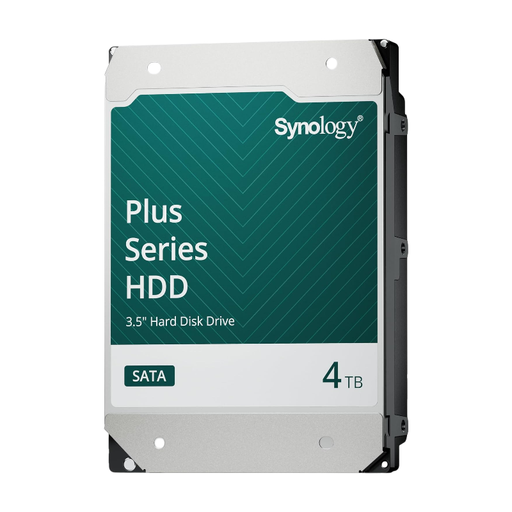
Synology SATA HDD 4 TB
An internal drive for storage in a compatible Synology NAS; check compatibility with your exact NAS model.
The Joybuy product listing specifies 4 TB, 3.5 inch, SATA, 5.400 RPM, CMR and 24/7 operation.
View at Joybuy
 No image available
Synology SATA HDD 16 TB
An internal drive for storage in a compatible Synology NAS; check that the capacity suits your archive and NAS model.
The Joybuy product listing specifies 16 TB, 3.5 inch, SATA, 7.200 RPM, CMR and 24/7 operation.
View at Joybuy
 No image available
WD Red Plus 6 TB, 256 MB cache
An internal WD Red Plus drive for NAS use; check the fit and support for your exact NAS model.
The Joybuy product listing specifies 6 TB, SATA III, 5.400 RPM, 256 MB cache and CMR.
View at Joybuy
 No image available
Western Digital WD Red Plus 8 TB
An internal WD Red Plus drive for NAS use; compare the complete model with your enclosure’s compatibility information.
The Joybuy product listing specifies 3.5 inch, SATA 6 Gb/s, CMR, 5.640 RPM and 256 MB cache.
View at Joybuy
 No image available
My Passport 4 TB
This portable external USB drive can be used as a separate backup from a home computer; it is not a NAS and does not provide network storage.
The Joybuy product listing specifies USB 3.0, 256-bit AES hardware encryption, password protection and software for scheduled automatic backups.
View at Joybuy
Frequently asked questions
Are two drives in RAID enough to protect my letters?
No, RAID is no substitute for a separate backup. The National Cyber Security Centre distinguishes between redundancy for certain drive failures and a backup; keep a separate copy too, and check that you can restore it.
Can I use an internal NAS drive directly as network storage?
No, you’ll also need a suitable NAS device. The National Cyber Security Centre describes a NAS as storage with a network connection and management software. If you already have an enclosure, check that it’s compatible with the complete drive model.
Which settings matter after installation?
Change the default passwords, set appropriate user permissions and don’t make the NAS directly accessible over the internet unless you need to. This is security advice from the National Cyber Security Centre; these settings aren’t a feature of a standalone drive.
Does the GDPR apply to my private archive of letters?
Article 2 of the GDPR excludes processing by a natural person in the course of a purely personal or household activity from the regulation. This does not necessarily apply if you also use the scans professionally or commercially.
As an individual, do I have to keep scanned financial letters for a set number of years?
According to the Government of the Netherlands, individuals are not legally required to retain their financial records. However, it recommends keeping them for five years in case of a subsequent tax assessment. This answer does not necessarily apply to a business or self-employed person.


