
Protecting irreplaceable recordings
You can’t easily replace lost lecture recordings, so you want a separate backup in addition to your NAS. Seagate makes it clear that RAID on its own isn’t a backup.


Start by checking how much space your recordings take up now and how much they’re likely to grow, then make sure the internal drive fits your NAS enclosure. Mirroring can help you keep access to your files if one drive fails, but it doesn’t replace a separate backup. A NAS drive on its own isn’t a complete network storage setup.
You can’t easily replace lost lecture recordings, so you want a separate backup in addition to your NAS. Seagate makes it clear that RAID on its own isn’t a backup.
Your collection grows with each course or semester. Western Digital and Seagate offer NAS drives in a range of capacities, so plan for the space you need based on your files and expected growth.
You’re looking for a replacement or extra internal drive and need to check that the exact drive model is compatible with your NAS enclosure. Synology provides compatibility information for its systems.
Best if: you want one central archive and don’t need access if the drive fails.
Trade-off: arrange a separate backup if you want to be able to restore recordings after data loss.
Best if: keeping access to your recordings if one drive fails is important, and your NAS supports this setup.
Trade-off: the second drive holds an extra copy; mirroring isn’t a separate backup.
Best if: you also want a copy stored outside your NAS or mirrored drives.
Trade-off: you’ll need an additional storage destination and a regular backup routine.
| Key consideration | What to look for | Who is it most relevant to? |
|---|---|---|
| Keeping recordings safe | Check whether mirroring is right for your NAS and arrange a separate backup that you can restore from. | If lost lectures can’t be replaced, you’ll want to know how to recover them. Around 29% of consumers prioritise keeping recordings safe above all else. |
| Room to grow | Add up your current files, allow for expected growth each semester and factor in your chosen drive configuration. | If your archive grows with each course, don’t base your decision on current file sizes alone. Around 23% of consumers put room to grow first. |
| Compatibility with your NAS | Check the form factor, connection, available drive bays and compatibility with your exact NAS model. | If you already own a NAS, you’ll want to make sure the internal drive fits your enclosure. Around 18% of consumers consider compatibility their top priority. |
| Comfort in your workspace | Compare noise and power figures for the specific model where available; spindle speed alone doesn’t tell you how loud it will be. | If your NAS is near your desk or listening area, its practical impact on the room may be worth considering. Around 18% of consumers put workspace comfort first. |
| Complete setup | Work out which enclosure, internal drives and separate backup destination you still need. | If you want to understand the total cost, take into account what you already own and the storage configuration you choose. Around 12% of consumers prioritise the total cost of their setup above all else. |
Mirroring can help if one drive fails, but it doesn’t protect against every cause of data loss. Seagate states that RAID isn’t a backup solution.
Alongside your NAS setup, plan a separate copy and test that you can restore your files from it.
An internal SATA drive is just one part of a storage setup. Your enclosure must support the drive’s form factor and exact model.
First check what hardware you already have, then consult the compatibility information for your NAS model.
Drive monitoring and a warranty don’t ensure that you can restore recordings from a separate copy.
Consider support and backup separately, and keep an extra copy of recordings you can’t replace.
Western Digital describes WD Red Plus as a range of internal 3.5-inch NAS hard drives available in different capacities and model numbers.
Seagate positions IronWolf as a range of NAS hard drives for systems with multiple drive bays.
Synology describes the Plus Series as drives for use in its storage systems; the range includes the HAT3300-4T.
Toshiba describes the N300 as a range of internal NAS hard drives for uses including archiving and home offices.
These Joybuy products are internal NAS drives for storage in a compatible enclosure; check compatibility with your exact NAS model.
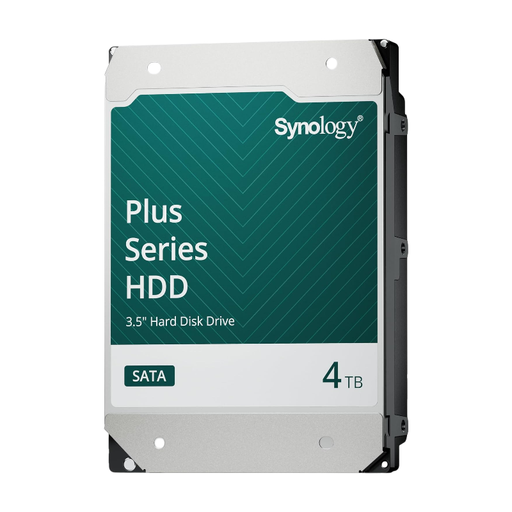 No image available
An internal drive for storage in a compatible Synology NAS enclosure.
4 TB; 3.5-inch SATA; CMR; 5.400 rpm; firmware updates via DSM.
Check support for your exact NAS model.
 No image available
An internal drive for expanding a compatible Synology NAS.
16 TB; 3.5-inch SATA; CMR; 7.200 rpm; 512 MB cache.
Check support for your exact NAS model.
 No image available
An internal NAS drive for a compatible enclosure.
6 TB; 3.5-inch SATA; CMR; 5.400 rpm; 256 MB cache.
The product description specifies NAS use with up to eight drive bays; check compatibility with the exact model.
 No image available
An internal NAS drive for a compatible enclosure with a 3.5-inch SATA connection.
8 TB; 3.5-inch SATA; CMR; 5.640 rpm; 256 MB cache; SATA 6 Gb/s.
The product description specifies NAS use with up to eight drive bays; check compatibility with the exact model.
No. Mirroring can help if one drive fails, but Seagate states that RAID isn’t a backup. For important recordings, keep a separate copy too and check that you can restore it.
No. An internal 3.5-inch SATA hard drive is just one part of a storage setup. Before installation, check that your NAS enclosure supports the drive’s form factor and exact model.
A manufacturer’s warranty doesn’t replace your statutory guarantee in the Netherlands. ACM ConsuWijzer explains that you have statutory rights as well as any seller’s warranty; a faulty drive and keeping your files safe are separate issues.
It depends on who is recording and what happens to the recording. The Dutch Data Protection Authority describes an exception for footage kept strictly for personal use or within a very limited circle; this doesn’t mean that wider distribution is automatically permitted. Educational institutions have their own privacy obligations and arrangements covering matters such as retention and informing people. Check your institution’s rules before recording or sharing.