Who is this choice relevant to?

Puzzle fan with limited desk space

Wants a screen of their own without a dedicated monitor, and is choosing between playing in handheld mode and setting the device down on a table. The Nintendo Switch 2 has a built-in touchscreen; the Switch Lite has no stand, according to Nintendo Nederland.

Player with an existing game library

Wants to check in advance whether specific narrative puzzle games and purchases will work on Nintendo, Steam or Windows. Nintendo lists separate Switch editions, while Valve provides compatibility information for each Steam game.

PS5 owner who wants to use their desk

Wants to play existing PS5 games on a small screen without setting up a separate TV or monitor. PlayStation Portal uses Remote Play over Wi-Fi and is also available for certain cloud streaming services, subject to Sony's requirements.

What should you look for when choosing?

Nintendo Switch 2

Choose this option: if you want to use a built-in screen, either handheld or on a table, and your games are available on Switch.

Bear in mind: Nintendo lists 256 GB of storage and support for microSD Express to expand game storage. Check older Switch games individually.

Nintendo Switch Lite

Choose this option: if you mainly play in handheld mode and your chosen Switch games support it.

Bear in mind: Nintendo Nederland states that the Lite has no built-in stand and cannot be connected to a TV.

SteamOS handheld, such as Steam Deck

Choose this option: if the puzzle games you want to play are in your Steam library and you check compatibility for each title.

Bear in mind: Valve lists a touchscreen and trackpads for the Steam Deck OLED, but not every Steam game is suited to handheld controls without adjustments.

Windows handheld

Choose this option: if access to Windows PC games and their specific storefronts is important to you.

Bear in mind: ASUS lists a 7-inch FHD screen and Windows 11 Home for the ROG Xbox Ally. Check the controls and system requirements for each game.

PlayStation Portal

Choose this option: if you already own a PS5 and want to play over Wi-Fi on a second screen, or play a compatible game through cloud streaming.

Bear in mind: Sony requires, among other things, PlayStation Plus Premium and an account that is not a child account for cloud streaming. Remote Play depends on a PS5 and a network connection.

Concern What to look for when buying Who is this important for?
Game availability Check the platform and edition for the titles you want; for Steam Deck, check Valve's compatibility information for each game. If I already have narrative puzzle games in mind, I want to know whether the right edition will work on the device. Around 40% of consumers name game availability as their main buying concern.
Desk setup Decide whether you'll hold the device or set it down; check whether you need a stand or separate screen. At a small desk, I don't want to give up space for a separate monitor or stand. Around 31% of consumers say a suitable desk setup is their main buying concern.
Readability and controls Compare the screen and input options; check the game's own text and control settings. If clues contain small details, I want to check that the screen and controls are up to the task. Around 15% of consumers name readability and input as their main buying concern.
Existing equipment and requirements Check whether the way you plan to play requires a PS5, Wi-Fi, a subscription or a suitable account. If I already own a PS5, I want to know whether I can use it to play on a second screen and what requirements apply. Around 14% of consumers name existing equipment and related requirements as their main buying concern.

Common buying mistakes

  • Assuming every handheld has the same game library

    Games can vary by platform and edition, so a purchase you already own won't necessarily work on another system.

    Make a note of the titles you want to play, then check each game's platform, edition and compatibility before buying.

  • Choosing a Switch Lite when you want to set the device down on a table

    Nintendo Nederland states that the Switch Lite has no built-in stand and cannot be connected to a TV.

    Choose the Lite if playing handheld is enough for you; if you want to play with the device on a table, check that your chosen model can stand on its own.

  • Treating PlayStation Portal as a standalone offline gaming device

    Remote Play uses a PS5 and Wi-Fi. Cloud streaming has different requirements, including a suitable account and a PlayStation Plus Premium subscription.

    Check which way you plan to play and whether you meet the relevant requirements.

  • Planning to use a standard microSD card for Switch 2 games

    Nintendo states that microSD Express cards are the only cards supported for expanding game storage on the Switch 2.

    Check the card standard and first consider whether the built-in storage will be enough for the games you want to play.

Brands to compare

Nintendo

The Switch 2 is designed for handheld and table-top play; the Switch Lite is for handheld play with supported Switch games.

  • Nintendo lists a 7.9-inch touchscreen for the Switch 2.
  • Nintendo states that the Switch Lite has no stand or TV output. Check game compatibility and play style for each title.

Valve

The Steam Deck OLED is an option for players who mainly want to use Steam games and built-in trackpads.

  • Valve lists a 7.4-inch OLED touchscreen, trackpads and a weight of around 640 g.
  • Valve's compatibility information varies by game; a listing on Steam doesn't guarantee that handheld controls will work smoothly.

ASUS

The ROG Xbox Ally is a Windows handheld for playing PC games on a built-in screen.

  • ASUS lists Windows 11 Home and a 7-inch FHD screen for the ROG Xbox Ally.
  • Check the exact model, system requirements and controls for the games you want to play.

Lenovo

The Legion Go S Powered by SteamOS is worth comparing if you're looking for a handheld with a larger screen.

  • Lenovo lists an 8-inch touchscreen and SteamOS for model 83N6001RMH.
  • Check the exact model and compatibility of your games individually.

Sony PlayStation

PlayStation Portal is designed for PS5 owners who want to play on another screen using Remote Play; cloud streaming is a separate option.

  • Sony lists an 8-inch screen and Remote Play over Wi-Fi.
  • Cloud streaming requires, among other things, PlayStation Plus Premium and is not available for child accounts. Portal is not a standalone offline gaming device for installed games.

Joybuy products for this use

This selection includes handhelds for handheld or table-top play, with Nintendo Switch 2, Windows and SteamOS models.
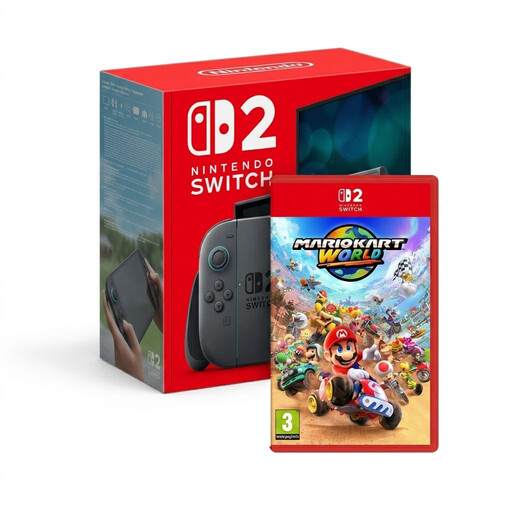
Nintendo Switch 2 with Mario Kart World bundle

Nintendo Switch 2 + Mario Kart World

A good fit if you're looking for a Nintendo Switch 2 for handheld or table-top play.

The product name specifies a bundle with Mario Kart World.

View at Joybuy

Lenovo Legion Go 8ASP2 handheld

Lenovo Legion Go 8ASP2

A Windows handheld to consider if you want to play PC games on a screen of your own; check each game's system requirements and controls.

The product information lists Windows 11 Home, a touchscreen and an integrated touchpad.

View at Joybuy

Lenovo Legion Go S 8APU1 handheld, model 83N6001TMH

Lenovo Legion Go S 8APU1 83N6001TMH

A SteamOS handheld to consider if you want to play Steam games on a built-in screen; check compatibility for each game.

The product information lists SteamOS, an 8-inch touchscreen and an integrated touchpad.

View at Joybuy

ASUS ROG Xbox Ally handheld, white

ASUS ROG Xbox Ally, 16 GB RAM, 512 GB SSD, white

A Windows handheld for playing PC games on a built-in screen; check the system requirements and controls for the games you want to play.

The product information lists Windows 11 Home, a 7-inch FHD touchscreen, 16 GB RAM and a 512 GB SSD. The charger is not included.

View at Joybuy

MSI Claw A8 BZ2EM-047NL handheld, white

MSI Claw A8 BZ2EM-047NL, 1 TB, white

A handheld gaming PC to consider if you want to play puzzle games from a PC library on a screen of your own.

The product name lists 1 TB of storage; the product information specifies an 8-inch touchscreen and Wi-Fi. The charger is not included.

View at Joybuy

Frequently asked questions

How do I know if my puzzle game will work on the handheld I've chosen?

Check the exact game and edition on the platform you plan to use. Nintendo lists Chants of Sennaar as a Switch game; for Steam Deck, you can check Valve's compatibility information for each title.

Can I set a Switch Lite down on my desk and connect it to a TV later?

Nintendo Nederland states that the Switch Lite has no built-in stand and cannot be connected to a TV. Before buying, decide whether playing handheld is enough for you.

Do I always need a PS5 to use PlayStation Portal?

You need a PS5 to use Remote Play for installed games. Sony also describes cloud streaming for supported PS5 games without an active PS5 session. Separate requirements apply, including PlayStation Plus Premium, a suitable account and broadband internet.

What are my rights if I don't like a gaming device I bought online or it develops a fault?

When you buy a product online, you generally have a statutory cooling-off period. According to ACM ConsuWijzer, this lasts for up to 14 days after delivery, with possible exceptions. You are also covered by the statutory guarantee if the product does not meet what you could reasonably expect.

Is a narrative puzzle game automatically suitable for children?

No. The Dutch government describes PEGI as an age rating for games, so check the rating and content of each title. For example, Nintendo lists PEGI 7 for Chants of Sennaar and PEGI 12 for The Case of the Golden Idol: Complete Edition.
