
Narrative puzzle fans
First, choose the mysteries and puzzle games you want to play. Then check whether the title and edition you want are available and compatible with the console you’re considering.


Start with the narrative puzzle games you really want to play, then check whether you want to play on a monitor, a built-in screen or both. A home console suits a permanent desk setup; the Switch 2 and Steam Deck OLED also offer handheld play, but compatibility, controls and required accessories vary by game and device.
First, choose the mysteries and puzzle games you want to play. Then check whether the title and edition you want are available and compatible with the console you’re considering.
You mainly play in your home office, so you’ll want to check how the console connects to your monitor, how it’s controlled and whether you can use physical games or downloads.
You want to play your puzzle games in more places, so check how the controls work on the built-in screen and whether you can connect the device to a monitor.
| What to consider | What should you look for? | Who is this most important to? |
|---|---|---|
| Game availability | Check the platform and edition for each title you want, and compatibility for older games. | I start with the puzzle stories I want to play and only then check the console; around 33% of consumers in this group prioritise access to the games they want. |
| Playing on a monitor | Check your monitor’s video input, the console’s connection and which cables are included. | If my monitor is where I always play, I want to know how the console connects to it; around 27% of consumers prioritise their desk setup. |
| Switching between desk and handheld play | Check that the device has both a built-in screen and the monitor connection you need, and see how the controls work for each game. | I also want to play away from my desk, so a built-in screen matters to me; around 20% of consumers give flexible handheld play top priority. |
| Physical or digital games | Compare the console version with any games you already own on disc, and factor in any accessories you may need. | If I already own games on disc, I want to know whether I can use them on my console; around 20% of consumers prioritise physical games and purchase costs. |
Nintendo warns that some Switch games are not compatible, or are not fully compatible, with Switch 2. Some games may also require original Joy-Con controllers.
Before choosing, check the compatibility status and any control requirements for the games you want to play.
A game may work differently than expected or require additional controls.
Xbox Series S and the PS5 Digital Edition do not have a disc drive. The PS5 version with a disc drive is a different model.
Compare the console version with the disc games you actually want to play.
You may need to buy digital versions of games you already own on disc.
Valve describes the dock as a way to charge the device and connect peripherals, not as a performance upgrade.
Check which monitor ports and accessories you need, and what’s included with the option you choose.
You may need a separate dock or a compatible hub to connect to a monitor.
The model name alone doesn’t confirm which version or accessories are included with a particular offer.
Before choosing, check the model, box contents, seller and accompanying product information.
The Switch 2 is an option if you want to combine desk and handheld play; the Switch Lite is designed for handheld play only.
PS5 models are designed for play on an external screen; you can choose between a model with a disc drive and a digital edition.
Xbox Series S suits a permanent, all-digital setup, with Xbox game availability to be checked separately.
The Steam Deck OLED is a handheld option for compatible Steam games; you can use a separate dock to connect it to a desk monitor.
This selection of Joybuy products includes dedicated PlayStation 5 models and handheld or hybrid consoles. Check the availability and compatibility of each puzzle game on your chosen platform.
 No image available
For anyone who wants to play narrative puzzles on PS5 on an external screen; the Dutch PlayStation Store lists The Case of the Golden Idol for PS5.
Digital version with no disc drive; the product description lists an HDMI cable.
 No image available
For anyone looking for a portable games console with a built-in screen to play in different places.
The product information lists Windows 11 Home, a 7-inch Full HD screen, 16GB RAM and a 512GB SSD. The product description says the charger is sold separately.
 No image available
For anyone who wants to switch between playing on an external screen and handheld play; the product information lists TV, tabletop and handheld modes.
Nintendo warns that not all Switch games are supported or fully compatible; check each game individually.
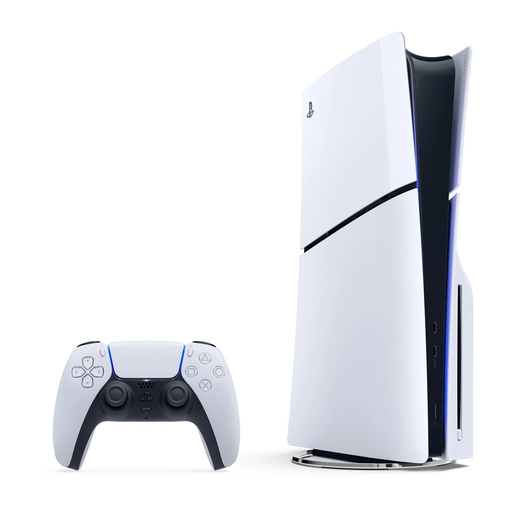 No image available
For anyone who wants to play narrative puzzles on PS5 on an external screen and use compatible games on disc.
The product description lists 1 TB of storage and an Ultra HD Blu-ray disc drive. The Dutch PlayStation Store lists The Case of the Golden Idol for PS5.
Start by choosing a few specific games. The Dutch PlayStation Store lists The Case of the Golden Idol for PS5, Xbox Netherlands lists it for Series X|S, and Nintendo lists it for Switch; Valve lists the Steam version as Deck Verified. Then check the exact edition and compatibility on each platform.
No. Nintendo says the Switch Lite cannot connect to a TV. Valve offers a separate dock for Steam Deck with HDMI and DisplayPort connections; check that these are compatible with your monitor.
Not always. Nintendo recommends checking whether each Switch game is compatible with Switch 2. Sony says most PS4 games work on PS5, but notes there are exceptions and some features may change.
Not necessarily. Xbox Netherlands lists The Case of the Golden Idol as a game available to buy separately; any cloud features have their own terms. Check the specific game to see whether you want to use an optional online feature or service.
According to the Dutch government, you’re entitled to a product that works properly, and the Netherlands has no fixed statutory warranty period. If a product is faulty, the seller is your first point of contact; an additional commercial warranty does not replace your statutory rights.