If you don’t have room for a monitor, start by looking at a handheld or a Switch you can use in tabletop mode, then check that your mystery games work on the model you choose. A Switch in tabletop mode gives you separate controllers; a Steam Deck or Windows handheld is a better fit if the PC games you want are available and compatible. A home console needs space for a screen, but could suit you if you already have one.
Who is this choice relevant to?
Gamer without space for a monitor
You want to read clues on a built-in screen and keep the amount of extra equipment on your desk to a minimum. Nintendo Netherlands describes tabletop mode for the Switch OLED and Switch 2; Valve lists a built-in screen for the Steam Deck OLED.
Gamer with a specific game library
Your choice starts with the mystery games you already own or want to play. So check the platform and compatibility of the exact title; Nintendo Netherlands warns that not every older Switch game is fully compatible with Switch 2.
Gamer with an existing desk screen
You can make room for a monitor and want to weigh up a dock or home console against gaming on a built-in screen. Valve describes using a USB-C dock or hub with a separate screen; PlayStation describes the PS5 Digital Edition as a console without a built-in screen.
What should you consider when choosing?
Start with the game you want to play and the space you have. Then decide which controls and any extra equipment will suit your desk.
| What to consider |
What should you check? |
Who should give this more weight? |
| Space and readability |
Measure the space for the device, stand and your hands; compare the screen on the exact model. |
I want to read clues on a built-in screen without filling my whole desk with equipment. Around 33% of consumers prioritise space and readability. |
| Game compatibility |
Search for the exact title in the platform’s store; check older Switch games individually for Switch 2. |
I want to know first whether the mystery games I own or want to play are available and work well. Around 33% of consumers prioritise game compatibility. |
| Controls |
Check which inputs the game supports and whether you have enough room to move around the device. |
If I often use menus and interact with clues, I want to know whether the buttons, touchscreen or touchpad suit the game. Around 20% of consumers prioritise controls. |
| Extra equipment |
Check which monitor, dock, power supply or storage you already have, and see what’s included with the exact bundle. |
I want to know in advance what I’ll need in addition to the console. Around 14% of consumers prioritise extra equipment and the overall set-up. |
Common buying mistakes
-
Assuming every older Switch game works on Switch 2
Nintendo Netherlands says some Switch games may not be supported or may not be fully compatible with Switch 2.
Check the compatibility of the exact title before you buy.
-
Assuming a compact device gives you a complete desk set-up
A handheld has a built-in screen, but using it with a separate screen may require a dock or hub. You may also need a power supply or extra storage, depending on the model and the equipment you already have.
Check your screen, connections, power supply and storage, then compare them with what’s included in the exact bundle.
To connect a separate screen to a Steam Deck, you may need a suitable USB-C dock or hub. A compatible microSD card for the Switch OLED model is sold separately; the ASUS store page reviewed states that its ROG Xbox Ally offer does not include a charger.
-
Assuming an additional warranty package is essential
According to the Dutch government, your statutory guarantee still applies without an extra package; if there’s a problem with a product, contact the seller.
Compare the terms of any additional cover with your statutory rights and check whether the package offers anything you need.
Brands to consider
Nintendo
A good option if you want to use a Switch game library or set up a Switch in tabletop mode on your desk.
- Nintendo Netherlands lists tabletop mode, an adjustable stand and 64 GB of system memory for the OLED model.
- Nintendo Netherlands says not every older Switch game is fully compatible with Switch 2; check each title individually.
Valve
The Steam Deck OLED is an option if your mystery games are on Steam and you want to play them on a built-in screen.
- Valve lists a 7.4-inch screen, trackpads and a weight of around 640 g for the Steam Deck OLED.
- Steam Deck compatibility is rated for each title individually. A suitable dock or hub may be needed to use a separate screen.
ASUS
The ROG Xbox Ally is worth considering if you’re looking for a Windows handheld for PC games on a built-in screen.
- ASUS Netherlands lists Windows 11 Home, a 7-inch touchscreen and 512 GB of storage for the ROG Xbox Ally (2025).
- The ASUS store page reviewed says that a charger is not included with that offer; check what comes with the exact model.
Lenovo
Legion Go models could suit you if you’re looking for a handheld with a built-in screen; check the model before linking a game library or specifications to it.
- The Dutch Lenovo page for article number 83N6001RMH lists an 8-inch screen, 1 TB of storage and SteamOS.
- These specifications apply to that model and may not apply to other Legion Go S models.
Sony PlayStation
A PS5 Digital Edition could suit you if you already have space for a screen and the game you want is available on PlayStation.
- PlayStation Netherlands lists Return of the Obra Dinn as a PS4 game that can be played on PS5.
- The Digital Edition has no disc drive or built-in screen. PlayStation warns that some PS4 features may not be available on PS5.
Joybuy products for gaming at a small desk
This selection includes handhelds with built-in screens and a Nintendo Switch OLED that you can use in tabletop mode.
 No image available
Lenovo Legion Go 8ASP2
The built-in screen lets you play without a separate monitor; check that your mystery game works on this exact model.
The product information lists an 8.8-inch OLED touchscreen, an integrated touchpad and detachable controllers.
View at Joybuy
 No image available
Lenovo Legion Go S 8APU1, 83N6001TMH
This handheld has a built-in screen; check that the PC game you want works on this model.
The product information lists an 8-inch touchscreen, SteamOS and an integrated touchpad alongside the controller controls.
View at Joybuy
 No image available
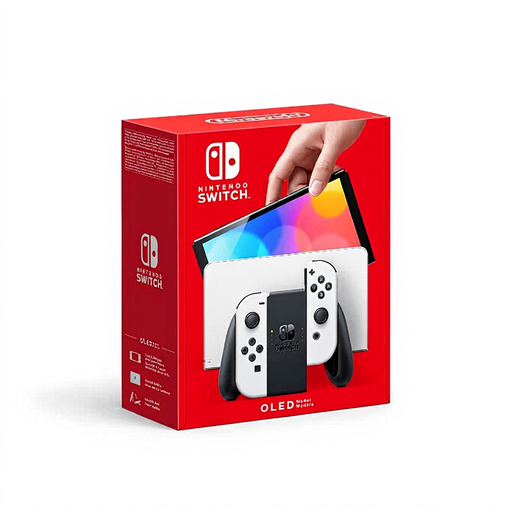
Nintendo Switch OLED White
Tabletop mode lets you play without a separate monitor, although the stand and separate Joy-Con controllers do take up desk space.
Nintendo lists a 7-inch OLED screen and 64 GB of system memory for the OLED model. A compatible microSD card is sold separately.
View at Joybuy
Frequently asked questions
Do I need a separate screen to play at my desk?
Not with a handheld or a Switch in tabletop mode: both have a built-in screen. You’ll need to make room for a suitable screen if you have a PS5 home console.
Can I connect a Nintendo Switch Lite to my desk monitor later?
No. Nintendo says the Switch Lite does not support TV mode and cannot be connected to a screen using the Switch dock.
How can I check a mystery game before buying a console?
Search for the exact title and model in the platform’s store. Check older Switch games individually for compatibility with Switch 2, and check the Deck status for each Steam game.
What extra equipment might I need?
It depends on what you already have and which model you choose. You may need a dock or hub to connect a separate screen to a Steam Deck; check your storage needs for a Switch OLED and the included power supply for the ROG Xbox Ally.
What rules apply when buying online in the Netherlands?
According to the Dutch government, many distance purchases come with a 14-day cooling-off period, subject to terms and exceptions that may vary by purchase. Government guidance says electronic products placed on the EU market must carry a CE marking; this does not confirm that an individual offer complies.


