If you’re playing mystery games and have few spare sockets, choose a controller that works with both your device and the specific game. Then compare AA batteries, charging via an existing USB port and wired play. Your choice comes down to playing without a charging break, having a USB port available or running a cable across your play area. A wireless connection to your device doesn’t automatically mean the game supports controller input.
Who is this choice for?
Player with limited charging options
You want to play a mystery game without using an extra plug socket or a dedicated charging dock. Compare AA batteries with charging via a USB port you already have available. Xbox Support lists AA batteries as a power option for the Xbox Wireless Controller; Nintendo says the charging grip for the original Switch has a USB port for charging the original Switch Pro Controller.
PC player with a specific game in mind
You want to know whether your mystery game supports gamepad controls and whether the controller works with your PC in the connection mode you’ve chosen. Valve explains that Steam Input lets you configure input devices, but you should also check whether the game itself supports controller input.
Console player who wants to sit further away
You want to play without a cable, but need a controller that works with your exact console version. Nintendo says the Switch 2 Pro Controller works only with the Switch 2, not the original Switch.
What should you look for?
| What to consider |
What should you check? |
Who is this important for? |
| Compatibility |
Check the console version or operating system, the connection mode and whether the specific game supports gamepads. |
I don’t want to find out after buying that my mystery game doesn’t support a gamepad. That’s why around 33% of consumers prioritise compatibility between their device, game and controller. |
| Power |
Check the power source, available USB ports and whether rechargeable AA batteries need to be charged separately. |
I want to play or charge without reserving an extra socket for my controller. That’s why around 27% of consumers prioritise power options that don’t need an extra plug. |
| Freedom of movement |
Check whether a cable can run safely across your play area and whether a wireless receiver needs a spare USB port. |
I want to play from where I’m sitting without a cable getting in the way, and keep walkways clear. That’s why around 20% of consumers prioritise playing without a cable. |
| Controls and features |
Check which buttons and extra features your game supports, and what type of connection they require. |
I want to use buttons to follow prompts and navigate menus, or use an extra feature if my game supports it. That’s why around 20% of consumers prioritise controls and in-game features. |
What to watch out for when buying
-
Assuming rechargeable AA batteries charge inside the controller
Xbox Support says rechargeable AA cells don’t charge inside the Xbox Wireless Controller. So, just because the controller has a USB port doesn’t mean you can charge these batteries there.
Choose between AA batteries and a compatible rechargeable battery pack. Also check what’s included with the specific version.
If you use rechargeable AA cells, you’ll need a separate, compatible way to charge them.
-
Confusing controllers or console versions with similar names
Different versions may offer different platform support or connection modes. For example, Nintendo says the Switch 2 Pro Controller doesn’t work with the original Switch.
Before buying, check the full model name, your console version and the connection mode you plan to use.
-
Assuming that pairing means a game will work properly
A PC may connect to a controller even if a specific game doesn’t support it, or only supports it partially. PlayStation also says that, on PC, DualSense haptics require a USB connection when supported by the game.
Check controller support and controls for each game. If you want haptic feedback on PC, don’t assume a wireless connection will be enough.
Relevant brands
Xbox
An option for compatible Xbox consoles, Windows PCs and other listed devices, including models with replaceable batteries.
- Microsoft lists Xbox Wireless and Bluetooth as connection options. Xbox Support describes AA batteries and a separate rechargeable battery pack as power options.
- Xbox Support says rechargeable AA batteries don’t charge inside the controller. Check the version, packaging and support for your game.
Nintendo
The original Switch Pro Controller is designed for the original Switch; the Switch 2 Pro Controller is a separate product line for Switch 2.
- Nintendo estimates that the original Switch Pro Controller lasts around 40 hours on a full charge. According to Nintendo, the included charging cable can be plugged into an available USB port on the Switch dock.
- The quoted battery life is an estimate and may vary depending on how you use the controller. Nintendo says the Switch 2 Pro Controller works only with Switch 2.
PlayStation
DualSense is an option for PS5 and for compatible games on PCs and other devices supported by PlayStation.
- PlayStation describes Bluetooth and USB connections with the systems listed.
- According to PlayStation, DualSense haptics on PC require a USB connection, and the game must support the feature.
PowerA
The Enhanced Wired Controller is a wired option for Xbox Series X|S, Xbox One and Windows.
- PowerA lists a detachable 3-metre USB cable and programmable buttons for this model.
- The cable uses a USB port and needs to run safely and conveniently across your play area.
8BitDo
The Ultimate 2C Wireless and Ultimate 2C Bluetooth are different versions with their own platform support.
- For the Ultimate 2C Wireless, 8BitDo lists a USB-A receiver and support for Windows via 2.4 GHz or cable, and Android via Bluetooth.
- 8BitDo states that the Wireless version offers 19 hours of play over 2.4 GHz under ideal conditions. The Bluetooth version is designed for Switch and Switch 2, so check which one you need.
Controllers at Joybuy
This selection includes wired and wireless controllers for the Xbox, PS5, Nintendo Switch and PC scenarios mentioned above. Before buying, check that the version works with your device and mystery game.
 No image available
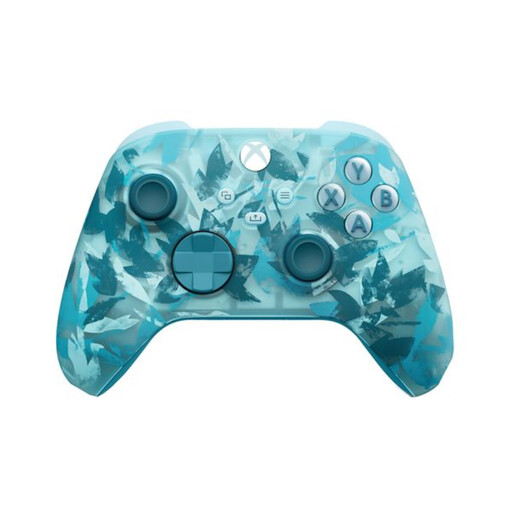
Xbox Wireless Controller for Xbox Series/PC - Ice Breaker Special Edition
A wireless controller for playing on a compatible Xbox console or PC without a cable getting in the way.
Rechargeable AA batteries don’t charge inside the controller, so you’ll need a separate way to charge them.
Joybuy
 No image available
PS5 DualSense Wireless Controller V3 - Cosmic Red
A wireless PS5 controller for playing without a cable attached to the controller.
Charging requires a USB connection. PlayStation says DualSense haptics on PC require a USB connection if the game supports the feature.
Joybuy
 No image available
Nintendo Switch Pro Controller - Black
For players using the original Nintendo Switch who want a wireless controller. Nintendo estimates that this model lasts around 40 hours on a full charge, depending on how it’s used.
Nintendo says you can charge it via an available USB port on the Switch dock.
Joybuy
 No image available
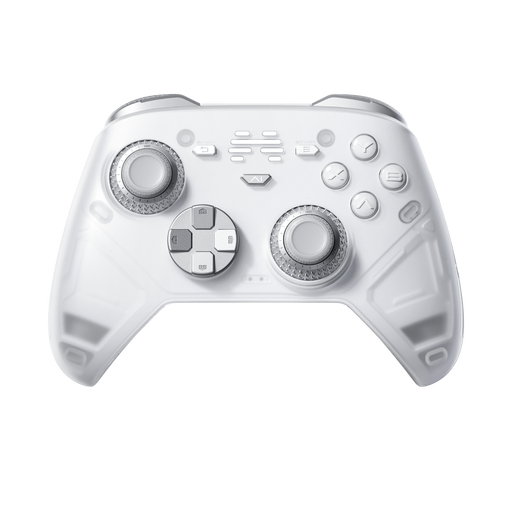
BEITONG KP70 Elite Wireless Gaming Controller
A wireless option for anyone looking for a controller for the platforms listed in the product name, including PC and Nintendo Switch. Check the full model and platform details for your device.
Joybuy
 No image available
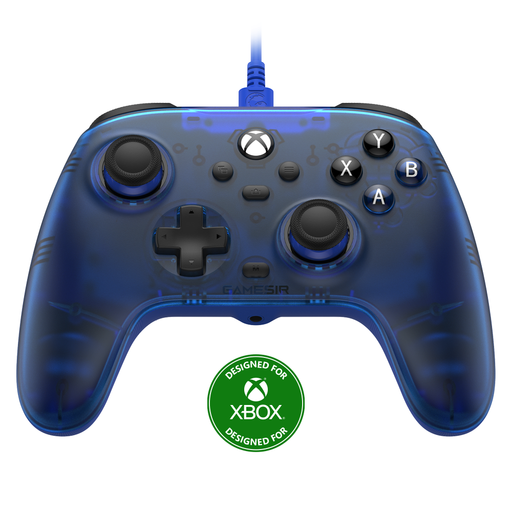
GameSir T7 Wired Xbox Controller
A wired Xbox controller for anyone who doesn’t want to charge a controller battery and can use a USB cable while playing.
Check that the cable can run conveniently from your play area and that your device and game support the controller.
Joybuy
Frequently asked questions
Will every PC controller work with every mystery game?
No. Check whether your specific game supports controllers and how its buttons are mapped. Valve says Steam Input offers configuration options, but that doesn’t mean every game works well with a controller.
Can you charge rechargeable AA batteries by connecting an Xbox Wireless Controller via USB?
No. Xbox Support says rechargeable AA batteries don’t charge inside the controller. Xbox lists a separate rechargeable battery pack as an option for charging inside the controller.
How can you charge an original Nintendo Switch Pro Controller without an extra plug-in adapter?
Nintendo says to charge it using the included USB cable connected to an available USB port on the Switch dock. Nintendo estimates that a full charge takes around six hours, so make sure that port is free when you want to charge.
Does the Switch 2 Pro Controller also work with the original Switch?
No. Nintendo says the Switch 2 Pro Controller works only with the Nintendo Switch 2. Check your console version before choosing a controller.
Does DualSense haptics work on PC via Bluetooth?
For compatible PC games, PlayStation says DualSense haptics require a USB connection. Also check whether the game supports the feature.


