
PC puzzle fan
Wants to know whether their mystery game can be played with a gamepad, especially when investigating clues with a cursor. Valve Steam Support explains that gamepad commands only work when a game supports them.


First, check whether your mystery game supports gamepad controls on your device: a controller that connects won’t automatically work with every game. Then choose one with a grip and button layout that suit your hands, and consider how you want to manage power during a long session. Valve Steam Support explains that gamepad commands depend on support from the game; a stated battery life, such as a manufacturer’s estimate, doesn’t prove that a controller will feel comfortable in your hands.
Wants to know whether their mystery game can be played with a gamepad, especially when investigating clues with a cursor. Valve Steam Support explains that gamepad commands only work when a game supports them.
Wants a grip and power setup that work well for extended play. A manufacturer’s stated battery life, such as those from Microsoft, 8BitDo or Nintendo, isn’t a personal comfort test.
Wants a controller for their particular PS5, Xbox or Nintendo Switch model and wants to know whether the chosen game supports its extra features. Sony and Nintendo describe features and compatibility for each controller and system.
First, check that your game and device support the controller. Then compare the grip, button layout and power options; extra features only matter if your game uses them.
| What to consider | What should you check? | Who should pay particular attention? |
|---|---|---|
| Game and device compatibility | Check whether your specific mystery game supports gamepad controls and whether the controller is designed for your device and connection method. | I want to be sure I can use a controller to investigate clues, navigate menus and perform actions in my game; around 36% of consumers prioritise game and device compatibility. |
| Grip and button reach | Consider the shape and grip texture, and check that you can comfortably reach the directional pad, sticks and shoulder buttons. | For a long session, I want a grip that suits my hands and buttons that are easy to reach; around 29% of consumers prioritise hand comfort above all else. |
| Power | Check whether the model uses batteries, a rechargeable battery or a cable, and whether any required cables or adapters are included. Manufacturer battery-life estimates can vary depending on the model and connection. | I don’t want to have to stop unexpectedly to recharge or change batteries; around 21% of consumers focus on uninterrupted play and power management. |
| Customisable controls | Check which buttons you can customise and whether your device and game support those settings. | If I perform the same actions often, I may want to remap them; around 14% of consumers prioritise customisable controls. |
A controller may connect to your PC even if the game doesn’t recognise the gamepad commands you want to use. Configuration can help with some games, but it doesn’t guarantee support.
Check the controls for your mystery game before choosing a controller based on its extra features.
A controller may offer different connection options for different devices. The 8BitDo Ultimate 2C Wireless lists 2.4 GHz or a cable for Windows, and Bluetooth for Android.
Check the connection specified for your device and see which cables or adapters are included with the version you’ve chosen.
Battery life depends on the model and conditions. Nintendo estimates around 40 hours for the Switch Pro Controller; 8BitDo states 19 hours for the Ultimate 2C Wireless at 2.4 GHz under ideal laboratory conditions.
Compare the power type and charging options as well as the stated hours. Treat those figures as manufacturer estimates, not a guarantee of how long your session will last.
Your statutory rights depend on what you can reasonably expect from the product and are separate from any manufacturer’s warranty.
Keep your proof of purchase and contact the retailer if the product is faulty.
The Xbox Wireless Controller is worth considering if you switch between Xbox and devices such as Windows PCs.
DualSense is designed for PS5; PC use may have limitations that vary from game to game.
Nintendo makes separate Pro Controllers for Switch and Switch 2, so check which system you have.
The Ultimate 2C Wireless is worth comparing if you use Windows or Android and want to check the connection for each device.
The wired G7 SE may suit a fixed Xbox or Windows setup where using a cable is convenient.
This selection includes DualSense versions for PS5 and listings for controllers for PS4 and PC, or Switch and PC. Before buying, check that your specific game and device support the controls you want to use.
 No image available
A PS5 option to consider if you’re looking for DualSense controls for a mystery game.
The product description lists haptic feedback, adaptive triggers, a rechargeable battery and Bluetooth or USB-C connectivity. Haptic feedback and adaptive triggers depend on support from the game.
 No image available
An option to consider if you’re looking for a controller for PS4 or PC. Gamepad controls on PC depend on support from the specific game.
The product description lists a touchpad, gyroscope, dual vibration and an included charging cable.
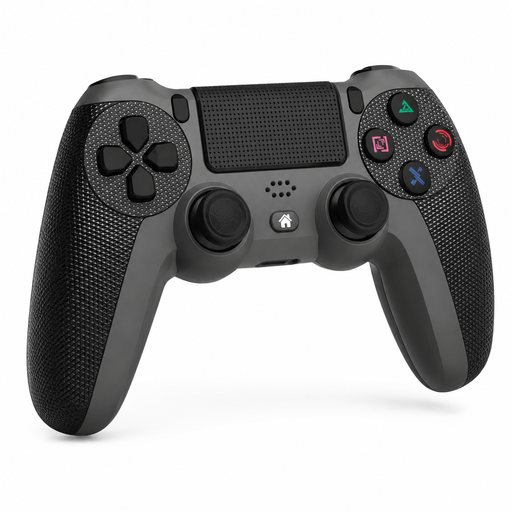 No image available
A product listing for PS4 models and PC. If you’re using it with a PC, also check that your mystery game supports gamepad controls.
The description lists a touchpad, six-axis gyroscope, dual vibration, a turbo function and an included charging cable.
 No image available
A product listing for Switch and PC. Check that your device and specific mystery game support the controls you want to use.
The product description lists dual vibration motors, a gyroscope sensor and an ergonomic design for longer gaming sessions.
 No image available
A DualSense version for a PS5 mystery game; extra controller features depend on support from the game.
The product description lists haptic feedback, adaptive triggers, a rechargeable battery and Bluetooth or USB-C connectivity.
No. Connecting to a PC doesn’t automatically mean the game will recognise gamepad commands. Check the controls for your specific game. For some PC games, a Steam Input configuration may help, but support still depends on the game.
Check which connection is specified for your device. According to 8BitDo, the Ultimate 2C Wireless uses 2.4 GHz or a cable with Windows, and Bluetooth with Android; the GameSir G7 SE has a wired USB-C connection.
Check the power type, charging options and any included cables. Nintendo estimates around 40 hours of battery life for the Switch 2 Pro Controller; 8BitDo states 19 hours for the Ultimate 2C Wireless at 2.4 GHz under ideal laboratory conditions. These figures don’t guarantee how long your session will last.
ACM ConsuWijzer states that online purchases come with a 14-day cancellation period after delivery. Statutory rights are separate: if a product doesn’t meet what you can reasonably expect from it, you can raise the issue with the retailer. Any manufacturer’s warranty doesn’t replace those rights.