
Console mystery gamers
You play from the sofa on a PS5, Xbox or Switch 2 and want to know whether the controller works with both your console and the specific game.


Start with the device your mystery game runs on and check whether that specific game supports controller input; playing on a big screen doesn’t change compatibility. Then choose based on the controls you need, how you’ll connect from your seat and how comfortable the controller feels. Extra features only matter if your game and connection support them.
You play from the sofa on a PS5, Xbox or Switch 2 and want to know whether the controller works with both your console and the specific game.
You connect a PC to a big screen and want to play from your seat, even if a mystery game involves lots of pointing and clicking.
You want to play directly on a compatible smart TV. Check that your TV model, service, game and controller all work together.
Choose this if: you play on an Xbox or Windows PC and are looking for a controller for those devices.
The trade-off: controller support doesn’t mean that every PC game can be played entirely with a controller.
Choose this if: you play on PS5, or have a PC game that supports DualSense.
The trade-off: Sony says adaptive triggers require in-game support; haptic feedback on PC also requires a USB connection.
Choose this if: you play your mystery game on a Switch 2 and want to use that console’s controls.
The trade-off: Nintendo says the Switch 2 Pro Controller is only for Switch 2; an existing Switch Pro Controller can also be synced wirelessly with Switch 2.
Choose this if: your PC has an available USB port and your game supports controller input.
The trade-off: the 8BitDo Ultimate 2C Wireless’s described 2.4GHz connection uses a receiver plugged into the Windows PC; the stated compatibility doesn’t prove that it works with consoles.
Choose this if: you play directly on a Samsung TV and the TV, service, game and controller are all supported.
The trade-off: Samsung limits cloud gaming to certain TV models; check which services and games are available too.
| What to consider | What should you check? | Who should pay extra attention? |
|---|---|---|
| Device and game | Check the full game title, version, the device it runs on and the stated controller support. | I want to avoid being unable to play properly from the sofa because my game or device doesn’t support the controller. Around 28% of consumers put device and game compatibility first. |
| Pointing and clicking | See how the game is controlled and whether its game page mentions controller support. | If my puzzle game involves lots of cursor work, I want to know whether using a controller is practical. Around 22% of consumers give pointing and clicking top priority. |
| Connection from the sofa | Check how the model connects and whether your gaming device supports the required port or wireless method. | I want to play from my seat without a cable or receiver getting in the way. Around 22% of consumers pay particular attention to the connection from the sofa. |
| Comfort and buttons | Compare the shape, grip and button layout; check that the buttons you use most are easy to reach. | For a relaxing puzzle session, I want a controller that feels comfortable in my hands and has easy-to-reach buttons. Around 17% of consumers put comfort and button reach first. |
| Power and gaming service | Check how your chosen model is powered and whether your TV and cloud gaming service support the game you want. | I want to know in advance what my chosen gaming setup needs to keep working, from the controller’s power source to game availability. Around 11% of consumers pay closest attention to this. |
A console, PC and cloud gaming service used with a TV each have their own compatibility requirements. A big screen doesn’t automatically make a controller suitable for the game.
First work out what the game runs on, then check the device, game and controller as a combination.
Sony says that haptic feedback on PC requires both in-game support and a USB connection. Adaptive triggers also depend on support from the game.
Check which features your game supports before choosing a controller for its extra feedback.
For haptic feedback on PC, you may need a USB cable or a different setup from your seat.
Samsung says cloud gaming is available on certain TV models; the services and games available may vary depending on your setup.
Check that your TV model, chosen service and preferred game are supported before choosing this option.
The Xbox Wireless Controller is an option for playing on an Xbox or Windows PC connected to your TV.
DualSense suits PS5 players and supported PC games where the controller’s features matter.
The Switch 2 Pro Controller is designed for mystery games on a Switch 2.
The Ultimate 2C Wireless is an option for a Windows PC setup that uses a USB receiver.
The G7 SE offers a wired option for Xbox and PC if a cable from your seat is practical.
These products are suited to gaming on Xbox or PC, PS5 and Nintendo Switch 2. Always check that your specific mystery game supports your device and controller.
 No image available
Suited to an Xbox or Windows PC setup; check whether your mystery game supports controller input.
This version is Robot White.
 No image available
A wired option for Xbox or PC when the cable works well with your seating position.
The product name lists Xbox Series X/S, Xbox One and Windows 10/Windows 11. Bear in mind the distance between your seat and gaming device.
 No image available
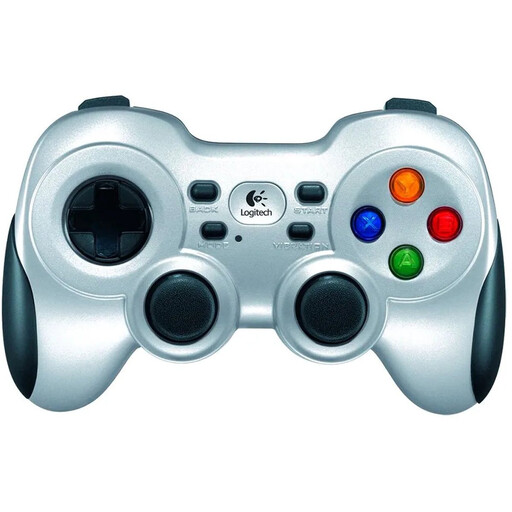
A wireless controller for a PC setup with a big screen; check that your game and gaming device support it.
The product name lists PC use and the colour Silver.
 No image available
Suited to playing on PS5; Sony also lists PC support for certain devices and games.
Haptic feedback and adaptive triggers depend on support from the game; according to Sony, haptic feedback on PC requires a USB connection.
 No image available
An option for a mystery game on Nintendo Switch 2; Nintendo says this controller model is only for that console.
This version is Black. Check whether the game supports the controller input you want.
No. Check which device the game runs on and whether that specific game supports that controller. A big screen doesn’t add controller support.
For the 2.4GHz connection described by 8BitDo, plug the receiver into a USB port and set the controller to the specified mode. The manual lists Windows 10 version 1903 or later for this connection method.
Not necessarily: according to Sony, haptic feedback on PC requires a USB connection and support from the game. Adaptive triggers also depend on in-game support.
No. Samsung lists certain compatible TV models, and the services and games available may vary. Check that your TV, service and preferred game are supported.
For eligible online consumer purchases, the Dutch government generally provides a 14-day cooling-off period. You’re also entitled to a product that meets the required standards; according to the Dutch government, there’s no fixed statutory warranty period for all products in the Netherlands.
The Dutch Authority for Digital Infrastructure outlines European requirements for electrical, electronic and radio equipment sold on the market. Equipment that meets the applicable requirements carries a CE mark; a statement on an online shop page alone doesn’t prove that a specific item complies.