First, choose a controller that works with your device and the specific mystery game. Features such as lighting or haptics are only useful if the game supports them. The wired GameSir Kaleid Flux has LED strips for certain Xbox and Windows devices, but that doesn’t mean the action buttons light up. On PS5, the DualSense may be worth considering for games with haptics or adaptive triggers. If you want to play without a cable, also check the connection and power requirements of your chosen model.
Who is this guide for?
Players who want to check compatibility first
You play on a particular console or PC and want to know whether both your device and your mystery game support the controller. The features listed vary by model, and support for special functions can also vary from game to game.
Players who want to find the buttons in the dark
You want to be able to identify your controller without losing the atmosphere of a dark room. GameSir lists LED strips for the Kaleid Flux, but this doesn’t confirm that the action buttons themselves are illuminated.
Players who care about feel or layout
You’re looking for tactile feedback or controls that feel comfortable while you explore. With the DualSense, haptics and adaptive triggers depend on the game; on PC, additional PlayStation requirements apply.
What should you consider when choosing?
Wired with LED strips: GameSir Kaleid Flux
A good fit if: you play on a supported Xbox or Windows PC and a 3 m cable suits your set-up.
Bear in mind: it’s a wired controller; the LED strips may be distracting and don’t mean the action buttons are illuminated. GameSir lists the supported platforms and cable specification.
PS5 features: Sony DualSense
A good fit if: you play on PS5 and your game supports haptic feedback or adaptive triggers.
Bear in mind: PlayStation says that haptics on PC depend on game support and require a USB connection.
Wireless for Xbox or Windows: Xbox Wireless Controller
A good fit if: you want to play wirelessly on a supported Xbox or Windows PC.
Bear in mind: check the power requirements and whether your game supports controller input; the listed features don’t confirm that the buttons are illuminated.
Nintendo Switch: Switch Pro Controller
A good fit if: your mystery game on a supported Switch system offers controller input and you’re looking for motion controls or HD Rumble.
Bear in mind: Nintendo estimates battery life at around 40 hours, depending on use; this is not the same model as the Switch 2 Pro Controller.
Wireless for PC with charging dock: 8BitDo Ultimate 2 Wireless Controller
A good fit if: you use a supported Windows PC and a charging dock is important to you.
Bear in mind: 8BitDo lists Windows and Android; don’t assume this means it’s compatible with Xbox, PS5 or Switch.
First, check that your device and game are supported. Steam offers filters for supported controller types, but you should also check the information for the specific game.
| What to consider |
What to look for |
Who should pay extra attention? |
| Device and game |
Check which devices the exact model supports and the controller information for your game. |
If I play on one console or PC, I want to know in advance whether both the device and my mystery game support the controller. Around 36% of consumers put compatibility first. |
| Lighting in the room |
Check which part actually lights up and whether you find the lighting comfortable while playing. |
In a dark room, I want to be able to orient myself around the controller without the light overpowering the atmosphere. Around 28% of consumers give finding their way in the dark top priority. |
| Feel and layout |
Check whether each game supports haptics and triggers; also consider your preferred button layout. |
If tactile feedback or a familiar layout matters to me while exploring, I want to know whether my game supports those features. Around 18% of consumers prioritise tactile controls. |
| Cable and charging |
Check the connection type, the distance to your device and the model’s power or charging requirements. |
I want to be able to play from where I sit, so I take into account either a cable or charging. Around 18% of consumers give the freedom to move without a cable top priority. |
Avoiding common buying mistakes
-
Assuming LED strips mean illuminated action buttons
GameSir lists LED strips for the Kaleid Flux. This doesn’t mean that the letters or symbols on the action buttons light up.
Check exactly which part lights up, and don’t choose a controller based on the RGB label alone.
-
Confusing a PC connection with full support for special features
According to PlayStation, haptic feedback on PC depends on the game, and using it requires a USB connection.
Check whether the feature works with each game and connection before making it the deciding factor.
-
Confusing a Switch Pro Controller with a Switch 2 Pro Controller
Nintendo describes this as a Switch Pro Controller and provides separate pairing information for Switch and Switch 2 systems.
Compare the full product name with your system and check that your game supports the controller.
-
Failing to compare an extended warranty with your existing rights
According to the Dutch government, you’re entitled to a product that works properly, and there’s no fixed statutory warranty period. An extended warranty is only worth considering once you’ve checked what extra cover the terms provide.
Check what service or cover the extended warranty offers, and contact the seller if the product is faulty.
Relevant brands
GameSir
For anyone looking for a wired controller with LED strips for a supported Xbox or Windows PC.
- For the Kaleid Flux, GameSir lists Hall Effect sticks, extra buttons and a detachable 3 m USB-C cable.
- The Kaleid Flux is wired; its LED strips don’t confirm that the action buttons are illuminated.
Sony PlayStation
For PS5 players whose games use haptic feedback or adaptive triggers.
- PlayStation lists haptic feedback and adaptive triggers for the DualSense.
- On PC, haptics depend on the game and, according to PlayStation, require a USB connection.
Xbox
For Xbox and Windows players looking for a wireless controller layout.
- Xbox lists a textured grip, hybrid D-pad and support for Xbox, Windows, iOS and Android.
- Check that your specific game is supported; this product information doesn’t confirm that the action buttons are illuminated.
Nintendo
For supported Switch games where you want a directional pad, motion controls or HD Rumble.
- Nintendo lists a directional pad and estimated battery life of around 40 hours, depending on use.
- Check your exact Switch system and game; don’t confuse this model with the Switch 2 Pro Controller.
8BitDo
A wireless option with a charging dock for supported Windows and Android devices.
- 8BitDo lists compatibility with Windows and Android, as well as an integrated charging dock.
- The information provided doesn’t confirm that this model is compatible with Xbox, PS5 or Switch.
Controllers at Joybuy
This Joybuy selection includes controllers for Xbox and Windows, Nintendo Switch and PS5. First, compare support for your device and game; then consider lighting, connection and controls.
 No image available
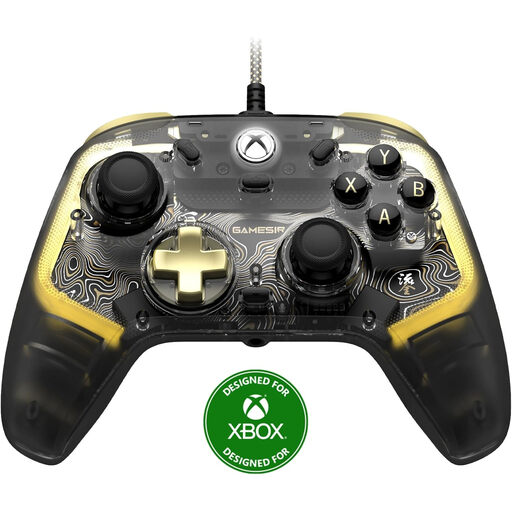
GameSir Kaleid Flux Smoke Transparent RGB Wired Xbox Controller
A wired option for supported Xbox and Windows devices if LED strips suit the way you play.
GameSir lists a detachable 3 m USB-C cable. The LED strips don’t mean the action buttons are illuminated.
View at Joybuy
 No image available
Xbox Wireless Controller Pulse Red
A wireless option to consider if you play on a supported Xbox or Windows PC and want to play without a cable.
Check that your mystery game supports controller input; compatibility with a device alone doesn’t confirm this.
View at Joybuy
 No image available
Nintendo Switch Pro Controller Black
For anyone who wants to play a supported Switch game with a directional pad, motion controls or HD Rumble.
Nintendo lists battery life of around 40 hours, depending on use. This is the Switch Pro Controller, not the Switch 2 Pro Controller.
View at Joybuy
 No image available
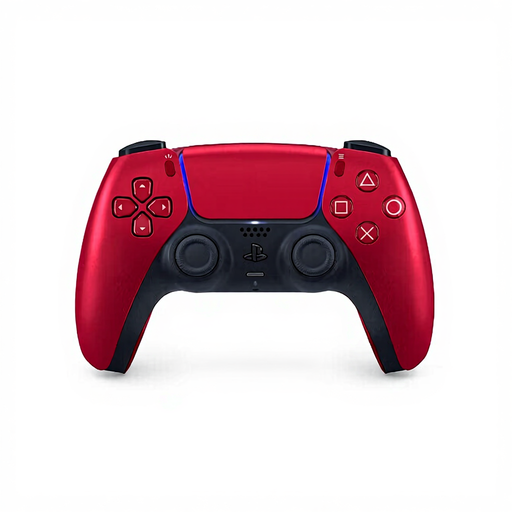
Sony PlayStation 5 DualSense Wireless V2 Controller Volcanic Red
A PS5 controller to consider if your game supports haptic feedback or adaptive triggers.
PlayStation says that haptics on PC depend on game support and require a USB connection.
View at Joybuy
 No image available
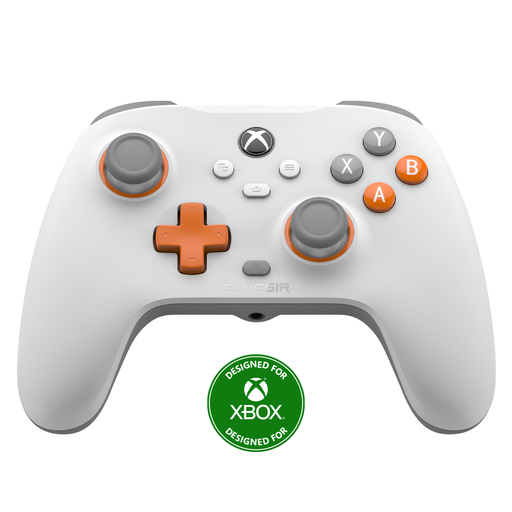
GameSir T7 Wired Xbox Controller with Hall Effect Joysticks and Triggers, White
A wired controller to consider if you play on one of the listed Xbox or Windows devices.
The product name lists Hall Effect joysticks and triggers. Check that your game supports the controller.
View at Joybuy
Frequently asked questions
Will a controller automatically work with every mystery game on PC?
No. Check support for the specific game. Steam offers filters for supported controller types, but a compatible connection alone doesn’t confirm that the game supports controller input.
How do you connect the GameSir Kaleid Flux?
According to GameSir, the Kaleid Flux is wired and has a detachable 3 m USB-C cable. The listed devices are Xbox Series X|S, Xbox One and Windows 10/11; check that the cable reaches your playing area.
Does DualSense haptic feedback work on PC?
It depends on the game and the connection. PlayStation says that haptic feedback on PC requires game support and a USB connection.
Is a Switch Pro Controller the same as a Switch 2 Pro Controller?
No. Check the full product name and whether your system supports it. Nintendo describes the Switch Pro Controller as a separate model.
What can you do if the controller turns out to be faulty after purchase?
According to the Dutch government, you’re entitled to a product that works properly in the Netherlands, and there’s no fixed statutory warranty period. Contact the seller if the product is faulty; an extended warranty doesn’t replace those rights.


