What should you look for when buying?
Wired USB computer headset
A good fit if: you’re recording on a compatible computer and want to listen back straight away.
Bear in mind: the cable limits how freely you can move around while practising.
Separate wired headworn microphone
A good fit if: you’re practising standing or walking and have a compatible bodypack or microphone input.
Bear in mind: the microphone isn’t automatically a complete recording and monitoring setup.
Wireless presentation setup
A good fit if: freedom of movement matters and you can put together the complete transmitter-and-receiver chain.
Bear in mind: you’ll also need to check the frequency requirements for the location where you’ll be practising.
First, choose a recording setup that suits the way you practise. Then check that the microphone position, connection and fit work for the way you speak.
For consumers choosing a microphone for this type of practice, the percentages below give a general indication of the main purchase priority. Each row covers one priority.
| Consideration |
What should you check? |
Who is this important for? |
| Microphone position |
Check that you can place the arm at the corner of your mouth, then make a test recording with words containing p and b sounds. |
If you want to compare recordings with the microphone in a consistent, close position, this should be your priority. Around 33% of consumers give microphone placement top priority. |
| Connection and recording setup |
Check the USB-A, USB-C or other connector, the recording app, and any power supply or additional equipment you may need. |
If you want to record without extra steps, check that your microphone connects directly to your recording device. Around 27% of consumers give a working recording connection top priority. |
| Comfort and listening back |
Compare the fit and controls of the exact model; a standalone headworn microphone doesn’t replace headphones. |
For repeated speaking and listening sessions, it matters whether the fit feels comfortable to you. Around 20% of consumers give comfort and listening back top priority. |
| Freedom of movement |
Check the cable length or, if using a wireless setup, the complete set and the frequency requirements at your practice location. |
If you want to practise your presentation while walking, a cable may restrict your movement. Around 20% of consumers give freedom of movement top priority. |
Wired headsets at Joybuy
This selection focuses on wired headsets for practising with a computer or a device with a compatible 3,5mm or USB connection. Check that each headset’s connector is compatible with your recording device.
 Image unavailable
Trust GXT 498W Forta, white
Suitable for practising with a device that has a compatible 3,5mm connection; the microphone is flexible and detachable.
Wired connection with a 1,2 m cable. The cable may restrict your movement if you practise while walking.
View at Joybuy
 Image unavailable
AOC wired gaming headset
May suit practice on a PC if your device has a compatible 3,5mm connection; the description mentions an adjustable microphone.
The description lists a weight of 207 g and breathable ear cushions. Check your recording device’s connection.
View at Joybuy
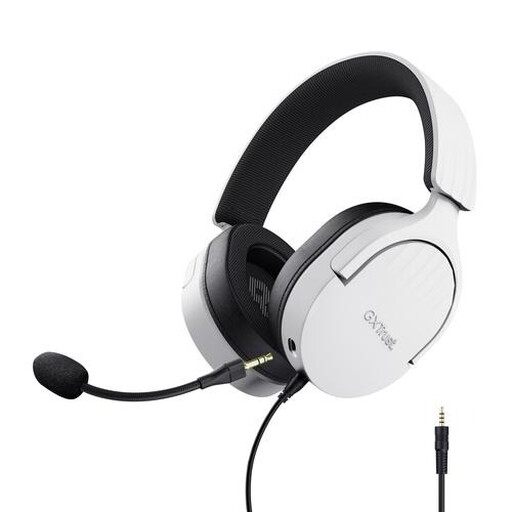 Image unavailable
Trust GXT 489W Fayzo, white
For practising on a PC with a compatible 3,5mm connection; the microphone is flexible and detachable.
Wired, with a stated audio cable length of 1,2 m. The cable may restrict movement if you practise while walking.
View at Joybuy
 Image unavailable
Trust Ayda USB-A with USB-C adapter cable
For computer practice when the USB connection suits your device; the headset has an on-ear fit and controls on the earcup.
The description lists a USB-A connection, USB-C adapter cable, a stated cable length of 180 cm and a weight of 141 g.
View at Joybuy
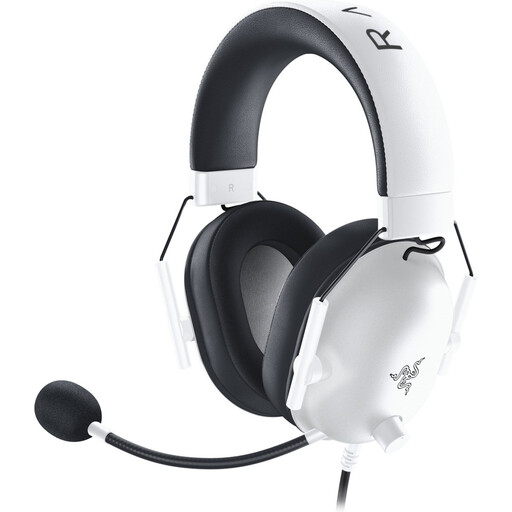 Image unavailable
Razer BlackShark V2 X White
For speech practice with a compatible device; the description mentions PC compatibility, a microphone and a 3,5mm connection.
The description lists a cardioid microphone, a weight of 240 g and a 130 cm cable. The cable may restrict movement if you practise while walking.
View at Joybuy
Frequently asked questions
Where should you position the microphone when practising?
For the SM35, Shure recommends positioning the microphone at the corner of your mouth, rather than directly in front of it, to reduce plosive sounds. Use this as a starting point and make a test recording with the microphone you plan to use.
Can a standalone headworn microphone record directly to your laptop?
You can’t tell from the microphone’s shape alone. The Shure SM35 includes a TA4F model with specific power requirements, while the Sennheiser Headmic 4 EW has a connector for a compatible bodypack. Check the exact connector and the complete signal path to your laptop.
How should you store a headworn microphone after practising?
For the SM35, Shure recommends storing the microphone dry and allowing any perspiration to dry completely first. Follow the manufacturer’s care instructions for other models.
Do you need a licence for a wireless microphone in the Netherlands?
Not always. According to the Dutch Authority for Digital Infrastructure, a licence is usually not required for wireless microphones, but the right frequencies and conditions of use are key. Some bands do require a licence, and usable frequencies can vary by location. Check the frequency band, power and intended practice location for the specific set.
What are your rights if a headset bought online isn’t suitable or stops working?
For an online purchase by a consumer, you’ll generally have a statutory 14-day cooling-off period from delivery, subject to exceptions. If the product is faulty, you also have statutory consumer rights: according to ACM ConsuWijzer, statutory guarantees in the Netherlands don’t have a fixed term of exactly two years for every product. Consumer rules don’t automatically apply when an organisation, such as a museum, makes the purchase.


