First, check how the museum provides its audio tour. A web version may mean you can avoid downloading an app, although the Rijksmuseum van Oudheden says you’ll need an internet connection; Wereldmuseum Amsterdam mentions loan devices. Then choose wired earbuds if they’re compatible with your device and you’d rather not charge them, or wireless earbuds if freedom of movement matters more. Check the fit and whether you can still hear enough of your surroundings. Earbuds themselves won’t free up storage on your phone.
Who are these options for?
Visitor with a full phone
This visitor wants to follow the audio tour without automatically having to save an extra app or tour file. The Rijksmuseum van Oudheden offers a web version that requires an internet connection, while Wereldmuseum Amsterdam mentions free loan devices. Check which options your museum offers.
Visitor who wants to stay alert to others
This visitor wants to follow the commentary while still noticing directions or conversations in the galleries. Compare the fit and ambient sound features. Sony and JBL list these features for specific models, but that doesn’t prove that every museum voice will be easy to understand.
Visitor on a long listening route
This visitor wants to listen without having to stop and recharge. The Consumers’ Association points out that total battery life can include charges from the case, so compare listening time per charge and the settings available on the exact model.
What should you look for in earbuds for a museum audio tour?
No new earbuds
Choose this if: you already have a suitable pair of earbuds or the museum offers a loan device that will work for you.
Bear in mind: facilities vary from museum to museum, so check whether the loan device works with your earbuds.
Wired earbuds
Choose this if: your device has a compatible audio socket and you don’t want to carry a charging case.
Bear in mind: a cable can get in the way as you walk. Also check that your device supports the specific model.
Wireless earbuds
Choose this if: you want to walk without a cable and be able to put your earbuds away in a case between stops.
Bear in mind: fit and listening time vary by model. Being able to hear your surroundings doesn’t guarantee you’ll understand every conversation.
| Key consideration |
What to check before buying |
Who might find this especially important? |
| Storage and access |
Check whether the museum offers a web version, Wi-Fi or a loan device, and test whether your existing earbuds work with it. |
If my phone is nearly full, I want to know first whether I can follow the tour without another download. Around 36% of consumers put storage and access at the top of their buying concerns. |
| Ambient sound |
Compare how well the earbuds seal and whether they have an ambient sound mode. Consider whether you also want to hear conversations in the galleries. |
I want to follow the commentary while still noticing directions or conversations. For around 29% of consumers, staying alert to others comes first. |
| Fit during the tour |
Check which earbuds or ear tip sizes are included, and read the returns policy before assessing the fit. |
If I’m walking or standing for a long time, I want my earbuds to feel comfortable and stay in place. Fit is the main buying concern for around 21% of consumers. |
| Listening time per charge |
Compare battery life per charge with the settings you plan to use, not just the total time including the case. |
I want to listen through a long visit without having to put my earbuds back in the case. Around 14% of consumers prioritise uninterrupted listening time. |
Common buying mistakes
-
Assuming new earbuds will free up phone storage
Earbuds won’t change how much storage an app or tour file takes up on your phone. Museums offer different ways to listen, such as a web version, Wi-Fi or a loan device.
Check the museum’s information first and see whether your existing earbuds will work with the listening option it offers.
-
Confusing total battery life with listening time per charge
The total battery life quoted may include charges from the case. Settings such as ambient sound or noise cancellation can also affect the stated battery life.
For the exact model, compare listening time per charge with the settings you plan to use during your visit.
-
Choosing based on the plug alone
A matching plug on its own doesn’t confirm that a pair of earbuds will work with your device. For example, Apple lists specific devices and minimum software versions for its USB-C EarPods; a 3.5 mm model also needs a compatible socket.
Check the connection, your device and the requirements for the exact model before placing your order.
Brands to compare
Sony
The WF-C510 is an example of wireless in-ear earbuds with an ambient sound mode, while the MDR-EX15LP and MDR-EX15AP offer wired options.
- Sony lists the WF-C510 at around 4,6 g per earbud, with up to 8 hours of listening time with ambient sound mode on, or 11 hours with it off.
- Sony lists a 3.5 mm plug for the MDR-EX15 variants. Check your device’s connection; the WF-C510 specifications don’t automatically apply to other models.
JBL
The Wave Beam 2 is an example of wireless in-ear earbuds with ANC and Smart Ambient, for anyone who wants to switch between listening and staying aware of their surroundings.
- JBL lists the Wave Beam 2 at 10 hours per charge, plus 30 hours from the case, with ANC off.
- That battery life doesn’t necessarily apply with ANC on, and it doesn’t indicate how clearly you’ll hear museum audio.
Apple
EarPods with USB-C are a wired option for devices that meet Apple’s compatibility requirements.
- Apple lists compatible USB-C Macs running macOS Monterey 12.6 or later, iPads running iPadOS 16.4 or later, and iPhones running iOS 17 or later.
- Don’t assume they’ll work with other phones; check the requirements for your device.
Philips
The TAT1209BK/00 is an example of compact wireless earbuds with a small charging case.
- Philips describes this model as offering Bluetooth streaming and a pocket-sized case.
- This product description doesn’t confirm a specific listening time or how clearly you’ll hear speech in a museum.
Earbuds at Joybuy
This selection includes wired USB-C earbuds and wireless earbuds with a range of designs and features. Choose based on your device’s connection, how much ambient sound you want to hear and whether you’re happy to use a cable.
 No image available
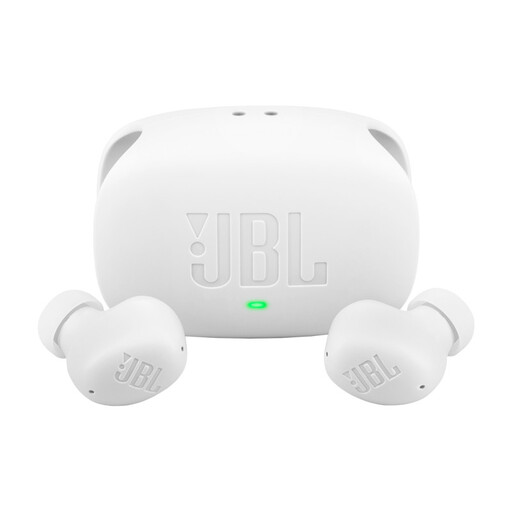
JBL Wave Buds 2 - White
For anyone who wants to listen wirelessly and compare ambient sound features. The product description mentions ANC and Smart Ambient, plus up to 10 hours per charge and 40 hours including the case with ANC off. This doesn’t indicate how clearly you’ll hear speech in a museum.
View at Joybuy
 No image available
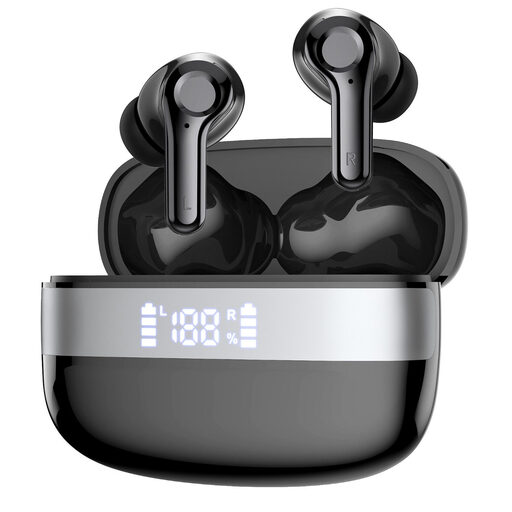
Bluetooth 5.4 in-ear earbuds with LED battery display, USB-C and 6–8 hours of playback
For anyone looking for wireless in-ear earbuds with a stated hands-free feature. The product title lists Bluetooth 5.4, USB-C and 6–8 hours of playback. Check what USB-C is used for on this model and whether its features are compatible with your device.
View at Joybuy
 No image available
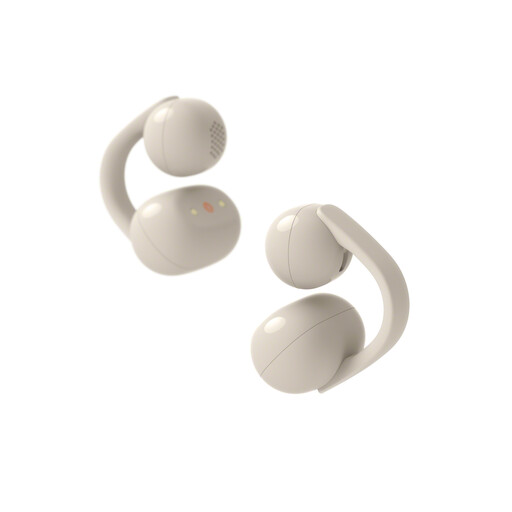
Sony WFLC900C.CE7
For anyone who wants to stay aware of their surroundings while listening. The product description mentions an open-ear design and three modes, including Voice Focus. This isn’t an independent assessment of how clearly you’ll hear an audio tour.
View at Joybuy
 No image available
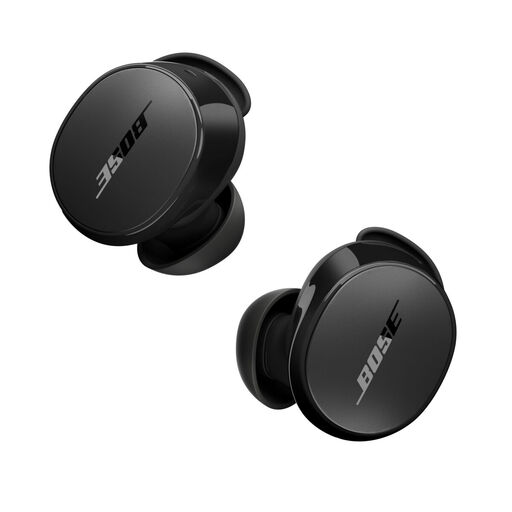
Bose QuietComfort Earbuds Black
For anyone who wants to listen wirelessly and compare ambient sound modes. The product description mentions active noise cancellation, an Aware mode and up to 8,5 hours of use on a single charge. Check which settings this figure applies to.
View at Joybuy
 No image available
Bose Noise Cancelling Wired Earbuds - Black
For anyone looking for wired earbuds that, according to the product description, don’t need charging. The description lists USB-C and active noise cancellation; check that your device supports audio through this connection. The cable can get in the way as you walk.
View at Joybuy
Frequently asked questions
Do you need to install an app for every Dutch museum audio tour?
No, it varies from museum to museum. The Rijksmuseum van Oudheden also offers its tours online through a web version, which the museum says requires an internet connection. Wereldmuseum Amsterdam mentions free loan devices; check the options at the museum you’re visiting.
How can you prepare to listen if your phone is nearly full?
Before you set off, check whether the museum offers a web version, Wi-Fi or a loan device, and test whether your own earbuds work with it. Cruquius Museum mentions museum Wi-Fi as a way to save storage space; this won’t necessarily be an option at other museums.
How do you compare the battery life of wireless earbuds?
Compare listening time per charge with the settings you plan to use, and charge your earbuds before a long visit. Total battery life including the case isn’t the same as uninterrupted listening time. Follow the instructions for your exact model when charging and cleaning it.
What are your rights in the Netherlands when buying online or if a product is faulty?
According to the Dutch government, online purchases from a business usually come with a 14-day cooling-off period, subject to legal exceptions. If a product is faulty, you have statutory rights against the seller; the Netherlands doesn’t have a fixed, general warranty period for this. Check the specific returns policy before taking the earbuds out of their packaging.
Do you need to turn the volume up high to follow the commentary?
Turning the volume up high isn’t a standard solution. The World Health Organization warns that both sound level and listening time matter when it comes to hearing risks. Check the fit first, then try a quieter listening environment or a different setting.


