
Multilingual editor
Writes and edits posts in several languages and wants the key labels to match the selected input layout. Microsoft Support and Apple Support explain how to set up additional keyboard layouts or input sources.


For a multilingual neighbourhood noticeboard, a standard keyboard will generally do the job if you set the right input layout on your computer; a dedicated multilingual model isn’t automatically necessary. Then choose between a full-size, compact or split keyboard based on how often you enter numbers, how much desk space you have and the hand position you’d like to try. A different keyboard is no substitute for a well-set-up workstation or regular breaks.
Writes and edits posts in several languages and wants the key labels to match the selected input layout. Microsoft Support and Apple Support explain how to set up additional keyboard layouts or input sources.
Works on posts for extended periods and pays attention to hand position, workstation set-up and taking breaks. Arboportaal recommends alternating screen-based work with other tasks; Logitech describes the ERGO K860 as having a fixed split keyboard frame.
Switches between editing tasks, devices or number entry, and weighs up features, a numeric keypad and available desk space. Logitech says the MX Keys S can switch between up to three devices; CHERRY describes the KC 6000 SLIM as a full-size model.
First compare the input layout, then consider the size and features you’ll actually use when editing.
A good fit if: you regularly enter strings of numbers and have room for a numeric keypad.
Bear in mind: its larger size takes up more desk space.
A good fit if: you mainly edit text and want to leave room for your mouse.
Bear in mind: if you enter a lot of numbers, you may need a separate numeric keypad.
A good fit if: you repeat editing tasks or update the noticeboard on several computers. Logitech says the MX Keys S can switch between up to three devices and lets you customise actions through Logi Options+.
Bear in mind: extra features are less useful if you only use one computer; check that you can use the configuration software.
A good fit if: you’d like to try a different hand position during longer typing sessions. Logitech describes the ERGO K860 as a curved, fixed split model with a palm rest.
Bear in mind: the two halves can’t be positioned separately; a different shape is no substitute for breaks or a suitable workstation set-up.
| Factor to consider | What to check before buying | Who is this most relevant to? |
|---|---|---|
| Language and character input | Compare the key labels with the input layout you set on your computer. Windows offers keyboard layouts (Microsoft Support); macOS uses input sources (Apple Support). | If I write posts in several languages, I want the characters on the keys to match the selected input source. Around 42% of consumers put multilingual input first. |
| Typing comfort during longer sessions | Assess the shape and hand position alongside your workstation set-up; Arboportaal recommends alternating screen-based work with other tasks. | During longer editing sessions, I want a hand position and workstation set-up that work for me. Around 25% of consumers give typing comfort top priority. |
| Shortcuts and devices | Logitech says the MX Keys S offers customisable actions through Logi Options+ and can switch between up to three devices. Check that you can use the software and whether you really switch between computers. | If I often carry out the same editing steps or use several computers, I want features that suit those tasks. Around 17% of consumers prioritise editing features or switching between devices. |
| Desk space and number entry | CHERRY describes the KC 6000 SLIM as a full-size model; R-Go Tools offers a separate numeric keypad for its compact range. Compare the space you have with how often you enter numbers. | When choosing between more room for my mouse and a numeric keypad, I want to know which I’ll need most often. Around 16% of consumers put this trade-off first. |
The labels printed on the keys and the software input layout are two different things. Microsoft Support and Apple Support explain how to set up additional layouts or input sources.
Before publishing, test names, accents, punctuation and any other scripts used on your neighbourhood noticeboard.
Allow time to set up input sources and check the characters you need.
CHERRY describes the KC 6000 SLIM as a full-size model. Logitech describes the ERGO K860 as a fixed split keyboard; that shape doesn’t guarantee that everyone will find it equally comfortable to type on.
Compare the dimensions, numeric keypad and hand position separately, and break up long periods of screen-based work.
If you enter lots of numbers, a compact keyboard may require a separate numeric keypad; a different set-up may also mean adjusting your workstation.
A model range may include different regional versions, key layouts or connections. This makes the exact version important for your computer and the characters you need to enter.
Before buying, check the full model variant, an image of the key layout and the connection you need.
The MX Keys S discussed here is a low-profile model with customisable actions and device switching; Logitech says the ERGO K860 has a fixed, curved, split keyboard frame.
CHERRY describes the KC 6000 SLIM discussed here as a full-size keyboard for a dedicated Windows workstation.
The Compact Break discussed here is a black, wired compact model with a US QWERTY layout.
This selection at Joybuy includes full-size and compact keyboards for multilingual text editing, with options for number entry, desk space and switching between devices.
 No image available
An option for editing text if you want a full-size keyboard and numeric keypad.
Wired plug-and-play model with navigation and function keys.
 No image available
An option for editing text with number entry and customisable keys.
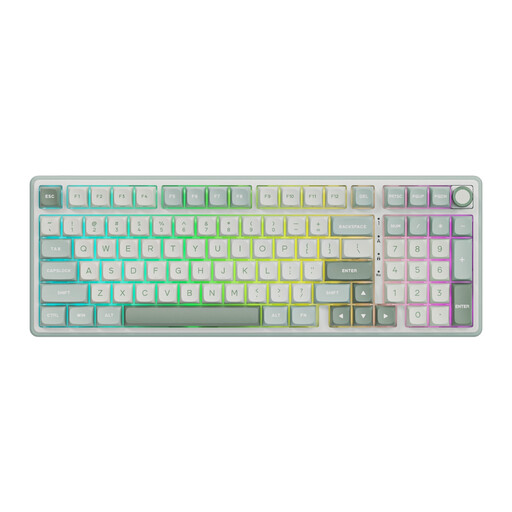
Wired mechanical keyboard with numeric keypad, RGB lighting and volume control. The description mentions programmable keys and macros through an online driver.
 No image available
An option if you want a full-size keyboard with a numeric keypad and switch between devices.
The description mentions scissor keys, a USB receiver, Bluetooth and connections to up to four devices.
 No image available
A compact option for editing text if you want to free up desk space.
The description mentions 82 keys, a 75% layout, Windows and Mac compatibility, and wired, Bluetooth and 2.4 GHz connections.
 No image available
A compact option if you’re looking for a small set-up and a US International QWERTY layout.
The description mentions a 60% size and USB-C connection.
Not necessarily: Windows supports additional keyboard layouts and macOS supports additional input sources, according to Microsoft Support and Apple Support. Test the characters you need in the programme you use to post, and compare the key labels with your chosen input layout.
In Windows, add a keyboard layout through the language settings; on a Mac, add an input source through the keyboard settings. Microsoft Support and Apple Support explain how to do this. The available layouts depend on the computer you use.
Not just because it’s a neighbourhood project. Arboportaal says that for employees who work with a screen for more than two hours a day, the screen and keyboard must not be attached to one another. Whether that rule applies to your working arrangements depends on your employment relationship and how you use the equipment.
For many distance purchases made by consumers from a business, you have a 14-day cooling-off period; check which exceptions apply. The Dutch government also states that there is no fixed statutory two-year warranty period: you are entitled to a product that works properly and can contact the seller if something is wrong.
Only if your work calls for one. Consider how often you enter strings of numbers and how much room you want to leave for your mouse; R-Go Tools offers a separate numeric keypad for its compact range, while the CHERRY KC 6000 SLIM discussed here is a full-size model.