If you usually charge two devices at the same time, choose a charger with ports that match your cables, and check the power available from each port when both are in use. A USB-C and USB-A combination can be handy if you use different cables; for three devices, you’ll need at least three compatible outputs. The total wattage doesn’t tell you how much power each device gets individually. Before buying, also check the relevant safety information for the specific model.
Who is this buying guide for?
Anyone charging two devices at once
You want to charge your phone and, for example, a pair of earbuds or a second phone from one mains socket. So check that there are enough compatible ports and look at the power available when both are occupied. Belkin specifies a maximum of 20 W per USB-C port for the WCB006.
Anyone checking charging speeds
You share a mains socket but want to know what happens to your phone’s charging power when you connect a second device. Compare the power available from each port and check that your phone and cable support the charging protocol you want to use. Samsung notes that charging speed depends on the device, cable and conditions.
Anyone using USB-A and USB-C cables
You want to keep using both types of cable at the same charging spot. Check that the charger has both a USB-A and a USB-C output; these ports may have different maximum power ratings. Belkin and UGREEN describe chargers with this combination.
What should you look for in a USB charger?
Start by thinking about how many devices you want to connect at once. Then choose ports that match your cables and check the power available for the combination you’ll actually use.
Two USB-C ports
Choose this if: you want to charge two devices with compatible USB-C cables from one mains socket.
Bear in mind: a USB-A cable won’t connect directly; also check whether the cable you need is included.
USB-C and USB-A
Choose this if: you want to use a USB-C cable and an existing USB-A cable with the same charger.
Bear in mind: the ports may have different maximum power ratings, so match your cable and device to the right output.
Three outputs for a dedicated charging spot
Choose this if: you regularly want to connect three devices at once from one charging spot.
Bear in mind: check the number of outputs of each type and how power is shared when several ports are in use.
| What to consider |
What to look for |
Who is this important for? |
| Charging two devices at once |
Check the port types and the stated power when both ports are in use. |
If I want to charge my phone and, for example, my earbuds at the same time, I need to know that both cables will fit. Around 36% of consumers say charging two devices simultaneously is their main buying priority. |
| Phone power when sharing the charger |
Check the power available from the phone’s port when the second output is also occupied, and make sure the phone and cable are compatible. |
If I charge my phone alongside another device, I want to know in advance which charging mode and cable are suitable. Around 29% of consumers prioritise maintaining their phone’s fast-charging speed. |
| Existing cables |
Check both ends of your cables and make sure USB-A and USB-C connect to the ports you want to use. |
If I use both USB-A and USB-C cables, I don’t want to replace either one unnecessarily. Around 21% of consumers prioritise being able to keep using different types of cable. |
| At least three devices |
Count the USB-C and USB-A outputs separately and check how power is shared when they’re used at the same time. |
If I need to charge three devices at once in one spot, I need at least three compatible outputs. Around 14% of consumers say this third simultaneous connection is their main requirement. |
Common buying mistakes
-
Assuming the total wattage applies to every port
For the Belkin WCB006, Belkin specifies a maximum of 20 W per USB-C port. So a product name’s total power rating doesn’t automatically mean that every port delivers the same amount.
Compare the specifications for each port and check how power is shared when you use the ports at the same time.
-
Choosing a USB-C charger without checking your cables
A charger with USB-C outputs only won’t connect directly to a USB-A cable. Apple notes that the cable for its dual USB-C port power adapter is sold separately.
Before buying, check the plugs at both ends of your cables and see whether you need to buy a cable separately.
-
Taking a product title as confirmation of its port layout
The product title for the UGREEN Nexode GaN 65W lists three USB-C ports, while the product description says it has two USB-C ports and one USB-A port.
Check the port layout of the exact version before relying on it to connect three USB-C cables.
Brands to consider
Belkin
The BoostCharge models mentioned have different port layouts: the WCB006 has two USB-C ports, while the WCB009vfWH combines USB-C and USB-A.
- Belkin lists a maximum of 20 W per USB-C port for the WCB006, and up to 30 W via USB-C and 12 W via USB-A for the WCB009vfWH.
- These are specifications for these particular models, not independently measured charging times or features of every charger from the brand.
UGREEN
The Nexode 35W combines USB-C and USB-A. The port layout of the Nexode GaN 65W version mentioned needs extra checking.
- UGREEN describes the Nexode GaN 65W as having two USB-C ports and one USB-A port.
- The product title lists three USB-C ports, while the description says it has two USB-C ports and one USB-A port. Check the layout of the exact version.
Apple
The 35W Dual USB-C Port Power Adapter is an option if you want to connect two devices using compatible USB-C cables.
- Apple lists iPhone, Apple Watch and AirPods among the devices that can be charged with the adapter.
- Apple notes that the cable is sold separately. Don’t assume you’ll get 35 W per port when two devices are connected at once.
Samsung
The Galaxy 50W Power Adapter Duo is worth considering if you want to check compatibility with a suitable Galaxy phone and its fast-charging mode.
- Samsung states that Super Fast Charging 2.0 requires a compatible USB PD 3.0 device that supports Direct Charging.
- Samsung also says charging performance depends on the device, cable and conditions; the claim doesn’t automatically apply to every phone or port configuration.
USB chargers at Joybuy
This selection includes chargers with two USB-C ports, a combination of USB-C and USB-A, and models with several outputs. For every mains-powered model, check the relevant safety information and make sure the specific version is suitable for use with the UK mains supply.
 No image available
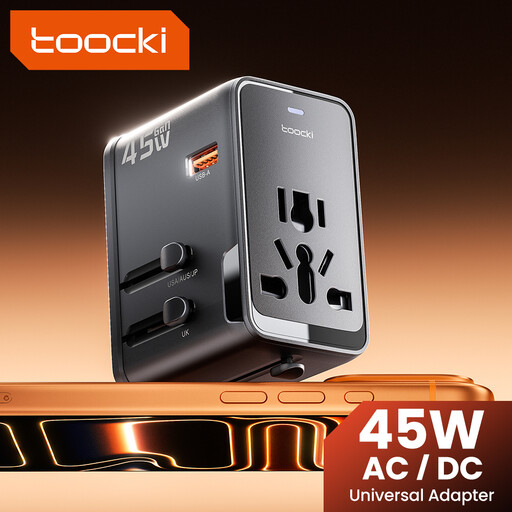
toocki Universal Travel Adapter 45 W PD, USB-A and 2 USB-C
An option if you want to connect USB-A and USB-C cables to one adapter.
The product name lists 45 W PD, one USB-A port and two USB-C ports. Check that the plug type is suitable for where you plan to use the adapter.
View at Joybuy
 No image available
Lenovo Dual USB-C 65 W GaN Charger
Suited to a charging spot where you want to connect two USB-C devices to one charger.
The product name lists 65 W, two USB-C ports, an EU plug and a 1.5 m USB-C cable. Check how power is shared when both ports are in use.
View at Joybuy
 No image available
65 W wall charger with 2 USB-C ports and retractable cable
An option if you’re looking for two USB-C outputs and a built-in retractable USB-C cable.
The product name lists 65 W and two USB-C ports. Check that the connections and power distribution suit the devices you want to charge at the same time.
View at Joybuy
 No image available
65 W wall charger with 2 USB-C ports and 1 USB-A port
An option if you want to connect three devices and use both USB-C and USB-A cables.
The product name lists two USB-C ports, one USB-A port and 65 W. Check how power is shared when all are in use at the same time.
View at Joybuy
 No image available
30 W wall charger with USB-C and USB-A
Suited to anyone who wants to use one USB-C cable and one USB-A cable with the same charger.
The product name lists 30 W and one port of each type. The stated maximum of 30 W is the combined power available when two devices are charging at the same time.
View at Joybuy
Frequently asked questions
How can you use a charging spot with limited mains sockets safely?
Keep the charger clear so heat can escape, and don’t charge devices under a pillow or duvet. Don’t use damaged cables or counterfeit chargers; these are safety recommendations from the Dutch Fire Service.
What can you do if your charger develops a fault too soon during normal use?
In the Netherlands, contact the seller about your statutory guarantee. According to ACM ConsuWijzer, if a product is faulty despite being used normally, you may be entitled to a free repair or replacement, and sometimes a refund; the appropriate solution depends on the circumstances.
What safety information should you check for a mains-powered USB charger?
For the specific model, check which safety requirements apply and whether it carries the CE marking, and check the connection specifications. EUR-Lex describes the scope of the Low Voltage Directive for equipment with a rated AC voltage of 50 to 1,000 V; Netbeheer Nederland gives the Dutch electricity supply as 230 V and 50 Hz.
When did the EU rules for common chargers come into force?
According to the European Commission, the requirements have applied since 28 December 2024 to the listed categories of portable devices, including mobile phones, tablets, headphones and earbuds. Also check that your cable’s plug fits the charger you choose for your charging spot.


