
Vandaag of morgen in huis

Kwaliteit gegarandeerd

Welkomstaanbiedingen ontgrendelen: GRATIS bezorging | Tot 80% korting | Gratis 30 dagen JoyPlus-proefperiode
Download de app
Buying a fast gaming monitor may seem straightforward: look at the refresh rate, response time and resolution. However, there are several potential pitfalls. For example, a high figure on the packaging does not automatically mean that your PC can make use of that performance. OLED features are also sometimes presented as universal benefits, even though usage and settings can affect the display’s lifespan.
The MSI MAG 272QP QD-OLED X24 gaming monitor is aimed at players who want to combine a 27-inch screen with WQHD resolution, 240Hz and QD-OLED picture quality. Below, you’ll find out which specifications really matter and which type of user this model – or an alternative – is best suited to.
A 240Hz monitor can display up to 240 refreshes per second. Your gaming PC therefore also needs to deliver a similar frame rate for you to see a difference compared with 144Hz or 180Hz. Demanding games at WQHD may require a powerful graphics card to achieve this.
So don’t just check the monitor. Also consider:
The stated 0.03 ms response time of an OLED monitor is a technical response-time figure according to the product information. The final image quality also depends on the measurement method used, overdrive settings, frame rate and the game itself. So don’t simply compare 0.03 ms with, for example, 1 ms MPRT; these figures are not always measured in the same way.
The MSI MAG 272QP QD-OLED X24 has a stated 0.03 ms GtG response time. This is well suited to competitive games, but it does not mean that every type of motion blur disappears in all circumstances.
QD-OLED provides per-pixel control over illumination. This makes deep blacks and high contrast possible. At the same time, elements that remain unchanged for long periods, such as a taskbar or game interface, are relevant considerations when using an OLED display.
For this model, MSI lists features under the name MSI OLED Care, along with a customised heatsink and graphene film for heat dissipation. These are features described in the product information; they do not guarantee a specific lifespan. Use the built-in protection features, avoid leaving the screen on unnecessarily for long periods and regularly switch between different types of content.
The monitor has a resolution of 2560 × 1440 pixels, also known as WQHD. On a 26.5-inch diagonal screen, this provides more image information than Full HD at the same screen size. Text, interfaces and details can therefore appear sharper, while WQHD requires less graphics processing power than 4K.
The aspect ratio is 16:9 and the screen is flat. This makes the model suitable for shooters, racing games, films and everyday use without the additional width of an ultrawide monitor.
A QD-OLED monitor combines OLED pixels with quantum-dot technology. According to the product information, the design includes features such as deep blacks, a wide colour gamut and 10-bit colour reproduction. The monitor also supports VESA DisplayHDR True Black 400.
This certification indicates that the screen meets certain HDR requirements. The visible HDR experience also depends on the game, film, settings and ambient lighting. HDR is therefore not a reason to overlook compatibility and picture settings.
The MSI MAG 272QP QD-OLED X24 supports:
These technologies synchronise the screen’s refresh rate with the graphics card’s frame rate. This can help reduce tearing and stuttering, but performance still depends on the connected hardware, drivers, cable and selected settings.
According to the stated product name and description, the monitor has two HDMI ports, DisplayPort and USB Type-C. Before buying, check exactly what the USB-C connection is intended for if you want to use it for video, data or power. Not every USB-C port supports the same functions.
The included stand offers:
This is practical for a desk where you switch between working upright, gaming and using the screen in portrait orientation.
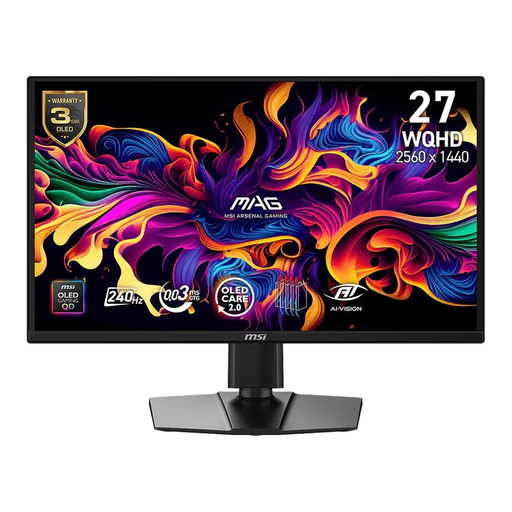
Why it suits this profile: For PC gamers looking for WQHD, 240Hz, QD-OLED and an adjustable stand in one 27-inch setup.
The specifications clearly state 2560 × 1440, 240Hz and 0.03 ms GtG. MSI OLED Care is included, but normal OLED usage remains important.
26.5-inch QD-OLED, WQHD, 240Hz, DisplayHDR True Black 400, plus support for G-SYNC Compatible and FreeSync Premium.
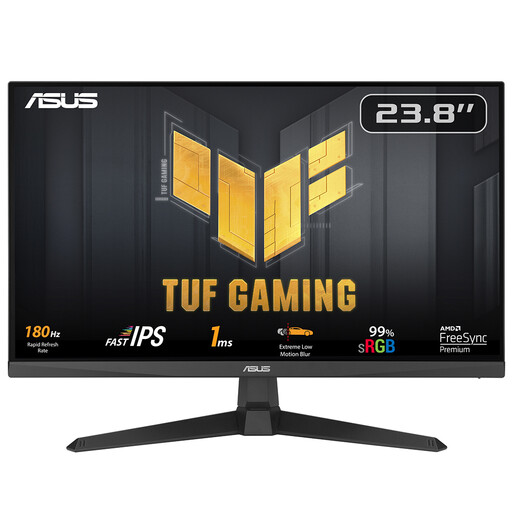
Why it suits this profile: A sensible choice for anyone who mainly wants fast gameplay but does not need a QD-OLED panel.
Choosing Full HD and 180Hz generally requires less graphics processing power than WQHD at 240Hz.
23.8-inch IPS, 1920 × 1080, 180Hz, 1 ms response time and FreeSync Premium.

Why it suits this profile: For esports fans who prefer Full HD over extra resolution and want an exceptionally high refresh rate.
The Full HD resolution can reduce the load on the graphics card, while the official specifications state 320Hz and G-SYNC Compatible.
24.5-inch IPS, 320Hz, HDMI 2.1, DisplayPort 1.4, 110 mm height adjustment and FreeSync Premium.
Choose this model if you:
An LCD model may be the more sensible choice if you use a lot of static office windows, have a lower budget or do not own a powerful graphics card. Also check whether your desk is deep enough and whether the connections are compatible with your PC.
We’ve compiled a complete, up-to-date list of products that fully meet these strict selection criteria and the applicable European safety regulations.
According to the product name and description, the model has USB Type-C. Before buying, check the latest product specifications to see which functions the port supports, such as video, data or charging. USB-C does not automatically mean that all three functions are available.
Lifespan depends on brightness, usage time, temperature, content and how static images are displayed. MSI lists OLED Care, a customised heatsink and graphene film for this model. These are protective features mentioned in the manufacturer’s description, not a fixed lifespan guarantee. Use a screen saver and allow the panel to perform its maintenance routines regularly.
Power consumption varies depending on brightness, HDR use, connected devices and the selected picture mode. The MSI MAG 272QP QD-OLED X24 product specifications state 200 cd/m² SDR brightness and up to 400 cd/m² HDR brightness. If you want to save energy, you can reduce the brightness and disable HDR when they are not needed.
