
Vandaag of morgen in huis

Kwaliteit gegarandeerd

Welkomstaanbiedingen ontgrendelen: GRATIS bezorging | Tot 80% korting | Gratis 30 dagen JoyPlus-proefperiode
Download de app
A barebone desktop PC may seem like an affordable choice at first glance: the basic computer is there, but you choose the memory, storage and operating system yourself. That gives you flexibility, but only if you check in advance which components are actually compatible.
With the MSI PRO DP180 14A-059BEU barebone desktop PC, the processor, memory support, storage options and connections are particularly important. Below, you can read about the most common purchasing mistakes and what to look out for before placing your order.
A PC without an operating system is not ready to use straight away. You still need to invest in compatible RAM, an SSD or HDD, an operating system and, in some cases, a licence. A keyboard, mouse and monitor are not included as standard either.
So don't just calculate the price of the barebone. Add up all the components needed for your working environment. For business users, installing company software, security tools and backup solutions may also need to be taken into account.
The product information states support for up to 64 GB of internal memory and DDR4 modules. That does not mean that every memory module will be suitable. Before buying, check the required form factor, speed, capacity per module and the number of available memory slots in the current manual.
A common mistake is buying DDR5 memory because it sounds newer. DDR4 and DDR5 are not interchangeable. For this PC with DDR4 support, you should specifically look for DDR4 compatibility.
According to the product specifications, the MSI PRO DP180 uses Intel UHD Graphics 730 as its integrated graphics card. This is suitable for office software, browsing, video playback and various professional applications. No dedicated graphics card is listed.
If you use 3D rendering, modern games or demanding video-editing software, you should check whether a dedicated graphics card can be installed and whether the power supply is suitable for it. The stated power supply has an output of 350 W. This makes it important to calculate total power consumption before choosing any upgrades.
According to the product details, the Intel Core i5-14400 PC has 10 cores and 16 threads, with a maximum turbo frequency of 4.7 GHz and 20 MB Smart Cache. For multitasking with office programmes, multiple browser tabs, video calls and general professional software, this provides a solid foundation.
The final performance also depends on the installed memory, storage and software. An SSD generally provides shorter start-up and loading times than a traditional hard drive, while an HDD may be appealing if you need to store larger amounts of data.
The MSI barebone PC supports up to 64 GB of internal memory. This is relevant for users who work with large spreadsheets, virtual machines, databases or several professional programmes at the same time.
For storage, the product information lists support for M.2, SSD and HDD. The case also has one 3.5-inch bay. Before placing your order, check:
For modern workspaces, connections are often more important than an eye-catching design. According to the specifications, this desktop includes four USB 2.0 ports, three USB 3.2 Gen 1 Type-A ports and one USB 3.2 Gen 2 Type-C port. It also features HDMI 2.1, DisplayPort 1.4, VGA, two LAN ports and audio connections.
The built-in Wi-Fi 6 desktop supports 802.11ax. This can be convenient in an office without a network cable, but actual speeds will still depend on your router, broadband package, distance and interference from other networks. For fixed business applications, Ethernet is often still the logical choice.
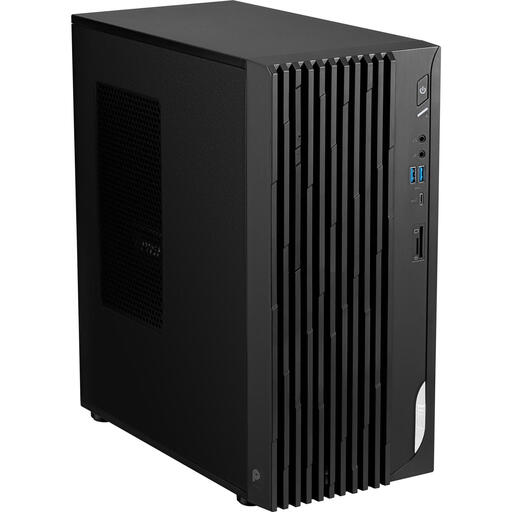
Why it suits this profile: This workstation barebone provides a clear foundation for anyone who wants to choose their own DDR4 memory, storage and operating system.
The product specifications make it clear that RAM, storage and the operating system still need to be added separately. This means you can plan the complete configuration in advance.
Intel Core i5-14400, up to 64 GB of memory, M.2 support and Wi-Fi 6.
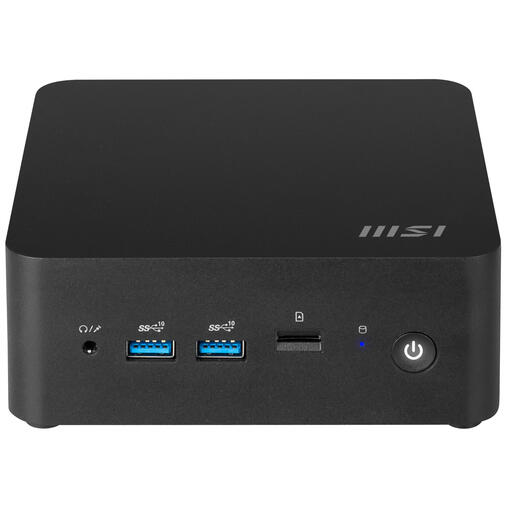
Why it suits this profile: If you are looking for a compact MSI barebone PC with modern wireless features, this 0.84-litre desktop is worth considering.
The compact case makes it easy to check the physical dimensions in advance. However, note that this model uses DDR5, so it is not an alternative to a PC with DDR4 support.
0.84-litre case, up to 64 GB of DDR5 memory, Wi-Fi 6E and two M.2 connections.
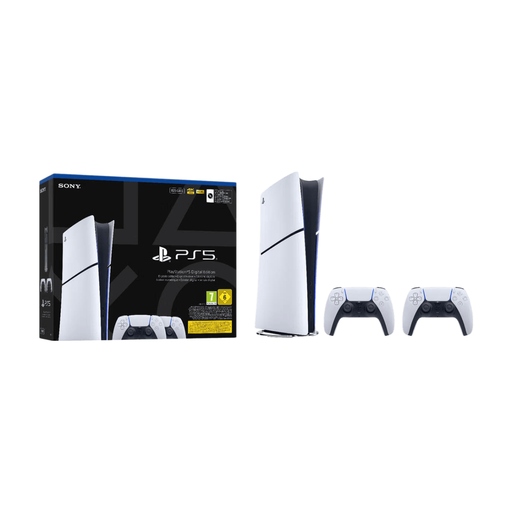
Why it suits this profile: This is not a desktop or barebone PC, but it is a relevant choice for anyone who only wants to play digital games and does not need a custom-built computer.
The product category is clearly different. If you only want to game, you do not need to assemble RAM, storage or an operating system for a barebone.
825 GB SSD storage, Wi-Fi 6 and two controllers included.
We have put together a complete, up-to-date list of products that fully meet these strict selection criteria and the applicable European safety regulations.
Place the desktop on a stable desk with sufficient space around the ventilation openings. First install the compatible DDR4 modules and chosen storage while the power cable is disconnected. Then connect a monitor via HDMI or DisplayPort and install the operating system and official MSI drivers.
Also check that your working environment uses an earthed socket. Keep small screws, cable ties and packaging materials out of the reach of children. Clean the case with a soft, dry cloth and do not block the air intake or outlet.
No. This is a barebone desktop PC without a pre-installed operating system. You choose and install a suitable operating system yourself, along with the necessary drivers and updates.
According to the listed product specifications, the MSI PRO DP180 supports up to 64 GB of internal memory. Before buying RAM, always check the latest MSI documentation for the correct DDR4 specifications and module configuration.
The desktop has integrated Intel UHD Graphics 730, and no dedicated graphics card is listed. The configuration may be suitable for office work, working from home and general professional use. For demanding 3D applications or games, you should check whether a suitable graphics card can be added and whether the 350W power supply is sufficient.
