
Vandaag of morgen in huis

Kwaliteit gegarandeerd

Welkomstaanbiedingen ontgrendelen: GRATIS bezorging | Tot 80% korting | Gratis 30 dagen JoyPlus-proefperiode
Download de app
Building a new PC is an exciting project, but choosing the right case can be overwhelming. The market is flooded with models that look fantastic at first glance but lead to frustration in practice. Before you invest in a new white PC case, it's crucial to look beyond the marketing photos. Many builders fall into the same traps: choosing a case that throttles their expensive components or makes the building process needlessly complex.
In this guide, we'll cover the key considerations when choosing a glass panel gaming case and take a closer look at the MSI MAG Pano 100R PZ. We'll help you avoid common mistakes, ensuring you make a choice that is both aesthetically pleasing and functionally sound.
dual chamber pc case can be a solution here.To avoid the pitfalls above, there are a few non-negotiable specifications you must check. These determine whether a case is right for your build.
The foundation of any build is the compatibility between your case, motherboard, and other components.
mid-tower like the MSI Pano 100R PZ often supports all three, offering flexibility for current and future builds.MSI MAG Pano 100R PZ White supports cards up to 380 mm.Good airflow is crucial for the longevity and performance of your components.
dual chamber pc case separates the heat-producing components (CPU, GPU) from the power supply and storage drives. This not only improves cooling but also creates a dedicated space for cables, resulting in a much cleaner look.A modern case should simplify the building process and be ready for future standards.
back-connect case is compatible with motherboards that have their connectors on the back. This allows for an extremely clean look from the front, as almost all cables are hidden from view. The MSI Pano 100R PZ is a prime example of this.Not every builder has the same priorities. Below are some product recommendations tailored to different builder profiles.
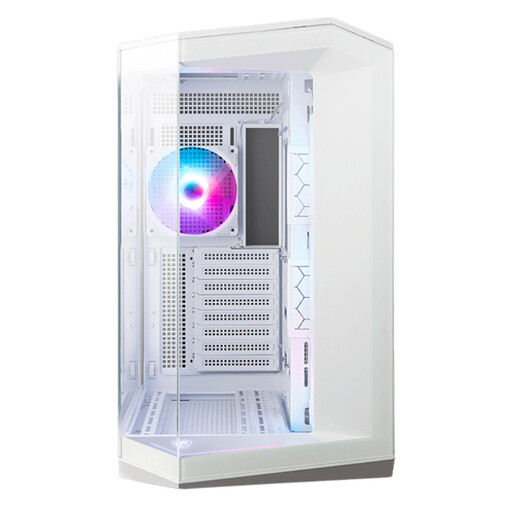
Why This Fits Their Persona: For the builder who sees their PC as a showpiece. The 270-degree panoramic glass offers an unobstructed view of the components, while the white finish and included ARGB fans provide a clean, modern aesthetic.
Avoids the "Aquarium" trap with extensive ventilation on the side, top, and bottom. The dual-chamber layout solves the cable management nightmare by providing a separate compartment for the PSU and cables.
Support for back-connect motherboards for an ultra-clean build. Room for up to 10 fans and 360mm radiators for serious cooling performance.
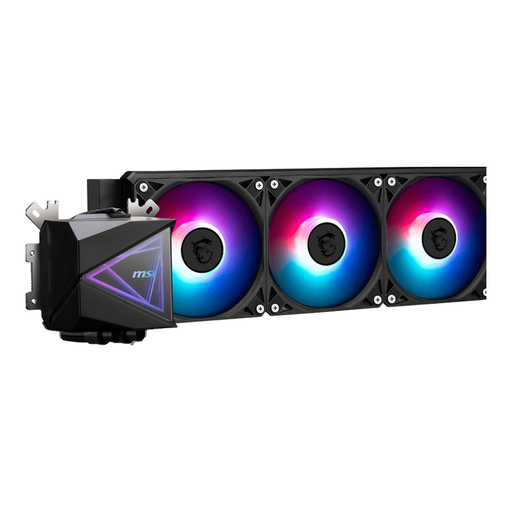
Why This Fits Their Persona: This user wants to extract maximum performance from their CPU. A 360mm All-in-One (AIO) liquid cooler is essential for keeping a high-end processor cool during intense gaming sessions or rendering tasks.
Tackles the compatibility problem head-on. By opting for a powerful 360mm cooler, you force yourself to select a case (like the Pano 100R PZ) that supports this radiator size, thus avoiding the pitfall of insufficient space.
Superior cooling capacity compared to most air coolers. The ARGB lighting on the pump and fans integrates seamlessly with the aesthetics of a glass-panel case.
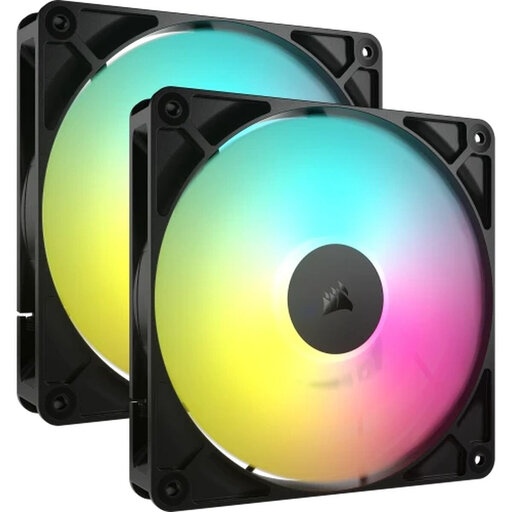
Why This Fits Their Persona: For the builder who wants total control over their lighting. While the Pano 100R PZ comes with fans, this user might want a unified lighting ecosystem or fans with a specific look and performance profile.
Stock fans can sometimes be a compromise. By choosing a separate set of quality fans, you avoid the pitfall of underperforming, noisy, or poorly lit stock fans and get the exact aesthetics and performance you're looking for.
High airflow at a relatively low noise level. Fully integrates with Corsair's iCUE software for comprehensive and synchronized lighting effects.
We have curated a complete, up-to-date list of products that fully meet these strict selection criteria and local regulations.
The MSI MAG Pano 100R PZ supports graphics cards up to 380 mm in length. This is ample space for most high-end graphics cards on the market, including many models from the NVIDIA GeForce RTX 40 series and AMD Radeon RX 7000 series. However, it is always wise to check the exact specifications of your specific card before purchasing.
A back-connect case is designed for a new type of motherboard (like MSI's Project Zero or ASUS's BTF series) where the power, fan, and other connectors are located on the back of the motherboard instead of the front. This ensures that almost no cables are visible in the main chamber of your PC, creating an extremely clean and tidy look. You don't necessarily need one unless you specifically have or plan to buy such a motherboard, but it's an excellent feature for those aiming for the ultimate clean build.
This ATX case offers very flexible cooling options. You can install up to 10 fans in total:
