
Vandaag of morgen in huis

Kwaliteit gegarandeerd

Welkomstaanbiedingen ontgrendelen: GRATIS bezorging | Tot 80% korting | Gratis 30 dagen JoyPlus-proefperiode
Download de app
As a Joybuy Product Recommendation Officer, I see PC builders and gamers navigate a jungle of marketing terms and technical specifications daily. It's especially easy to go wrong when choosing a component as crucial as a CPU cooler. The wrong choice not only leads to subpar performance but can also cause significant frustration.
Before you invest in a powerful liquid cooler for your processor, like the MSI MAG CORELIQUID I360, it's important to be aware of a few common pitfalls. Many buyers focus purely on promised cooling performance, overlooking three crucial factors:
This guide will help you avoid these issues and make an informed decision based on factual specifications.
To ensure your new CPU cooler fits and performs perfectly, there are a few technical specifications you should always check.
The two most important compatibility factors are the radiator's size and its support for your CPU socket.
The performance of a liquid cooler for your processor depends on the efficiency of its pump and fans.
Based on these criteria, we have selected a few products that suit different types of users.
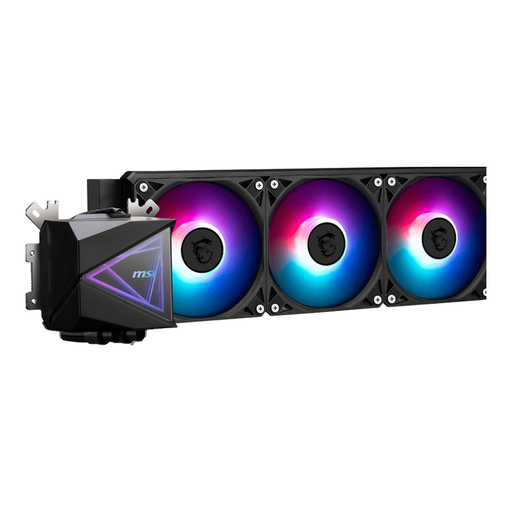
Why This Fits Their Persona: This user is looking for a powerful and reliable cooling solution for a high-end gaming PC. The 360mm radiator is ideal for keeping modern, high-heat processors (like AMD AM5 and Intel Socket 1700) cool, even during intense gaming sessions or when overclocking.
The product page explicitly lists support for Socket 1700 and AM5, preventing the compatibility mistake. According to MSI, the design is focused on a simpler installation, which mitigates cable chaos.
Large 360mm cooling surface for high thermal performance. Broad compatibility with the latest CPU sockets. Integrated ARGB lighting for a modern aesthetic.

Why This Fits Their Persona: This user wants a quiet system and is willing to replace the stock fans on an AIO or case with a quieter option. These 140mm fans are a popular choice for upgrading case airflow or for use on a compatible radiator.
It tackles the 'noise trap' by focusing on a specific feature: the magnetic levitation bearing. According to Corsair, this results in less friction and therefore lower noise production (min. 10 dB).
Low minimum noise level. High maximum airflow (94.7 CFM) for efficient cooling. PWM support for precise speed control.
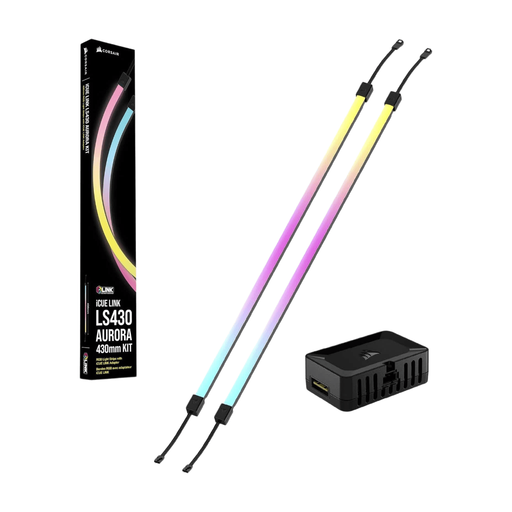
Why This Fits Their Persona: For this user, a PC is a visual statement. In addition to an ARGB liquid cooler, they want to extend the lighting to the rest of the case. These LED strips are designed to complete the light show and synchronise with other components.
This product is part of the iCUE LINK ecosystem, which, according to Corsair, is designed to reduce 'cable chaos' by connecting components together, simplifying installation.
Seamless integration with other Corsair iCUE products. Provides vibrant, customisable lighting to personalise a build. Simple installation within the LINK ecosystem.
We have compiled a complete, up-to-date list of products that meet these selection criteria and comply with current regulations.
No, this is a common mistake. A 360mm liquid cooling solution requires specific mounting space for a radiator approximately 394mm long, usually at the front or top of the PC case. Always check your case's manual and specifications before purchasing to avoid disappointment.
The average lifespan of an AIO cooler is between 5 and 7 years. The most common points of wear are the pump or the slow evaporation of the liquid (permeation) through the tubing. Products like MSI liquid cooling are built with durable materials. Furthermore, within the EU, a legal warranty of at least 2 years applies to such products.
This depends on your specific situation. A high-end AIO liquid cooler generally offers better cooling performance for powerful processors, especially when overclocking. It also provides a cleaner, more spacious look inside the case. On the other hand, premium air coolers can be very reliable, sometimes quieter, and often more affordable. The choice depends on your processor, budget, and aesthetic preferences.
