
Vandaag of morgen in huis

Kwaliteit gegarandeerd

Welkomstaanbiedingen ontgrendelen: GRATIS bezorging | Tot 80% korting | Gratis 30 dagen JoyPlus-proefperiode
Download de app
A high refresh rate sounds appealing, but it doesn’t tell you everything about a gaming monitor. The MSI MAG 276CF E20 gaming monitor features a 27-inch curved VA panel, Full HD resolution, 200Hz and a quoted response time of 0.5 ms. This makes it an interesting option for FPS, racing and other fast-paced games. However, there are a few things to check before you buy.
As a Joybuy Product Recommendation Officer, I focus on verifiable specifications and how well a product matches your needs. That way, you can avoid paying for features that aren’t right for your graphics card, desk or play style.
A 200Hz gaming monitor can display up to 200 refreshes per second. Your PC also needs to deliver enough frames per second to make the most of it. If you’re playing a demanding game at 80 fps, you won’t fully benefit from 200Hz. However, the high refresh rate can make a real difference in competitive shooters at lower graphics settings.
So, check not just the monitor but also how your graphics card performs in the games you play.
The MSI MAG 276CF E20 is advertised with a response time of 0.5 ms. Bear in mind that manufacturers use different measurement methods, such as GTG or MPRT. So a quoted figure doesn’t guarantee that every transition will be exactly that fast at every setting.
It’s also worth checking the overdrive settings and user reviews. Overdrive that’s too aggressive can cause visible artefacts, while a setting that’s too low can result in more motion blur.
The MSI supports HDR10 and has a brightness rating of 250 cd/m² according to the product specifications. HDR support means the monitor can process the signal, but it doesn’t automatically mean that light and dark scenes will have a wide contrast range. For everyday gaming, VA technology is mainly appealing for its high contrast and deep blacks.
This Full HD gaming monitor has a resolution of 1920 × 1080 and a 16:9 aspect ratio. At 27 inches, this is a practical combination for high frame rates, but the pixel density is lower than that of a 27-inch QHD monitor. Text and fine details may therefore look less sharp when viewed up close.
The 1500R curved monitor has a screen that curves towards you. This can be enjoyable for racing games and immersive single-player titles. For competitive FPS games, it’s especially important to sit directly in front of the screen; a curved panel may feel less natural when viewed from a sharp angle.
A VA gaming monitor is generally known for having higher contrast than many IPS panels. This can be useful for dark scenes and films. According to the product specifications, this model has a 178-degree viewing angle, but colours and contrast may look different when viewed from an angle.
For fast-paced gaming, the combination of 200Hz, FreeSync Premium and the quoted 0.5 ms response time is relevant. MSI lists support for FreeSync, FreeSync Premium and G-Sync Compatible. Once connected, check your graphics settings to make sure Adaptive-Sync is enabled.
According to the product information, the monitor has HDMI 2.0, DisplayPort and a 3.5mm connection. Check the port layout and the cables included with your specific delivery before buying an extra cable. The packaging lists an HDMI cable.
The stand tilts, but is not height-adjustable and doesn’t support portrait rotation. The monitor does support VESA 100 × 100 mm, though. A monitor arm could be a practical addition if you need to position the screen higher.
The MSI MAG 276CF E20 is best suited to players who want a large 27-inch screen with a high refresh rate without moving straight to QHD. For example:
If you mainly work with text, photos or creative software, it’s worth comparing QHD models too. And if you’re mainly looking for the fastest possible response, consider whether a 27-inch screen is right for your viewing distance.
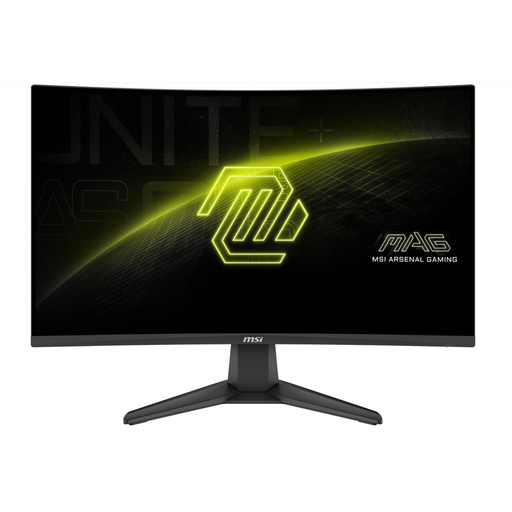
Why it suits this profile: This model combines a 27-inch screen, Full HD and 200Hz in a straightforward setup for fast-paced PC games. The resolution generally puts less demand on your graphics card than QHD.
The key specifications are clearly defined: 1920 × 1080, 200Hz, VA and Adaptive-Sync. Just bear in mind that the stand isn’t height-adjustable.
200Hz, 1500R curve, FreeSync Premium, VA panel and VESA 100 × 100 mm.
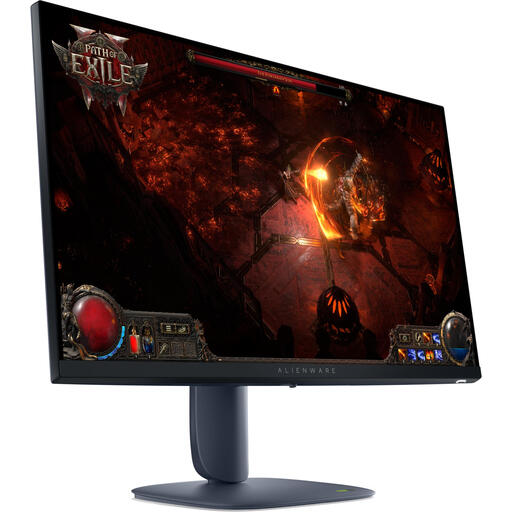
Why it suits this profile: This model is designed for gamers who want more detail on a 27-inch screen. Its QHD resolution of 2560 × 1440 gives it a higher pixel density than Full HD.
The higher resolution means you don’t have to choose a large 27-inch screen with a relatively low pixel density when sharpness matters more than maximum frame rates.
27-inch IPS, 2560 × 1440, 180Hz, DisplayHDR 600 according to the product description, and an adjustable stand.
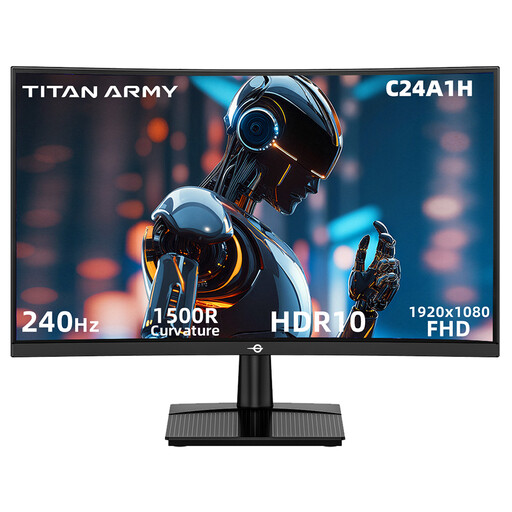
Why it suits this profile: This 23.6-inch model is aimed at players looking for a compact screen and a very high refresh rate for esports and FPS games.
The Full HD resolution keeps graphics demands down, while HDMI 2.0 and DisplayPort 1.2 support 240Hz at 1920 × 1080 according to the product specifications.
240Hz, 1500R curve, VA panel, Adaptive Sync and VESA 100 × 100 mm.
We’ve put together a complete, up-to-date list of products that meet these strict selection criteria and the applicable European safety regulations.
You may do, especially if your PC can deliver well over 165 frames per second in fast-paced games. Motion may look smoother, and tracking moving targets may feel more comfortable. The difference depends on your game, graphics card, settings and viewing habits.
We recommend using DisplayPort if you want to make the most of the high refresh rate with a PC. The product information also lists HDMI 2.0 and an included HDMI cable. Once everything is connected, check the settings in Windows and in the monitor’s menu.
Its lifespan depends on hours of use, heat, transport and the conditions on your desk. Place the monitor on a stable surface, keep the ventilation openings clear and use a soft, dry cloth to clean the screen. The MSI MAG 276CF E20 is listed with a three-year return-to-base warranty. Always check the current warranty terms when you buy.
