
Vandaag of morgen in huis

Kwaliteit gegarandeerd

Welkomstaanbiedingen ontgrendelen: GRATIS bezorging | Tot 80% korting | Gratis 30 dagen JoyPlus-proefperiode
Download de app
A large gaming laptop can quickly look like a good buy on paper. However, important details in product titles and adverts can easily be overlooked. Think of a high refresh rate without sufficient graphics performance, a graphics card whose power rating is not stated, or a laptop that does not come with a charger as standard.
The MSI Cyborg 17 B2RWEKG-023NL is aimed at gamers, students and home users looking for a large screen and modern hardware. In this buying guide, we’ll look at the key specifications, important considerations and alternatives.
An NVIDIA GeForce RTX 5050 is a relevant specification for a gaming laptop, but performance also depends on the configured power limit, cooling and the resolution you play at. According to the product specifications, the MSI Cyborg 17 has a maximum TGP of 45 watts. This is important to consider when comparing this laptop with an RTX 5050 laptop that lists a higher TGP.
A higher model number therefore does not automatically mean the same performance in every laptop. Always check the complete configuration.
The MSI Cyborg 17’s 17.3-inch display has a Full HD resolution of 1920 × 1080 and a refresh rate of 144Hz. This can provide smooth visuals, but only when the hardware can deliver enough frames per second in a game.
For competitive games, Full HD can be practical because the RTX 5050 has fewer pixels to render than with a QHD display. For demanding, graphically intensive games, you may need to adjust the settings.
This version has a QWERTY keyboard, Dutch language settings and RGB lighting. That suits many Dutch users, but always check when buying that the physical key layout matches your preference.
Also pay attention to the charger. The product information states that the charger is no longer included as standard and must be purchased separately. Before ordering, check the current package contents and the required 120-watt adapter.
The MSI Cyborg 17 uses a GeForce RTX 5050 with 8GB of video memory. This makes the laptop suitable for modern games, image editing and light 3D applications, depending on the settings and software used. Features such as ray tracing or higher graphics presets can place greater demands on the GPU.
The stated TGP of 45 watts is an objective point of comparison. When looking at other models, don’t focus only on “RTX 5050”; also check the power rating and cooling solution.
The processor is an Intel Core 7 240H with 10 cores, 16 threads and a maximum turbo frequency of 5.2GHz. Combined with 16GB of DDR5 memory at 5,600 MT/s, it is suitable for gaming, studying, browsing, video calls and multitasking.
According to the product specifications, the memory can be upgraded to a maximum of 96GB. This may be useful for users who later want to work with virtual machines, large projects or more demanding creative software. Before upgrading, check the manual and compatible modules.
The 512GB PCIe 4.0 SSD enables Windows and applications to start quickly. However, this storage capacity can fill up quickly if you install several large games. Check whether you can add another storage drive later, or factor in the use of an external SSD.
For peripherals, you get:
For online gaming, an Ethernet connection can be useful when your wireless network is not stable enough.
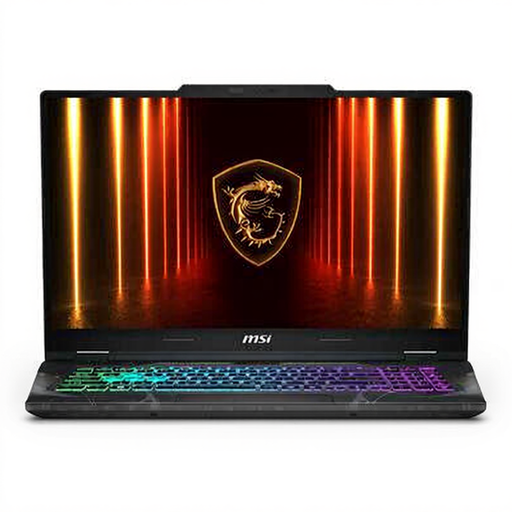
Why it suits this profile: This 17.3-inch gaming laptop combines an RTX 5050, 16GB DDR5, a 512GB SSD and a Full HD 144Hz display in one configuration. That makes it a straightforward choice for anyone buying a gaming laptop for the first time.
The product specifications list the RTX 5050 alongside its 45-watt TGP, making it easier to compare the graphics configuration. However, check whether the charger needs to be purchased separately.
17.3-inch IPS display, 144Hz, upgradeable DDR5 memory, Wi-Fi 6E and a QWERTY keyboard.
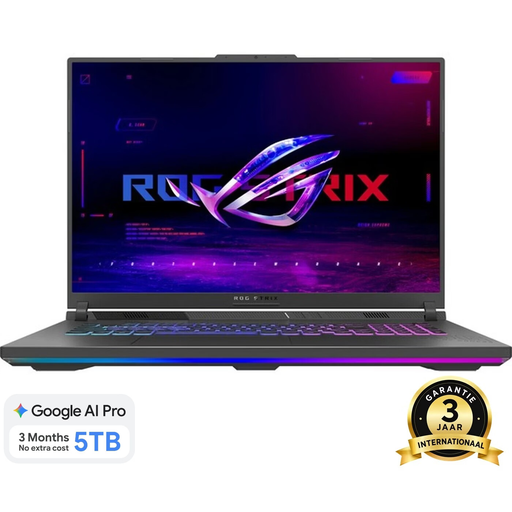
Why it suits this profile: If you have a larger budget and want a more premium finish with more screen space, you can compare this 18-inch gaming laptop with the MSI Cyborg 17.
The product specifications list the resolution, refresh rate, brightness and graphics card separately. This means you can assess the display on more than just its size.
18-inch WQXGA display with 240Hz, RTX 5060, 1TB SSD and 16GB DDR5 memory.
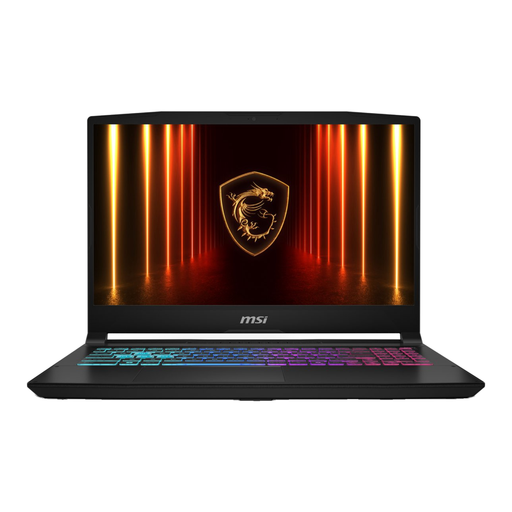
Why it suits this profile: For users who want to handle demanding multitasking, creative software or larger projects alongside gaming, this MSI configuration offers a higher level of performance.
The configuration lists the RTX 5070’s TGP, display resolution and connections. This helps you compare performance and usage options side by side.
AMD Ryzen 9 8940HX, RTX 5070, 16GB DDR5, 1TB SSD and a QHD+ 240Hz display.
Use this short checklist before ordering:
We’ve put together a complete, up-to-date list of products that fully meet these strict selection criteria and the applicable European safety regulations.
The laptop combines an RTX 5050 with 8GB of video memory, an Intel Core 7 240H and 16GB DDR5. This provides a solid basis for modern games. The final frame rate varies according to the game, graphics settings, resolution and power profile.
According to the listed product specifications, the memory can be upgraded to a maximum of 96GB. Before upgrading, check the available slots, the type of DDR5 module and MSI’s instructions.
Power consumption depends on the game, brightness, power settings and use of the RTX 5050. During intensive gaming, consumption is generally higher than during word processing or video streaming. For long gaming sessions, it is advisable to use the laptop while connected to mains power and keep the ventilation openings clear.
