
Vandaag of morgen in huis

Kwaliteit gegarandeerd

Welkomstaanbiedingen ontgrendelen: GRATIS bezorging | Tot 80% korting | Gratis 30 dagen JoyPlus-proefperiode
Download de app
An MSI barebone PC gives you more control over memory, storage and installation than a fully assembled computer. That sounds straightforward, but the term ‘barebone’ isn’t always used in the same way. Some models come without RAM or storage, while others list an operating system but are still sold as barebones.
For working from home, running a small business or professional use, there are three main pitfalls to watch out for:
First, check the maximum RAM capacity and memory type. A model with DDR5 memory uses different modules from a system with DDR4. According to the product specifications, the MSI CUBI NUC models support up to 64 GB of DDR5 RAM, while the MSI PRO DP180 supports up to 64 GB of internal memory and requires DDR4 modules according to the installation instructions.
Also check how many storage slots are available. An expandable PC with two M.2 slots offers more flexibility than a system with just one internal slot. Check whether there’s a SATA connection too, if you want to use a 2.5-inch SSD or hard drive.
Check the following:
For word processing, accounting, video calls and browsing, a modern Intel Core processor and enough RAM are usually more important than a dedicated graphics card. The MSI CUBI NUC AI uses an Intel Core Ultra 7 155H with integrated Intel Arc graphics. The MSI Cubi NUC 1MG-237BEU has an Intel Core 7 150U and integrated Intel Iris Xe Graphics.
The MSI PRO DP180 uses an Intel Core i5-14400 with Intel UHD Graphics 730. According to the product specifications, a discrete graphics card isn’t available. This type of barebone desktop PC is therefore best suited to office work, using multiple screens, administration and general productivity. For demanding 3D applications, modern games or professional video editing, a separate graphics card or a different type of system would make more sense.
A mini PC shouldn’t just be small; it should also suit your workspace. Check the number of USB ports, video outputs and network ports. If you need two wired network connections, a model with two 2.5Gbps Ethernet ports could be a good choice.
A mini PC with Wi-Fi 6E can connect to the 6GHz band, provided your router supports it. Wi-Fi 6E doesn’t guarantee faster speeds in every home. The MSI CUBI NUC models also support Bluetooth 5.3. The MSI PRO DP180 offers Wi-Fi 6, Bluetooth, two LAN ports, HDMI and DisplayPort.
Also think about where you’ll place it:
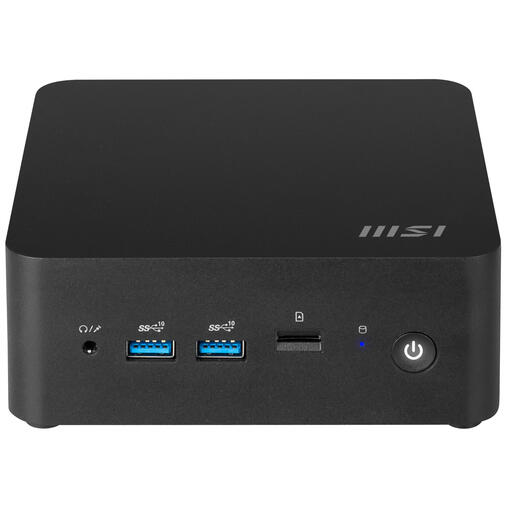
Why it suits this user: This compact model is well suited to working from home and everyday office tasks when desk space is limited and you want to choose the memory or storage to fit your budget.
The product specifications list two DDR5 SODIMM slots, two M.2 slots and a SATA connection. Do check which components are actually included.
Supports up to 64 GB of DDR5, has two 2.5Gbps LAN ports and a case measuring around 0.90 litres.
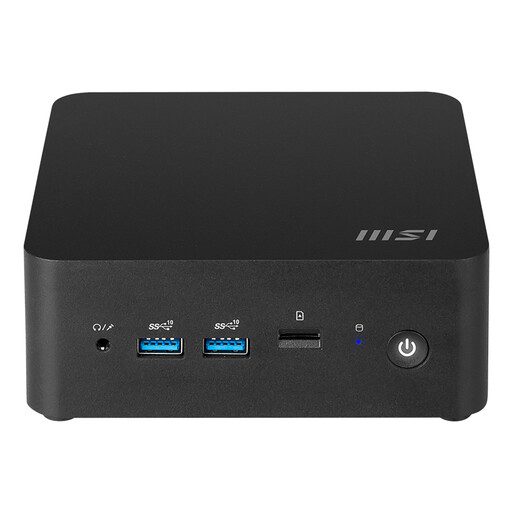
Why it suits this user: This model is a good fit for anyone looking for plenty of connections, modern wireless connectivity and a very small computer for home or office use.
The specifications list Wi-Fi 6E, Bluetooth 5.3, two Thunderbolt 4 ports and two M.2 PCIe 4.0 slots. Check the RAM and storage configuration of the version you choose before buying.
Intel Core Ultra 7 155H, support for up to 64 GB of DDR5, two 2.5Gbps LAN ports and a volume of around 0.52 litres.
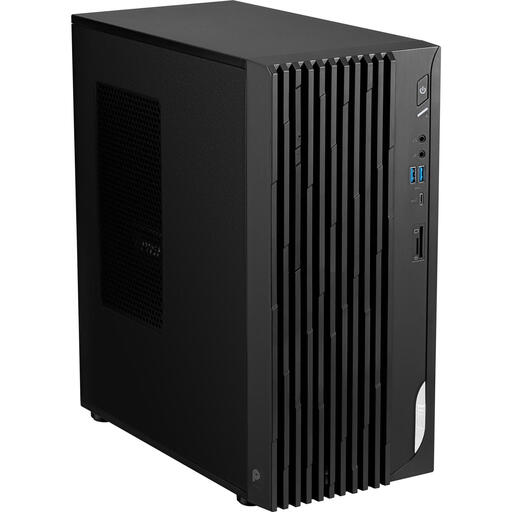
Why it suits this user: This desktop is suited to a permanent office setup, business administration and situations where you need several traditional ports and a larger case.
The product specifications state that it supports HDDs and SSDs, has a 3.5-inch drive bay and supports up to 64 GB of memory. The case is larger than that of a barebone mini PC, though.
Intel Core i5-14400, HDMI 2.1, DisplayPort 1.4, two LAN ports, seven USB ports and built-in speakers, according to the product specifications.
With a PC without an operating system, you’ll need a USB installation drive, a valid licence and compatible drivers. Check whether RAM and storage are included before you install anything. Windows 11 Home is listed in the product specifications for the CUBI NUC AI; check when buying whether this model is supplied as a complete system or in a barebone configuration.
A mini PC usually takes up less space and may use less power than a larger desktop for light office work, but actual consumption depends on processor load, storage, monitors and connected equipment. So look beyond the size and check the included power adapter too: the CUBI NUC models list a 120 W power supply, while the PRO DP180 has a 350 W power supply.
Keep each model clear of dust and don’t block the ventilation openings. Shut down the computer completely and unplug it before installing internal components. Keep small screws and cable ties out of children’s reach.
We’ve put together a complete, up-to-date list of products that meet these strict selection criteria and the applicable European safety regulations.
Yes, as long as the processor, RAM, storage and connections suit your work. The CUBI NUC models mentioned are compact options for browsing, documents and video calls. The PRO DP180 is more practical if you need several traditional ports or a larger storage configuration.
That depends on the version. A barebone may be supplied without an operating system, while some product listings mention Windows 11 Home. Always check what’s currently included in the box and, if you’re unsure, ask whether RAM, an SSD and the OS are included.
Its lifespan depends on workload, ventilation, software support and scope for upgrades. A model with replaceable RAM and multiple storage slots may remain useful for longer because you can upgrade its components. This doesn’t guarantee a particular lifespan, but it’s a practical point to consider when making your decision.
