
Vandaag of morgen in huis

Kwaliteit gegarandeerd

Welkomstaanbiedingen ontgrendelen: GRATIS bezorging | Tot 80% korting | Gratis 30 dagen JoyPlus-proefperiode
Download de app
An MSI barebone PC gives you more control over how your computer is configured. You choose the memory, storage and, in some cases, the operating system. This makes it an appealing option for people working from home, small businesses, IT professionals and DIY enthusiasts who don’t want to buy a standard configuration.
However, it’s easy to make the wrong choice when buying a barebone desktop PC. Buyers sometimes focus mainly on the processor name or compact size, even though compatibility, connections and what’s included in the box are just as important.
The term barebone usually means that some components are missing. These might include RAM, an SSD or an operating system. Before you buy, check:
Pay particular attention if the title and specifications seem to contradict each other. The MSI CUBI NUC AI 1UMG-018BEU is described as a barebone product, but its specifications also mention Windows 11 Home. Check the current product page and what’s in the box before assuming you’ll need to install your own operating system.
Space is limited in a compact mini PC. Some models have two M.2 slots, while others also support a 2.5-inch SATA drive. Check the memory type, too. DDR4 and DDR5 are not interchangeable.
An MSI CUBI NUC generally uses compact SODIMM modules. These are laptop-style memory modules, not standard desktop DIMMs. The MSI PRO DP180 has a desktop case and lists support for up to 64 GB of internal memory, but its specifications refer to DDR4. The right module therefore depends on the specific model.
“Lots of ports” doesn’t tell you much without the number and version of each one. Check for the connections you actually use:
A Wi-Fi 6E mini PC can use the 6GHz band, but you’ll also need a compatible router and network setup. Without this equipment, the device won’t automatically work faster.
For office work, browsing, administration and video calls, an Intel Core i5 or Intel Core 7 is generally a sensible starting point. The MSI PRO DP180 uses an Intel Core i5-14400 with 10 cores and 16 threads. Its integrated Intel UHD Graphics 730 is designed for displaying images and everyday applications; no separate graphics card is listed.
The MSI CUBI NUC models use mobile Intel processors. The CUBI NUC AI 1UMG-018BEU uses an Intel Core Ultra 7 155H with 16 cores, integrated Intel Arc graphics and an NPU. The CUBI NUC 1MG-237BEU uses an Intel Core 7 150U. These models are worth considering if a small form factor matters more to you than the option to add a separate desktop graphics card later.
Less memory may be enough for basic office work, but more is useful for lots of browser tabs, virtual machines, photo editing or business software. Keep three things in mind:
Choose memory based on the official specifications for the exact model, not just the processor range.
The term M.2 SSD support doesn’t tell you which size or protocol is used. The CUBI NUC 1MG-237BEU lists two M.2 PCIe 4.0 x4 connections, as well as SATA support. This gives you more flexibility to add a fast system SSD and extra storage.
The MSI CUBI NUC AI also lists two M.2 PCIe 4.0 x4 slots. The MSI PRO DP180 supports M.2 and SATA storage and has one 3.5-inch bay. This larger model is therefore better suited to adding an extra internal drive.
Always check the maximum M.2 size, whether a mounting screw is available and whether an SSD is actually included.
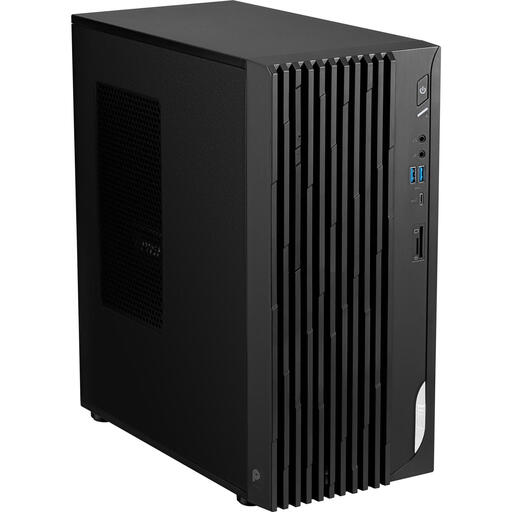
Why it suits this profile: This desktop has a familiar case, an Intel Core i5-14400 and room for up to 64 GB of memory. That makes it a good choice for a first custom-built work PC at a permanent workstation.
The storage options are clearly split between M.2 and SATA/HDD. Be sure to check whether DDR4 memory and storage are included.
Intel Core i5-14400, up to 64 GB of internal memory, HDMI, DisplayPort, two LAN ports and a 3.5-inch bay.
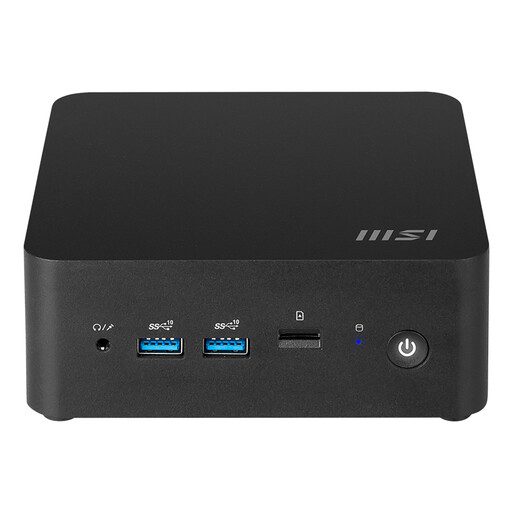
Why it suits this profile: The compact case, at around 0.52 litres, is well suited to modern home offices and business desks where multiple screens and fast connections are needed.
The specifications list DDR5, two M.2 PCIe 4.0 x4 slots and Wi-Fi 6E. This makes it easier to assess the memory, storage and wireless technology in advance.
Intel Core Ultra 7 155H, up to 64 GB DDR5, two Thunderbolt 4 ports, two HDMI outputs and VESA mounting capability.
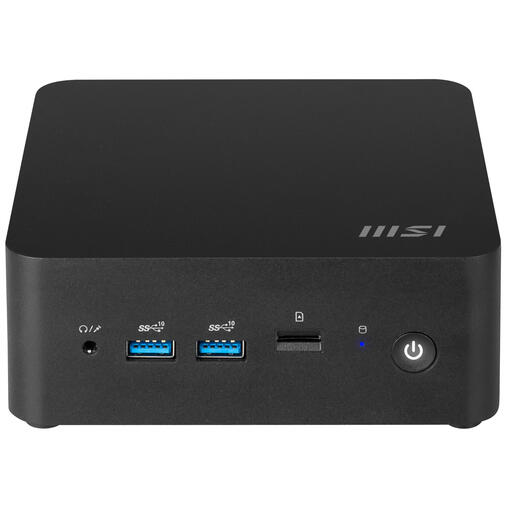
Why it suits this profile: This model combines a compact case with two M.2 slots, SATA support, two 2.5Gbps LAN ports and VESA mounting. It’s a good fit for compact office setups and specialist networking applications.
Its storage and networking options are more extensive than those of many compact systems. Be sure to check the exact case size: the stated capacity and dimensions may vary between product specifications.
Intel Core 7 150U, up to 64 GB DDR5, two M.2 PCIe 4.0 x4 slots, one SATA connection and Wi-Fi 6E.
We’ve put together a complete, up-to-date list of products that meet these strict selection criteria and current European safety regulations.
Place the PC on a stable, dry surface and keep the ventilation openings clear. If you’re installing RAM or an SSD, shut the system down completely and unplug the power cable. For compact models, use the supplied adapter and check that all connections are secure.
Once everything is installed, check the BIOS. You can use it to see whether the memory and storage are recognised. Then install your preferred operating system and the latest drivers from the manufacturer. For business applications, it’s a good idea to check in advance that your software is compatible with the processor and integrated graphics solution you’ve chosen.
It depends on the model and version. Barebone PCs are often supplied without RAM, storage or an operating system. Windows 11 Home is listed in the specifications for the MSI CUBI NUC AI 1UMG-018BEU, even though the product title describes it as a barebone. Always check the current contents of the box.
The models mentioned can be upgraded, but the type of component varies. The CUBI NUC systems use DDR5 SODIMM memory and M.2 storage. The PRO DP180 lists DDR4 and support for M.2 and SATA. Check the capacity, size and interface before ordering components.
A small case alone doesn’t tell you how much power the system uses. Power consumption depends on the processor, power supply, storage and workload. The CUBI NUC models use an external 120 W power supply; the PRO DP180 lists a 350 W power supply. Depending on how you use it, actual consumption is generally lower than the maximum power rating.
