First, choose a mouse that everyone who will use it can operate and that connects to the shared computer. Kensington says its ambidextrous Orbit is suitable for both left- and right-handed users, and its trackball stays in place. A compact mouse such as the MX Anywhere 3S may suit people who often move between workstations and want to scroll quickly, according to Logitech. A vertical mouse requires more consideration of hand preference and fit; these differences do not prove greater accuracy or health benefits.
Who is this choice relevant to?
People using a shared desk
You need a mouse that suits several people’s hand preferences, connections and ways of working. Kensington describes the Orbit K72337EU as ambidextrous, making it suitable for both left- and right-handed users; with a vertical mouse, the version you choose matters.
People creating weather charts
You select data for charts and want to navigate longer data series. Microsoft Support explains how to select data cells to create a chart; try out which cursor controls and scrolling method work best with your software.
People who work at a screen for long periods
You want the grip and workstation set-up to suit you. Arboportaal points out that screen work involves repetitive hand movements and static strain; a mouse is just one part of your workstation and is not a treatment for symptoms.
What should you consider when choosing?
First, work out who will share the mouse. Then consider how you select data and navigate files, and finally check that its shape and connection suit the workstation.
| Consideration |
What to look for when buying |
Who should pay particular attention? |
| Use by several people |
Check hand preference, fit and connection. Kensington describes the Orbit K72337EU as ambidextrous; the Logitech Lift is available in separate left- and right-handed versions. |
If colleagues with different hand preferences share one mouse, you’ll want everyone to be able to use it without an awkward adjustment. Around 33% of consumers prioritise ease of use for everyone. |
| Charts and navigating data |
Try selecting data and scrolling both slowly and quickly in your own software. Microsoft Support explains how to select data cells for a chart. |
When working with long weather data series, you’ll want to select cells and navigate a spreadsheet smoothly. For around 27% of consumers, chart controls and data navigation are the main priorities. |
| Fit and working posture |
Compare hand preference, hand size and grip. Logitech designed the Lift for small to medium-sized hands; Arboportaal describes varying your activities as part of screen work. |
If you work at a screen for long periods, you’ll want a grip that suits your hand, without losing sight of the rest of your workstation. Working posture is the main concern for around 20% of consumers. |
| Quiet operation and maintenance |
Check the click controls and cleaning instructions for the exact model. Trust describes the Seron’s buttons as quiet. |
In a shared space, you’ll want to keep clicking noise down and follow a maintenance routine that suits the mouse. Quiet operation and maintenance are decisive factors for around 20% of consumers. |
What to watch out for when buying
-
Choosing a right-handed vertical mouse for a changing group of users
The Logitech Lift comes in separate left- and right-handed versions. Trust describes the Bayo+ model reviewed as a right-handed mouse, so this shape won’t automatically suit everyone at a shared desk.
Find out in advance who will use the mouse and their hand preferences. If needed, compare an ambidextrous model with individual mice.
If the shape you choose doesn’t suit everyone, you may need a second version or a different shared input device.
-
Assuming a wireless mouse comes with the receiver you need
Logitech states that the compatible Logi Bolt receiver is not included with the consumer version of the MX Anywhere 3S.
Before buying, check what’s in the box and whether Bluetooth is available on the shared computer.
If you need the compatible receiver, you may have to buy it separately.
-
Assuming DPI or an ergonomic shape guarantees better charts or fewer symptoms
A DPI rating alone doesn’t prove greater accuracy when working with charts. A mouse’s shape is no substitute for a suitable workstation set-up or for varying your screen-based activities.
Test the controls in your own software, and assess your entire workstation and the variety of tasks you do.
Relevant brands to consider
Logitech
Logitech is worth considering for a compact mouse for use on the move, and a vertical mouse for users whose hand preference and the shape suit them.
- Logitech says the MX Anywhere 3S can connect to up to three devices via Bluetooth. The Lift is available in separate left- and right-handed versions and, according to Logitech, is designed for small to medium-sized hands.
- The compatible Logi Bolt receiver is not included with the consumer version of the MX Anywhere 3S mentioned here. If the Lift will be shared, check which version is suitable. Claims about comfort are not clinical evidence.
Kensington
Kensington is worth considering for the wired Orbit K72337EU, which suits a fixed workstation with little room to move a mouse around.
- According to Kensington, the Orbit K72337EU has an ambidextrous design, a scroll ring and a 150 cm USB cable; the cable means you don’t need batteries.
- With a trackball, you control the pointer using a ball rather than moving the mouse. Check that everyone finds it comfortable to use and that the cable suits the workstation.
Trust
Trust is worth considering for the Seron, which has a tilting scroll wheel for navigation, and the Bayo+, a vertical mouse for right-handed users.
- Trust describes the Seron’s buttons as quiet and says it has a tilting hyperscroll wheel. Trust also says the Bayo+ can connect to multiple devices.
- The Bayo+ model reviewed is designed for right-handed users, so it won’t automatically be suitable as the only mouse at a shared workstation where people have different hand preferences. Also check that the Seron’s connections are compatible with your computer.
Joybuy products for this workstation
This Joybuy selection includes computer mice for office or shared use. Before choosing, check the connection, controls and hand preference listed for each model.
 No image available
HOFOTEK M311 2.4G+BT quiet office mouse
May suit you if quiet operation and more than one connection option are important; check which connection is available on the shared computer.
The product name lists 2.4G+BT, adjustable DPI levels and one AA battery.
View on Joybuy
 No image available
AJAZZ AJ200 AI MC wireless mouse with charging dock
May suit you if you want to compare several connection options; check which connections are available on the shared computer.
The product name lists a charging dock, three connection modes, a PAW3311 sensor, 24,000 DPI and a weight of 63 g.
View on Joybuy
 No image available
AJAZZ AJ159 V2 MC wireless mouse
May suit you if you’re looking for a mouse with several connection modes and adjustable cursor sensitivity; check in advance which modes work with the shared computer.
The product name lists tri-mode connectivity, a PAW3311 sensor, a 300 mAh battery and DPI up to 24,000.
View on Joybuy
 No image available
Philips 3000 Series wireless mouse SPK7378B/00
May suit you if quiet clicks and a USB receiver are a good fit for the shared workstation.
The product name lists a 2.4GHz connection, USB receiver, optical sensor and 1600 DPI.
View on Joybuy
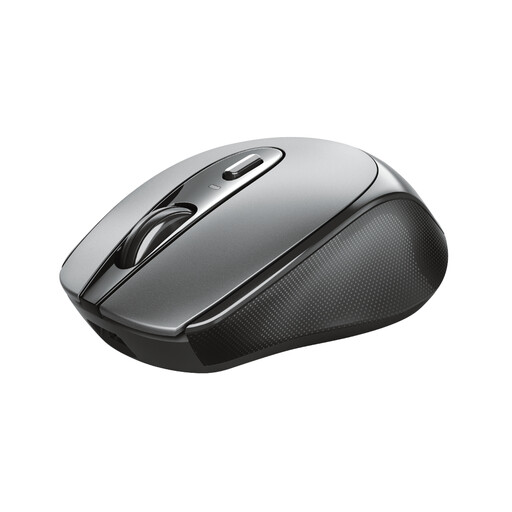 No image available
Trust Zaya wireless optical mouse
May suit you if left- and right-handed users will share the same mouse; check that the wireless receiver is compatible with the computer.
The product name lists an optical sensor, wireless RF connection and 1600 DPI.
View on Joybuy
Frequently asked questions
Do I need a high-DPI mouse for weather charts?
Not according to the information reviewed. Microsoft Support explains that you select data cells to create a chart, so try selecting the cells you need comfortably and check that the cursor setting suits your screen. A DPI rating does not measure chart accuracy.
How can I connect a mouse without finding out I have the wrong receiver?
Check the shared computer’s connections and the exact version of the mouse. Logitech says the consumer version of the MX Anywhere 3S can connect via Bluetooth, but the compatible Logi Bolt receiver is not included. The Kensington Orbit K72337EU uses a USB cable.
How do I maintain a trackball used by several people?
Follow the instructions for the exact version. For the wireless Orbit with scroll ring, Kensington recommends gently removing dirt from the ball with a finger or dry cloth. Don’t assume this advice also applies to the wired K72337EU or the exterior of other mice without checking first.
Does an ergonomic mouse mean I don’t need breaks from screen work?
No. Arboportaal says screen work should be regularly alternated with other work or a break. A mouse is no substitute for varying your activities or assessing your entire workstation.
What warranty and cooling-off period apply to an online purchase in the Netherlands?
According to ACM ConsuWijzer, the seller must offer an appropriate solution if a product breaks too soon under normal use. For online consumer purchases, you usually have up to 14 days after delivery to change your mind, subject to legal exceptions. Check the seller and the terms of the specific purchase.


