
Tide data comparer
You keep a table and chart side by side and want to move through long or wide data sets with ease. Rijkswaterstaat provides tide data, while Logitech and Trust describe mice with additional scrolling controls.


If two screens are connected to one computer, you don't need to switch between devices. Choose a mouse based on how you navigate your tables and how comfortable it is to use for extended periods. A tilt wheel or thumb wheel may be useful for wide data sets, while a vertical design is worth considering if it feels comfortable in your hand. Switching between devices only matters if you're actually using separate computers; always check the exact model and connection type.
You keep a table and chart side by side and want to move through long or wide data sets with ease. Rijkswaterstaat provides tide data, while Logitech and Trust describe mice with additional scrolling controls.
You do a lot of pointing and clicking when entering or checking times. Arboportaal highlights repetitive movements and static postures as considerations for screen-based work, so it's worth thinking about how the mouse fits your hand and how your workstation is set up.
You switch between separate devices, rather than just between two monitors. Microsoft Support explains how to use multiple monitors with one Windows computer. If you're using multiple computers, check the mouse's connections and switching options.
First, establish whether your screens are connected to one computer or to separate computers. Then consider the scrolling controls, hand position and connection type.
| What to consider | What to look for | Who is this important for? |
|---|---|---|
| Long and wide tables | Check whether the wheel or thumb wheel on the exact model supports horizontal scrolling. Test the scroll direction in your own software. | When I have a wide table open next to a chart, I want to move through the data in both directions. Around 36% of consumers put scroll navigation first as their main requirement. |
| Hand position during extended pointing | Assess the grip and button position, and consider how your screens and workstation are set up. | When entering data for extended periods, I want a grip that suits my hand and the ability to adjust my workstation properly. Around 29% of consumers say hand position is their top priority. |
| Switching between computers | Establish whether you're using two monitors or two separate computers, and check the available connection on each computer. | When I work with tide data on separate computers, I want to switch easily between them. Around 21% of consumers name device switching as their main requirement. |
| Simple connection | Check the available USB port, cable length or receiver type, and how the mouse is powered. | At a fixed workstation, I want a connection that suits my computer and how I use it. Around 14% of consumers prioritise an easy connection over extra scrolling or switching features. |
If both monitors are connected to one Windows computer, the pointer moves between the screens. Multiple connection channels are designed for switching between devices, so they meet a different need.
Arrange the screen order in Windows to match your physical setup, then test how the pointer moves before choosing a mouse with switching features.
A different mouse shape is no substitute for varying your activities and setting up your workstation to suit you. Arboportaal highlights repetitive movements and static postures as considerations for screen-based work.
Assess the mouse shape alongside the position of your screens and vary your posture. Arboportaal also recommends taking microbreaks.
Logitech describes several versions, including a Bluetooth edition. The connection and receiver included may vary by version.
Before buying, check the full model variant, connection type and box contents.
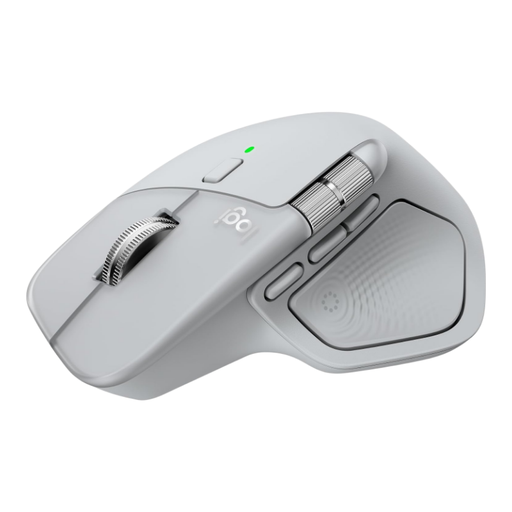
The M720 is worth considering if you're looking for a tilt wheel and the ability to switch between computers. The MX Master 3S range offers different scrolling and customisation options; check the exact version.
The Verto is a wired vertical option. According to Trust, the Vyran combines an angled design with scrolling and connectivity options for multiple devices.
The wired Expert Mouse trackball is an alternative for a fixed workstation where there's little room to move a mouse around.
The options below range from a conventional mouse to vertical models and mice that switch between devices. Choose one to suit your preferred scrolling controls, hand fit and connection type.
 No image available
A conventional mouse to compare if you need to navigate long or wide tables. Check whether this version offers the horizontal controls you need.
 No image available
A vertical mouse to consider if its shape feels comfortable in your hand. The product name specifies USB-C charging and a connection via Bluetooth or 2.4 GHz with a USB receiver.
 No image available
This vertical model is an option if the grip suits your hand. The product name specifies 6 buttons, a 2.4GHz connection, USB-C and a range of 800–1600 DPI.
 No image available
A wireless office mouse to compare if click noise or adjustable pointer speed matters for your work. The product name specifies 2.4G, silent operation and adjustable DPI.
 No image available
This version is an option if you want to switch between devices; check that the listed connections suit your computers. The product name specifies 2.4G and Bluetooth, silent operation, adjustable DPI and 1xAA Battery.
No, not if both screens are connected to the same computer. Arrange the screen order in Windows to match your physical setup and check that the pointer moves smoothly between them. Switching between devices is only relevant if you're using separate computers.
A tilt wheel or thumb wheel may allow horizontal scrolling, but check that the exact model has this feature. Logitech specifies a tilt wheel for the M720, while Trust lists a tilt-and-hyperscroll wheel for the Vyran.
Review your workstation setup and vary your screen-based tasks. Arboportaal also recommends changing your posture and taking microbreaks. Choose a different mouse shape based on fit and how you use it, not on promises that it will prevent discomfort.
No, the mouse won't change the data itself. Rijkswaterstaat states that the tide data on its tide page are calculated astronomical data that don't take weather conditions into account.
For an online consumer purchase, you're generally entitled to a 14-day cooling-off period after delivery, subject to legal exceptions, according to ACM ConsuWijzer. You're also legally protected if a product, when used normally, doesn't meet what you could reasonably expect; the seller is responsible for this.